# Instalação e Configuração SSHX

Procedimentos de instalação e configuração SSHX

# Instalação SSHX

Link: [https://sshx.io/](https://sshx.io/)

# A secure web-based, <span class="title-gradient svelte-5z6924">collaborative</span> terminal

<div class="relative" id="bkmrk-" style="text-align: justify;"><div class="absolute scale-150 md:scale-100 md:left-[180px] md:top-[-200px] md:w-[1000px] -z-10">  
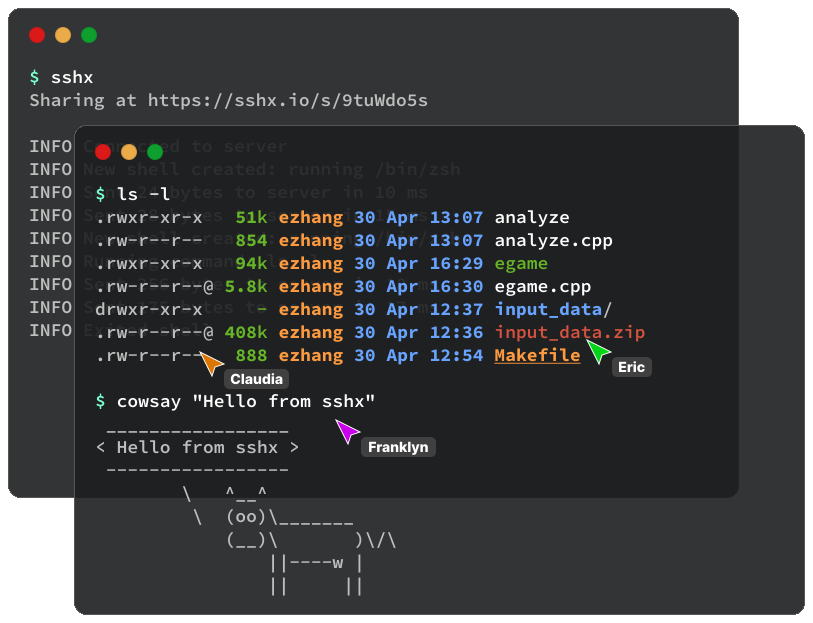
</div></div><div class="relative" id="bkmrk--1" style="text-align: justify;"><div class="md:absolute md:left-[500px] md:w-[1000px]">![two terminal windows running sshx and three live cursors](https://sshx.io/_app/immutable/assets/landing-graphic.55ebcdfb.svg)</div></div><section class="my-12 space-y-6 sm:text-lg md:max-w-[460px] text-zinc-400" id="bkmrk-sshx-lets-you-share-">`sshx` lets you share your terminal with anyone by link, on a **multiplayer infinite canvas**.

It has **real-time collaboration**, with remote cursors and chat. It's also **fast** and **end-to-end encrypted**, with a lightweight server written in Rust.

Install `sshx` with a single command. Use it for teaching, debugging, or cloud access.

</section><div class="pb-12 md:pb-36" id="bkmrk--2" style="text-align: justify;">  
</div><div class="mt-8 md:mt-32 grid md:grid-cols-2 xl:grid-cols-3 gap-4 md:gap-6" id="bkmrk--3" style="text-align: justify;"><div class="feature-block svelte-5z6924"><div class="feature-icon svelte-5z6924"><svg class="feather feather-cast " fill="none" height="14px" stroke="currentColor" stroke-linecap="round" stroke-linejoin="round" stroke-width="2" viewbox="0 0 24 24" width="14px" xmlns="http://www.w3.org/2000/svg"></svg></div></div></div>### Collaborative

Invite people by sharing a secure, unique browser link.

<div class="feature-block svelte-5z6924" id="bkmrk--4" style="text-align: justify;"><div class="feature-icon svelte-5z6924"><svg class="feather feather-lock " fill="none" height="14px" stroke="currentColor" stroke-linecap="round" stroke-linejoin="round" stroke-width="2" viewbox="0 0 24 24" width="14px" xmlns="http://www.w3.org/2000/svg"></svg></div></div>### End-to-end encrypted

Send data securely; the server never sees what you're typing.

<div class="feature-block svelte-5z6924" id="bkmrk--5" style="text-align: justify;"><div class="feature-icon svelte-5z6924"><svg class="feather feather-hard-drive " fill="none" height="14px" stroke="currentColor" stroke-linecap="round" stroke-linejoin="round" stroke-width="2" viewbox="0 0 24 24" width="14px" xmlns="http://www.w3.org/2000/svg"></svg></div></div>### Cross-platform

Use the command-line tool on macOS, Linux, and Windows.

<div class="feature-block svelte-5z6924" id="bkmrk--6" style="text-align: justify;"><div class="feature-icon svelte-5z6924"><svg class="feather feather-image " fill="none" height="14px" stroke="currentColor" stroke-linecap="round" stroke-linejoin="round" stroke-width="2" viewbox="0 0 24 24" width="14px" xmlns="http://www.w3.org/2000/svg"></svg></div></div>### Infinite canvas

Move and resize multiple terminals at once, in any arrangement.

<div class="feature-block svelte-5z6924" id="bkmrk--7" style="text-align: justify;"><div class="feature-icon svelte-5z6924"><svg class="feather feather-refresh-cw " fill="none" height="14px" stroke="currentColor" stroke-linecap="round" stroke-linejoin="round" stroke-width="2" viewbox="0 0 24 24" width="14px" xmlns="http://www.w3.org/2000/svg"></svg></div></div>### Live presence

See other people's names and cursors within the app.

<div class="feature-block svelte-5z6924" id="bkmrk--8" style="text-align: justify;"><div class="feature-icon svelte-5z6924"><svg class="feather feather-share-2 " fill="none" height="14px" stroke="currentColor" stroke-linecap="round" stroke-linejoin="round" stroke-width="2" viewbox="0 0 24 24" width="14px" xmlns="http://www.w3.org/2000/svg"></svg></div></div>### Ultra-fast mesh networking

Connect from anywhere to the nearest distributed peer in a global network.

<div class="my-48 hidden md:block" id="bkmrk--9" style="text-align: justify;"><div class="rounded-lg border border-white/10 overflow-hidden"><div class="flex bg-zinc-900 items-end"><div class="px-4 py-3 flex gap-1.5"><div class="w-2.5 h-2.5 rounded-full bg-red-500">  
</div><div class="w-2.5 h-2.5 rounded-full bg-yellow-500">  
</div><div class="w-2.5 h-2.5 rounded-full bg-green-500">  
</div></div><div class="flex ml-2"><div class="rounded-t-lg bg-zinc-800 h-7 w-44 px-2 flex items-center">![sshx logo](https://sshx.io/_app/immutable/assets/logo.318e7486.svg)</div></div></div></div></div>sshx

<div class="my-48 hidden md:block" id="bkmrk--10" style="text-align: justify;"><div class="rounded-lg border border-white/10 overflow-hidden"><div class="flex bg-zinc-900 items-end"><div class="flex ml-2"><div class="rounded-t-lg bg-zinc-800 h-7 w-44 px-2 flex items-center"><svg class="feather feather-x w-3.5 h-3.5 ml-auto text-zinc-400" fill="none" height="24px" stroke="currentColor" stroke-linecap="round" stroke-linejoin="round" stroke-width="2" viewbox="0 0 24 24" width="24px" xmlns="http://www.w3.org/2000/svg"></svg></div></div></div></div></div><div class="flex py-1 bg-zinc-800 gap-2" id="bkmrk--11" style="text-align: justify;"><div class="flex px-2 py-1 gap-2"><svg class="feather feather-arrow-left w-5 h-5 text-zinc-500" fill="none" height="24px" stroke="currentColor" stroke-linecap="round" stroke-linejoin="round" stroke-width="2" viewbox="0 0 24 24" width="24px" xmlns="http://www.w3.org/2000/svg"></svg></div></div><svg class="feather feather-info w-4 h-4 text-zinc-400" fill="none" height="24px" stroke="currentColor" stroke-linecap="round" stroke-linejoin="round" stroke-width="2" viewbox="0 0 24 24" width="24px" xmlns="http://www.w3.org/2000/svg"></svg><svg class="feather feather-user w-4 h-4 text-zinc-300" fill="none" height="24px" stroke="currentColor" stroke-linecap="round" stroke-linejoin="round" stroke-width="2" viewbox="0 0 24 24" width="24px" xmlns="http://www.w3.org/2000/svg"></svg>

<div class="my-48 hidden md:block" id="bkmrk--13" style="text-align: justify;"><div class="rounded-lg border border-white/10 overflow-hidden"><video autoplay="autoplay" controls="controls" height="1534" loop="loop" width="2476"></video></div></div>## Installation

<section class="installation-section svelte-5z6924" id="bkmrk--14">### <svg class="feather feather-download text-zinc-400 inline-block mr-1 mb-0.5" fill="none" height="20px" stroke="currentColor" stroke-linecap="round" stroke-linejoin="round" stroke-width="2" viewbox="0 0 24 24" width="20px" xmlns="http://www.w3.org/2000/svg"></svg>

</section>### macOS / Linux

Run the following in your terminal:

<div class="text-sm text-zinc-400 md:text-base md:pt-0.5" id="bkmrk-curl--ssf-https%3A%2F%2Fss" style="text-align: justify;"><div class="flex items-center gap-4">`curl -sSf https://sshx.io/get | sh`</div></div>Or, download the binary for your platform.

<div class="flex flex-wrap gap-2 mb-2" id="bkmrk-macos-arm64-%28apple-s" style="text-align: justify;">[<span class="text-sm">macOS ARM64 (Apple Silicon)</span> <svg class="feather feather-external-link text-zinc-400" fill="none" height="12px" stroke="currentColor" stroke-linecap="round" stroke-linejoin="round" stroke-width="2" viewbox="0 0 24 24" width="12px" xmlns="http://www.w3.org/2000/svg"></svg>](https://sshx.s3.amazonaws.com/sshx-aarch64-apple-darwin.tar.gz)</div>[<span class="text-sm">macOS x86-64 (Intel)</span> <svg class="feather feather-external-link text-zinc-400" fill="none" height="12px" stroke="currentColor" stroke-linecap="round" stroke-linejoin="round" stroke-width="2" viewbox="0 0 24 24" width="12px" xmlns="http://www.w3.org/2000/svg"></svg>](https://sshx.s3.amazonaws.com/sshx-x86_64-apple-darwin.tar.gz)

<div class="flex flex-wrap gap-2 mb-2" id="bkmrk-linux-arm64" style="text-align: justify;">[<span class="text-sm">Linux ARM64</span> <svg class="feather feather-external-link text-zinc-400" fill="none" height="12px" stroke="currentColor" stroke-linecap="round" stroke-linejoin="round" stroke-width="2" viewbox="0 0 24 24" width="12px" xmlns="http://www.w3.org/2000/svg"></svg>](https://sshx.s3.amazonaws.com/sshx-aarch64-unknown-linux-musl.tar.gz)</div>[<span class="text-sm">Linux x86-64</span> <svg class="feather feather-external-link text-zinc-400" fill="none" height="12px" stroke="currentColor" stroke-linecap="round" stroke-linejoin="round" stroke-width="2" viewbox="0 0 24 24" width="12px" xmlns="http://www.w3.org/2000/svg"></svg>](https://sshx.s3.amazonaws.com/sshx-x86_64-unknown-linux-musl.tar.gz)[<span class="text-sm">Linux ARMv6</span> <svg class="feather feather-external-link text-zinc-400" fill="none" height="12px" stroke="currentColor" stroke-linecap="round" stroke-linejoin="round" stroke-width="2" viewbox="0 0 24 24" width="12px" xmlns="http://www.w3.org/2000/svg"></svg>](https://sshx.s3.amazonaws.com/sshx-arm-unknown-linux-musleabihf.tar.gz)[<span class="text-sm">Linux ARMv7</span> <svg class="feather feather-external-link text-zinc-400" fill="none" height="12px" stroke="currentColor" stroke-linecap="round" stroke-linejoin="round" stroke-width="2" viewbox="0 0 24 24" width="12px" xmlns="http://www.w3.org/2000/svg"></svg>](https://sshx.s3.amazonaws.com/sshx-armv7-unknown-linux-musleabihf.tar.gz)

<div class="flex flex-wrap gap-2" id="bkmrk-freebsd-x86-64" style="text-align: justify;">[<span class="text-sm">FreeBSD x86-64</span> <svg class="feather feather-external-link text-zinc-400" fill="none" height="12px" stroke="currentColor" stroke-linecap="round" stroke-linejoin="round" stroke-width="2" viewbox="0 0 24 24" width="12px" xmlns="http://www.w3.org/2000/svg"></svg>](https://sshx.s3.amazonaws.com/sshx-x86_64-unknown-freebsd.tar.gz)</div><section class="installation-section svelte-5z6924" id="bkmrk--16">### <svg class="feather feather-download text-zinc-400 inline-block mr-1 mb-0.5" fill="none" height="20px" stroke="currentColor" stroke-linecap="round" stroke-linejoin="round" stroke-width="2" viewbox="0 0 24 24" width="20px" xmlns="http://www.w3.org/2000/svg"></svg>

</section>### Windows

Download the executable for your platform.

<div class="text-sm text-zinc-400 md:text-base md:pt-0.5" id="bkmrk-windows-x86-64" style="text-align: justify;"><div class="flex flex-wrap gap-2">[<span class="text-sm">Windows x86-64</span> <svg class="feather feather-external-link text-zinc-400" fill="none" height="12px" stroke="currentColor" stroke-linecap="round" stroke-linejoin="round" stroke-width="2" viewbox="0 0 24 24" width="12px" xmlns="http://www.w3.org/2000/svg"></svg>](https://sshx.s3.amazonaws.com/sshx-x86_64-pc-windows-msvc.zip)</div></div>[<span class="text-sm">Windows x86</span> <svg class="feather feather-external-link text-zinc-400" fill="none" height="12px" stroke="currentColor" stroke-linecap="round" stroke-linejoin="round" stroke-width="2" viewbox="0 0 24 24" width="12px" xmlns="http://www.w3.org/2000/svg"></svg>](https://sshx.s3.amazonaws.com/sshx-i686-pc-windows-msvc.zip)[<span class="text-sm">Windows ARM64</span> <svg class="feather feather-external-link text-zinc-400" fill="none" height="12px" stroke="currentColor" stroke-linecap="round" stroke-linejoin="round" stroke-width="2" viewbox="0 0 24 24" width="12px" xmlns="http://www.w3.org/2000/svg"></svg>](https://sshx.s3.amazonaws.com/sshx-aarch64-pc-windows-msvc.zip)

<section class="installation-section svelte-5z6924" id="bkmrk--18">### <svg class="feather feather-package text-zinc-400 inline-block mr-1 mb-0.5" fill="none" height="20px" stroke="currentColor" stroke-linecap="round" stroke-linejoin="round" stroke-width="2" viewbox="0 0 24 24" width="20px" xmlns="http://www.w3.org/2000/svg"></svg>

</section>### Build from source

Ensure you have up-to-date versions of Rust and protoc. Compile sshx and add it to the system path.

<div class="text-sm text-zinc-400 md:text-base md:pt-0.5" id="bkmrk-cargo-install-sshx" style="text-align: justify;"><div class="flex items-center gap-4">`cargo install sshx`</div></div><section class="installation-section svelte-5z6924" id="bkmrk--20">### <svg class="feather feather-git-branch text-zinc-400 inline-block mr-1 mb-0.5" fill="none" height="20px" stroke="currentColor" stroke-linecap="round" stroke-linejoin="round" stroke-width="2" viewbox="0 0 24 24" width="20px" xmlns="http://www.w3.org/2000/svg"></svg>

</section>### GitHub Actions

On GitHub Actions or other CI providers, run this command. It pauses your workflow and starts a collaborative session.

<div class="text-sm text-zinc-400 md:text-base md:pt-0.5" id="bkmrk-curl--ssf-https%3A%2F%2Fss-1" style="text-align: justify;"><div class="flex items-center gap-4">`curl -sSf https://sshx.io/get | sh -s run`</div></div>---

<div class="grid sm:grid-cols-2 lg:grid-cols-4 gap-4 md:gap-6 mb-6" id="bkmrk-%F0%9F%A4%96%C2%A0-github-%F0%9F%8C%B8%C2%A0-twitter" style="text-align: justify;">[🤖 GitHub ](https://github.com/ekzhang/sshx)[🌸 Twitter ](https://twitter.com/ekzhang1)[💌 Email ](mailto:ekzhang1@gmail.com)[🌎 Website ](https://www.ekzhang.com)</div>open source, © Eric Zhang 2023