NocoDB
Transforma banco de dados relacional em uma interface de planilha inteligente e moderna
Instalação e Configuração NocoDB
Procedimentos de instalação e configuração NocoDB
Instalação NocoDB
Link: https://hub.docker.com/r/nocodb/nocodb
https://github.com/nocodb/nocodb git clone https://github.com/nocodb/nocodb.git

NocoDB is the fastest and easiest way to build databases online.
Website • Discord • Community • Twitter • Reddit • Documentation
Join Our Community
Installation
Docker with SQLite
docker run -d \
  --name noco \
  -v "$(pwd)"/nocodb:/usr/app/data/ \
  -p 8080:8080 \
  nocodb/nocodb:latest
Docker with PG
docker run -d \
  --name noco \
  -v "$(pwd)"/nocodb:/usr/app/data/ \
  -p 8080:8080 \
  -e NC_DB="pg://host.docker.internal:5432?u=root&p=password&d=d1" \
  -e NC_AUTH_JWT_SECRET="569a1821-0a93-45e8-87ab-eb857f20a010" \
  nocodb/nocodb:latest
Nix
nix run github:nocodb/nocodb
NixOS
To use NocoDB as a NixOS module, a flake.nix would be as follows:
{
  description = "Bane's NixOS configuration";

  inputs = {
    nixpkgs.url = "github:nixos/nixpkgs/nixos-unstable";
    nocodb.url = "github:nocodb/nocodb";
  };

  outputs = inputs@{ nixpkgs, nocodb, ... }: {
    nixosConfigurations = {
      hostname = nixpkgs.lib.nixosSystem {
        system = "x86_64-linux";
        modules = [
          ./configuration.nix
          nocodb.nixosModules.nocodb

          {
            services.nocodb.enable = true;
          }
        ];
      };
    };
  };
}
Auto-upstall
Auto-upstall is a single command that sets up NocoDB on a server for production usage. Behind the scenes it auto-generates docker-compose for you.
bash <(curl -sSL http://install.nocodb.com/noco.sh) <(mktemp)
Auto-upstall does the following: 🕊
- 🐳 Automatically installs all pre-requisites like docker, docker-compose
- 🚀 Automatically installs NocoDB with PostgreSQL, Redis, Minio, Traefik gateway using Docker Compose. 🐘 🗄️ 🌐
- 🔄 Automatically upgrades NocoDB to the latest version when you run the command again.
- 🔒 Automatically setups SSL and also renews it. Needs a domain or subdomain as input while installation.
install.nocodb.com/noco.sh script can be found here in our github
Other Methods
Binaries are only for quick testing locally.
| Install Method | Command to install |
|---|---|
| 🍏 MacOS arm64 (Binary) |
curl http://get.nocodb.com/macos-arm64 -o nocodb -L && chmod +x nocodb && ./nocodb |
| 🍏 MacOS x64 (Binary) |
curl http://get.nocodb.com/macos-x64 -o nocodb -L && chmod +x nocodb && ./nocodb |
| 🐧 Linux arm64 (Binary) |
curl http://get.nocodb.com/linux-arm64 -o nocodb -L && chmod +x nocodb && ./nocodb |
| 🐧 Linux x64 (Binary) |
curl http://get.nocodb.com/linux-x64 -o nocodb -L && chmod +x nocodb && ./nocodb |
| 🪟 Windows arm64 (Binary) |
iwr http://get.nocodb.com/win-arm64.exe -OutFile Noco-win-arm64.exe && .\Noco-win-arm64.exe |
| 🪟 Windows x64 (Binary) |
iwr http://get.nocodb.com/win-x64.exe -OutFile Noco-win-x64.exe && .\Noco-win-x64.exe |
When running locally access nocodb by visiting: http://localhost:8080/dashboard
For more installation methods, please refer to our docs
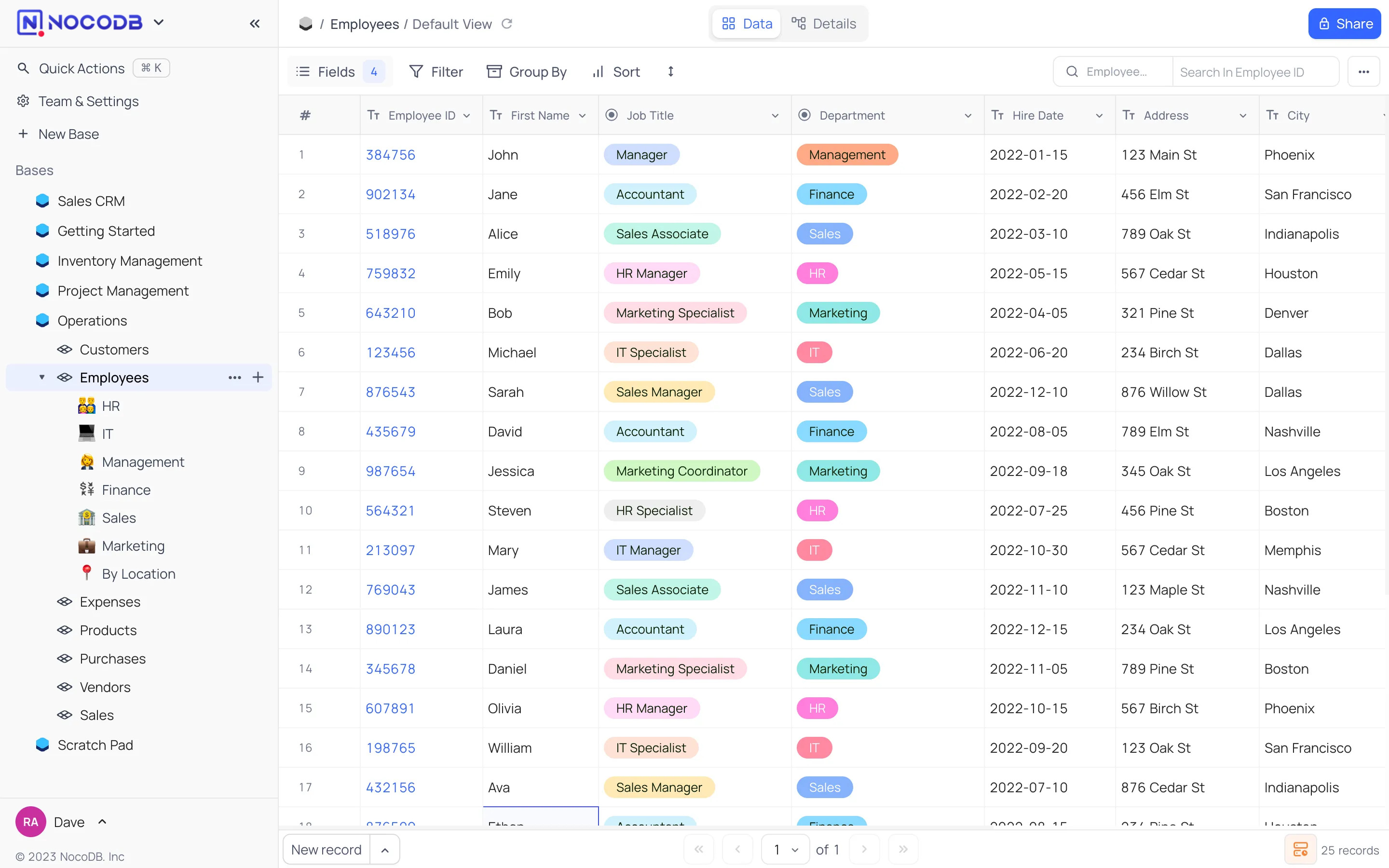
Screenshots



Features
Rich Spreadsheet Interface
- ⚡ Basic Operations: Create, Read, Update and Delete Tables, Columns, and Rows
- ⚡ Fields Operations: Sort, Filter, Group, Hide / Unhide Columns
- ⚡ Multiple Views Types: Grid (By default), Gallery, Form, Kanban and Calendar View
- ⚡ View Permissions Types: Collaborative Views, & Locked Views
- ⚡ Share Bases / Views: either Public or Private (with Password Protected)
- ⚡ Variant Cell Types: ID, Links, Lookup, Rollup, SingleLineText, Attachment, Currency, Formula, User, etc
- ⚡ Access Control with Roles: Fine-grained Access Control at different levels
- ⚡ and more ...
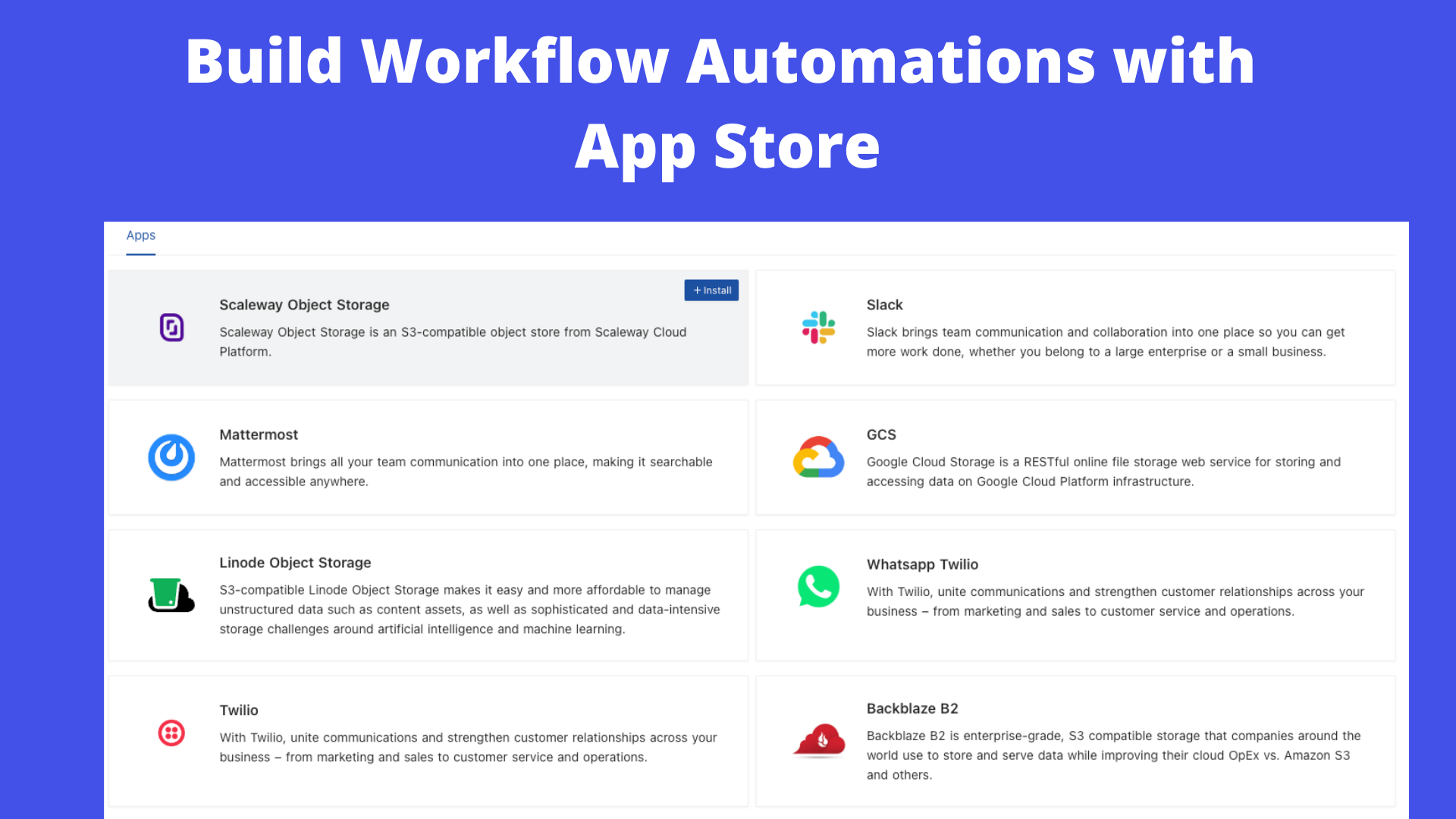
App Store for Workflow Automations
We provide different integrations in three main categories. See App Store for details.
- ⚡ Chat: Slack, Discord, Mattermost, and etc
- ⚡ Email: AWS SES, SMTP, MailerSend, and etc
- ⚡ Storage: AWS S3, Google Cloud Storage, Minio, and etc
Programmatic Access
We provide the following ways to let users programmatically invoke actions. You can use a token (either JWT or Social Auth) to sign your requests for authorization to NocoDB.
- ⚡ REST APIs
- ⚡ NocoDB SDK
Contributing
Please refer to Contribution Guide.
Why are we building this?
Most internet businesses equip themselves with either spreadsheet or a database to solve their business needs. Spreadsheets are used by Billion+ humans collaboratively every single day. However, we are way off working at similar speeds on databases which are way more powerful tools when it comes to computing. Attempts to solve this with SaaS offerings have meant horrible access controls, vendor lock-in, data lock-in, abrupt price changes & most importantly a glass ceiling on what's possible in the future.
Our Mission
ur mission is to provide the most powerful no-code interface for databases, accessible to every internet business across the world. By making this capability broadly available under a fair and sustainable model, we aim to democratise access to powerful computing tools and enable a billion-plus people to develop radical tinkering and building abilities on the internet.
License
This project is licensed under Sustainable Use License.
Contributors
Thank you for your contributions! We appreciate all the contributions from the community.
Instalação customizada NocoDB
LInk: https://nocodb.com/docs/self-hosting/installation/custom-infrastructure
Custom Infrastructure
Use this page for NocoDB deployments that the single-server installation wizard does not cover. These include managed databases, custom SSL certificates, private CAs, your own reverse proxy, multi-replica setups and Kubernetes.
Before you begin
NocoDB works with all actively maintained PostgreSQL releases (12 and later). Use the version that your managed provider offers. We recommend a current major version.
When to use this page
Use this page if one of these is true:
- You use a managed Postgres (RDS, Azure, Cloud SQL) with public CA SSL.
- You use a self-managed Postgres with a private or internal CA.
- You already have a TLS certificate and want to pin it through Traefik.
- You have nginx, Caddy or a load balancer in front, and want NocoDB on port 8080.
- You deploy to Kubernetes and want a reference compose file to translate.
Option A: Clone the repo and run the wizard interactively
git clone https://github.com/nocodb/nocodb.gitcd nocodb/docker-compose./setup.shsetup.sh runs the same installation wizard as the Single-server install one-liner. It writes its output into the current working directory. Use this option to edit the generated files before you start the stack.
Option B: Copy a pre-built example
The docker-compose/examples/ directory contains a set of selected configurations.
| Example | Postgres | Redis | Proxy | Best for |
|---|---|---|---|---|
quickstart-demo |
Bundled | Bundled | None (port 8080) | Local eval / "show me NocoDB" |
managed-postgres |
External managed (RDS/Azure/Cloud SQL) | External | None (port 8080) | Production behind your own LB |
external-postgres-and-redis |
External self-managed | External | None (port 8080) | Minimal Docker footprint |
traefik-custom-ssl |
External managed | External | Traefik + custom TLS cert | Production with your own SSL cert |
postgres-private-ca |
External (private CA) | External | Traefik + Let's Encrypt | On-prem / private cloud DB |
To start quickly with an example:
git clone --depth 1 https://github.com/nocodb/nocodb.git cp -r nocodb/docker-compose/examples/managed-postgres ./my-deploymentcd my-deployment# Edit docker-compose.yml, docker.env, and nocodb/db.json: replace placeholdersdocker compose up -dConfiguring SSL for an external Postgres with a private CA
SSL for an external Postgres with a private CA is the most complex external database setup. NocoDB reads its database connection from nocodb/db.json (knex format). In this file, you can put a CA certificate inline:
{ "client": "pg", "connection": { "host": "your-private-db-host.internal", "port": "5432", "user": "nocodb", "password": "your-password", "database": "nocodb", "ssl": { "rejectUnauthorized": true, "ca": "-----BEGIN CERTIFICATE-----\nMIID...\n-----END CERTIFICATE-----" } }}The CA must be one string, with newlines escaped as \n. The postgres-private-ca example shows the full layout, with a Traefik proxy.
To change a multi-line PEM into the single-line JSON form, run:
awk 'NF {sub(/\r/, ""); printf "%s\\n", $0}' your-ca.pemMulti-replica / scaling
NocoDB scales horizontally when you configure Redis. Redis is necessary for distributed coordination:
# In docker-compose.ymlnocodb: deploy: mode: replicated replicas: 3For more than a few replicas, run NocoDB in Kubernetes. Translate one of the examples into a Deployment + Service + Ingress. Point the same env vars at managed Postgres and Redis.
Bringing your own reverse proxy
The managed-postgres and external-postgres-and-redis examples expose NocoDB on host port 8080, without Traefik.
- Put your own nginx, Caddy or load balancer in front.
- Forward HTTP traffic to port 8080.
- Forward the
X-Forwarded-ProtoandHostheaders. NocoDB needs them to make correct callback URLs.
Related
Last updated on