# Swarmpit Docker

Link: [https://github.com/swarmpit/swarmpit#installation](https://github.com/swarmpit/swarmpit#installation) [https://swarmpit.io/](https://swarmpit.io/)

[![swarmpit](https://raw.githubusercontent.com/swarmpit/swarmpit/master/resources/public/img/logo.svg?sanitize=true)](https://swarmpit.io/)

Lightweight mobile-friendly Docker Swarm management UI

⚠️ **Status:** This UI is in maintenance mode. Click [here](https://github.com/swarmpit/swarmpit/issues/719) for details.

[![version](https://camo.githubusercontent.com/7e5a117d263a9f5db2a63121233c8a0c99026e2cec5925c9d60083844d7b66e3/68747470733a2f2f696d672e736869656c64732e696f2f6769746875622f72656c656173652d7072652f737761726d7069742f737761726d7069742e737667)](https://github.com/swarmpit/swarmpit/releases) [![gitter](https://camo.githubusercontent.com/22b3aca7b3e53fd12b311486d8622d4d5f9f274e04ab7200fe90b18648bdf486/68747470733a2f2f6261646765732e6769747465722e696d2f7472657a6f722f636f6d6d756e6974792e737667)](https://gitter.im/swarmpit_io/swarmpit) [![Test, Build & Deploy](https://github.com/swarmpit/swarmpit/actions/workflows/build.yml/badge.svg)](https://github.com/swarmpit/swarmpit/actions/workflows/build.yml) [![PRs Welcome](https://camo.githubusercontent.com/dd0b24c1e6776719edb2c273548a510d6490d8d25269a043dfabbd38419905da/68747470733a2f2f696d672e736869656c64732e696f2f62616467652f5052732d77656c636f6d652d627269676874677265656e2e737667)](https://github.com/swarmpit/swarmpit/pulls) [![Financial Contributors on Open Collective](https://camo.githubusercontent.com/417e04f12e9a5e2605c97e7a07ac3c0ba0c1dfab3ca34f9690b4df2501653a73/68747470733a2f2f6f70656e636f6c6c6563746976652e636f6d2f737761726d7069742f616c6c2f62616467652e7376673f6c6162656c3d66696e616e6369616c2b636f6e7472696275746f7273)](https://opencollective.com/swarmpit)

[![Twitter URL](https://camo.githubusercontent.com/19db955659aa569d718db98d46e9c4dc63e2407574c8cded851a681d1f9272d0/68747470733a2f2f696d672e736869656c64732e696f2f747769747465722f75726c2f68747470732f747769747465722e636f6d2f666f6c645f6c6566742e7376673f7374796c653d736f6369616c266c6162656c3d466f6c6c6f77253230253430737761726d7069745f696f)](https://twitter.com/swarmpit_io)

[![](https://raw.githubusercontent.com/swarmpit/swarmpit/master/resources/public/imac.png)](https://raw.githubusercontent.com/swarmpit/swarmpit/master/resources/public/imac.png)

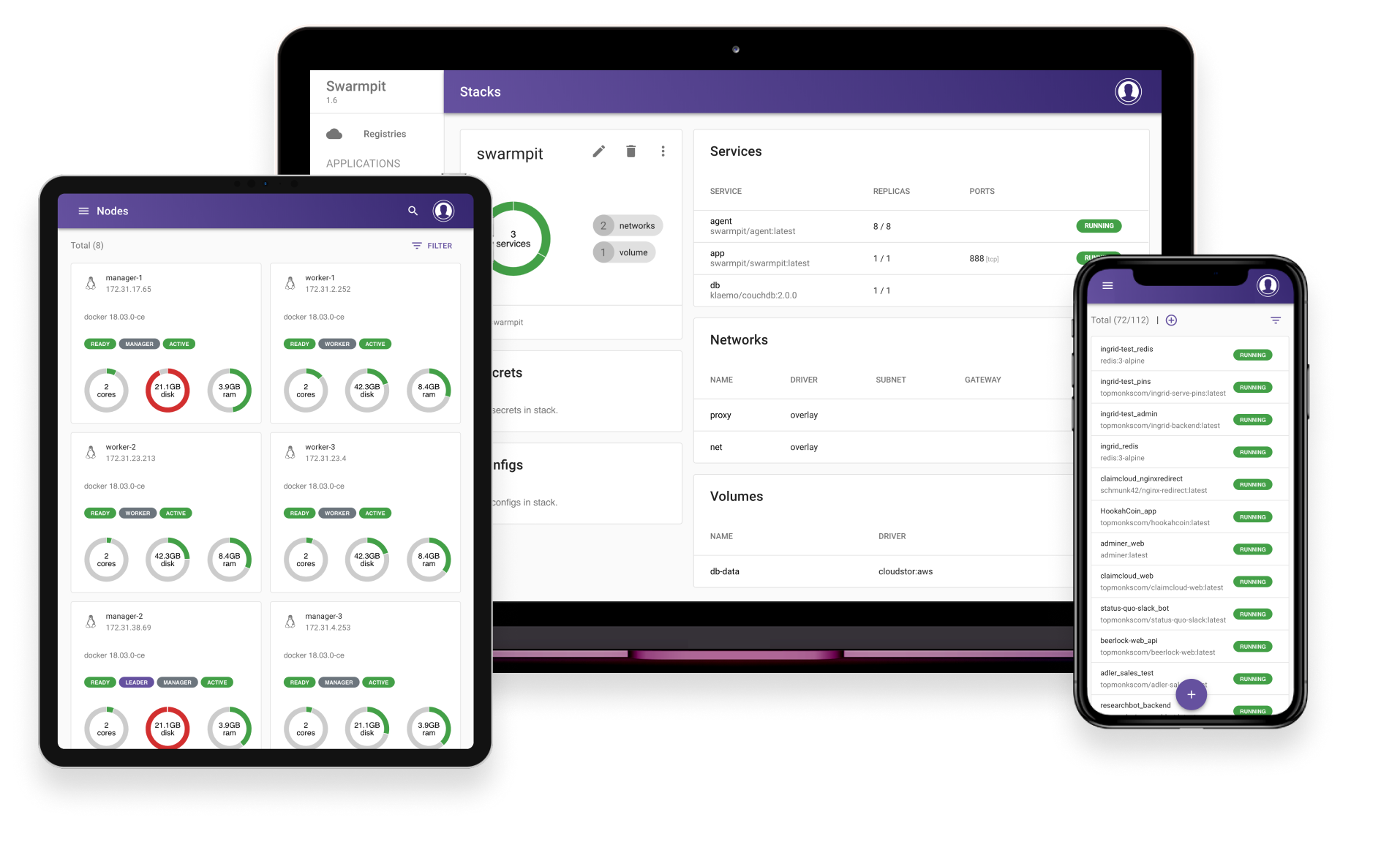
Swarmpit provides simple and easy to use interface for your Docker Swarm cluster. You can manage your stacks, services, secrets, volumes, networks etc. After linking your Docker Hub account or custom registry, private repositories can be easily deployed on Swarm. Best of all, you can share this management console securely with your whole team.

Swarmpit doesn't compromise your privacy as it is completely self-hosted and will never gather any metrics or other data from you.

More details about future and past releases can be found in [ROADMAP.md](https://github.com/swarmpit/swarmpit/blob/master/ROADMAP.md)

[![opencollective](https://camo.githubusercontent.com/bdd1bd58c61a05f30a5b3216cdfde5d81573104a49ad7c4f9b4b9ce7c2cc07a9/68747470733a2f2f6f70656e636f6c6c6563746976652e636f6d2f737761726d7069742f74696572732f6261636b6572732e7376673f6176617461724865696768743d3530)](https://opencollective.com/swarmpit)

## Installation

<div class="markdown-heading" dir="auto" id="bkmrk--4" style="text-align: justify;">[<svg aria-hidden="true" class="octicon octicon-link" height="16" version="1.1" viewbox="0 0 16 16" width="16"><path d="m7.775 3.275 1.25-1.25a3.5 3.5 0 1 1 4.95 4.95l-2.5 2.5a3.5 3.5 0 0 1-4.95 0 .751.751 0 0 1 .018-1.042.751.751 0 0 1 1.042-.018 1.998 1.998 0 0 0 2.83 0l2.5-2.5a2.002 2.002 0 0 0-2.83-2.83l-1.25 1.25a.751.751 0 0 1-1.042-.018.751.751 0 0 1-.018-1.042Zm-4.69 9.64a1.998 1.998 0 0 0 2.83 0l1.25-1.25a.751.751 0 0 1 1.042.018.751.751 0 0 1 .018 1.042l-1.25 1.25a3.5 3.5 0 1 1-4.95-4.95l2.5-2.5a3.5 3.5 0 0 1 4.95 0 .751.751 0 0 1-.018 1.042.751.751 0 0 1-1.042.018 1.998 1.998 0 0 0-2.83 0l-2.5 2.5a1.998 1.998 0 0 0 0 2.83Z"></path></svg>](https://github.com/swarmpit/swarmpit#installation)</div>The only dependency for Swarmpit deployment is Docker with Swarm initialized, we are supporting Docker 1.13 and newer. Linux hosts on x86 and ARM architectures are supported as well.

### Package installer

<div class="markdown-heading" dir="auto" id="bkmrk--6" style="text-align: justify;">[<svg aria-hidden="true" class="octicon octicon-link" height="16" version="1.1" viewbox="0 0 16 16" width="16"><path d="m7.775 3.275 1.25-1.25a3.5 3.5 0 1 1 4.95 4.95l-2.5 2.5a3.5 3.5 0 0 1-4.95 0 .751.751 0 0 1 .018-1.042.751.751 0 0 1 1.042-.018 1.998 1.998 0 0 0 2.83 0l2.5-2.5a2.002 2.002 0 0 0-2.83-2.83l-1.25 1.25a.751.751 0 0 1-1.042-.018.751.751 0 0 1-.018-1.042Zm-4.69 9.64a1.998 1.998 0 0 0 2.83 0l1.25-1.25a.751.751 0 0 1 1.042.018.751.751 0 0 1 .018 1.042l-1.25 1.25a3.5 3.5 0 1 1-4.95-4.95l2.5-2.5a3.5 3.5 0 0 1 4.95 0 .751.751 0 0 1-.018 1.042.751.751 0 0 1-1.042.018 1.998 1.998 0 0 0-2.83 0l-2.5 2.5a1.998 1.998 0 0 0 0 2.83Z"></path></svg>](https://github.com/swarmpit/swarmpit#package-installer)</div>Installer is your guide to setup Swarmpit platform. For more details see the [installer](https://github.com/swarmpit/installer)

#### Stable version

<div class="markdown-heading" dir="auto" id="bkmrk--8" style="text-align: justify;">[<svg aria-hidden="true" class="octicon octicon-link" height="16" version="1.1" viewbox="0 0 16 16" width="16"><path d="m7.775 3.275 1.25-1.25a3.5 3.5 0 1 1 4.95 4.95l-2.5 2.5a3.5 3.5 0 0 1-4.95 0 .751.751 0 0 1 .018-1.042.751.751 0 0 1 1.042-.018 1.998 1.998 0 0 0 2.83 0l2.5-2.5a2.002 2.002 0 0 0-2.83-2.83l-1.25 1.25a.751.751 0 0 1-1.042-.018.751.751 0 0 1-.018-1.042Zm-4.69 9.64a1.998 1.998 0 0 0 2.83 0l1.25-1.25a.751.751 0 0 1 1.042.018.751.751 0 0 1 .018 1.042l-1.25 1.25a3.5 3.5 0 1 1-4.95-4.95l2.5-2.5a3.5 3.5 0 0 1 4.95 0 .751.751 0 0 1-.018 1.042.751.751 0 0 1-1.042.018 1.998 1.998 0 0 0-2.83 0l-2.5 2.5a1.998 1.998 0 0 0 0 2.83Z"></path></svg>](https://github.com/swarmpit/swarmpit#stable-version)</div>Deploy our current milestone version

```
docker run -it --rm \
  --name swarmpit-installer \
  --volume /var/run/docker.sock:/var/run/docker.sock \
  swarmpit/install:1.9

```

<div class="snippet-clipboard-content notranslate position-relative overflow-auto" id="bkmrk--10" style="text-align: justify;"><div class="zeroclipboard-container"><svg aria-hidden="true" class="octicon octicon-copy js-clipboard-copy-icon" data-view-component="true" height="16" version="1.1" viewbox="0 0 16 16" width="16"></svg></div></div>#### Edge version

<div class="markdown-heading" dir="auto" id="bkmrk--11" style="text-align: justify;">[<svg aria-hidden="true" class="octicon octicon-link" height="16" version="1.1" viewbox="0 0 16 16" width="16"><path d="m7.775 3.275 1.25-1.25a3.5 3.5 0 1 1 4.95 4.95l-2.5 2.5a3.5 3.5 0 0 1-4.95 0 .751.751 0 0 1 .018-1.042.751.751 0 0 1 1.042-.018 1.998 1.998 0 0 0 2.83 0l2.5-2.5a2.002 2.002 0 0 0-2.83-2.83l-1.25 1.25a.751.751 0 0 1-1.042-.018.751.751 0 0 1-.018-1.042Zm-4.69 9.64a1.998 1.998 0 0 0 2.83 0l1.25-1.25a.751.751 0 0 1 1.042.018.751.751 0 0 1 .018 1.042l-1.25 1.25a3.5 3.5 0 1 1-4.95-4.95l2.5-2.5a3.5 3.5 0 0 1 4.95 0 .751.751 0 0 1-.018 1.042.751.751 0 0 1-1.042.018 1.998 1.998 0 0 0-2.83 0l-2.5 2.5a1.998 1.998 0 0 0 0 2.83Z"></path></svg>](https://github.com/swarmpit/swarmpit#edge-version)</div>Deploy latest version for the brave and true

```
docker run -it --rm \
  --name swarmpit-installer \
  --volume /var/run/docker.sock:/var/run/docker.sock \
  swarmpit/install:edge

```

<div class="snippet-clipboard-content notranslate position-relative overflow-auto" id="bkmrk--13" style="text-align: justify;"><div class="zeroclipboard-container"><svg aria-hidden="true" class="octicon octicon-copy js-clipboard-copy-icon" data-view-component="true" height="16" version="1.1" viewbox="0 0 16 16" width="16"></svg></div></div>### Manual installation

<div class="markdown-heading" dir="auto" id="bkmrk--14" style="text-align: justify;">[<svg aria-hidden="true" class="octicon octicon-link" height="16" version="1.1" viewbox="0 0 16 16" width="16"><path d="m7.775 3.275 1.25-1.25a3.5 3.5 0 1 1 4.95 4.95l-2.5 2.5a3.5 3.5 0 0 1-4.95 0 .751.751 0 0 1 .018-1.042.751.751 0 0 1 1.042-.018 1.998 1.998 0 0 0 2.83 0l2.5-2.5a2.002 2.002 0 0 0-2.83-2.83l-1.25 1.25a.751.751 0 0 1-1.042-.018.751.751 0 0 1-.018-1.042Zm-4.69 9.64a1.998 1.998 0 0 0 2.83 0l1.25-1.25a.751.751 0 0 1 1.042.018.751.751 0 0 1 .018 1.042l-1.25 1.25a3.5 3.5 0 1 1-4.95-4.95l2.5-2.5a3.5 3.5 0 0 1 4.95 0 .751.751 0 0 1-.018 1.042.751.751 0 0 1-1.042.018 1.998 1.998 0 0 0-2.83 0l-2.5 2.5a1.998 1.998 0 0 0 0 2.83Z"></path></svg>](https://github.com/swarmpit/swarmpit#manual-installation)</div>Deploy Swarmpit by using a compose file from our git repo with branch of corresponding version.

```
git clone https://github.com/swarmpit/swarmpit -b master
docker stack deploy -c swarmpit/docker-compose.yml swarmpit

```

<div class="snippet-clipboard-content notranslate position-relative overflow-auto" id="bkmrk--16" style="text-align: justify;"><div class="zeroclipboard-container"><svg aria-hidden="true" class="octicon octicon-copy js-clipboard-copy-icon" data-view-component="true" height="16" version="1.1" viewbox="0 0 16 16" width="16"></svg></div></div>For ARM based cluster use custom compose file.

```
git clone https://github.com/swarmpit/swarmpit -b master
docker stack deploy -c swarmpit/docker-compose.arm.yml swarmpit

```

<div class="snippet-clipboard-content notranslate position-relative overflow-auto" id="bkmrk--17" style="text-align: justify;"><div class="zeroclipboard-container"><svg aria-hidden="true" class="octicon octicon-copy js-clipboard-copy-icon" data-view-component="true" height="16" version="1.1" viewbox="0 0 16 16" width="16"></svg></div></div>[This stack](https://github.com/swarmpit/swarmpit/blob/master/docker-compose.yml) is a composition of 4 services:

- app - Swarmpit
- [agent](https://github.com/swarmpit/agent) - Swarmpit agent
- db - CouchDB (Application data)
- influxdb - InfluxDB (Cluster statistics)

Feel free to edit the stackfile to change an application port and we strongly recommend to specify following volumes:

- db-data
- influxdb-data

to shared-volume driver type of your choice. Alternatively, you can link db service to the specific node by using [constraint](https://docs.docker.com/compose/compose-file/#placement).

Swarmpit is published on port `888` by default.

## Environment Variables

<div class="markdown-heading" dir="auto" id="bkmrk--18" style="text-align: justify;">[<svg aria-hidden="true" class="octicon octicon-link" height="16" version="1.1" viewbox="0 0 16 16" width="16"><path d="m7.775 3.275 1.25-1.25a3.5 3.5 0 1 1 4.95 4.95l-2.5 2.5a3.5 3.5 0 0 1-4.95 0 .751.751 0 0 1 .018-1.042.751.751 0 0 1 1.042-.018 1.998 1.998 0 0 0 2.83 0l2.5-2.5a2.002 2.002 0 0 0-2.83-2.83l-1.25 1.25a.751.751 0 0 1-1.042-.018.751.751 0 0 1-.018-1.042Zm-4.69 9.64a1.998 1.998 0 0 0 2.83 0l1.25-1.25a.751.751 0 0 1 1.042.018.751.751 0 0 1 .018 1.042l-1.25 1.25a3.5 3.5 0 1 1-4.95-4.95l2.5-2.5a3.5 3.5 0 0 1 4.95 0 .751.751 0 0 1-.018 1.042.751.751 0 0 1-1.042.018 1.998 1.998 0 0 0-2.83 0l-2.5 2.5a1.998 1.998 0 0 0 0 2.83Z"></path></svg>](https://github.com/swarmpit/swarmpit#environment-variables)</div>Refer to following [document](https://github.com/swarmpit/swarmpit/blob/master/doc/configuration.md)

## User Configuration

<div class="markdown-heading" dir="auto" id="bkmrk--20" style="text-align: justify;">[<svg aria-hidden="true" class="octicon octicon-link" height="16" version="1.1" viewbox="0 0 16 16" width="16"><path d="m7.775 3.275 1.25-1.25a3.5 3.5 0 1 1 4.95 4.95l-2.5 2.5a3.5 3.5 0 0 1-4.95 0 .751.751 0 0 1 .018-1.042.751.751 0 0 1 1.042-.018 1.998 1.998 0 0 0 2.83 0l2.5-2.5a2.002 2.002 0 0 0-2.83-2.83l-1.25 1.25a.751.751 0 0 1-1.042-.018.751.751 0 0 1-.018-1.042Zm-4.69 9.64a1.998 1.998 0 0 0 2.83 0l1.25-1.25a.751.751 0 0 1 1.042.018.751.751 0 0 1 .018 1.042l-1.25 1.25a3.5 3.5 0 1 1-4.95-4.95l2.5-2.5a3.5 3.5 0 0 1 4.95 0 .751.751 0 0 1-.018 1.042.751.751 0 0 1-1.042.018 1.998 1.998 0 0 0-2.83 0l-2.5 2.5a1.998 1.998 0 0 0 0 2.83Z"></path></svg>](https://github.com/swarmpit/swarmpit#user-configuration)</div>By default Swarmpit offers you to configure first user using web interface. If you want to automate this process, you can use docker config to provide users.yaml file.

Refer to following [document](https://github.com/swarmpit/swarmpit/blob/master/doc/USER_CONFIG.md) for details.

## User Types

<div class="markdown-heading" dir="auto" id="bkmrk--22" style="text-align: justify;">[<svg aria-hidden="true" class="octicon octicon-link" height="16" version="1.1" viewbox="0 0 16 16" width="16"><path d="m7.775 3.275 1.25-1.25a3.5 3.5 0 1 1 4.95 4.95l-2.5 2.5a3.5 3.5 0 0 1-4.95 0 .751.751 0 0 1 .018-1.042.751.751 0 0 1 1.042-.018 1.998 1.998 0 0 0 2.83 0l2.5-2.5a2.002 2.002 0 0 0-2.83-2.83l-1.25 1.25a.751.751 0 0 1-1.042-.018.751.751 0 0 1-.018-1.042Zm-4.69 9.64a1.998 1.998 0 0 0 2.83 0l1.25-1.25a.751.751 0 0 1 1.042.018.751.751 0 0 1 .018 1.042l-1.25 1.25a3.5 3.5 0 1 1-4.95-4.95l2.5-2.5a3.5 3.5 0 0 1 4.95 0 .751.751 0 0 1-.018 1.042.751.751 0 0 1-1.042.018 1.998 1.998 0 0 0-2.83 0l-2.5 2.5a1.998 1.998 0 0 0 0 2.83Z"></path></svg>](https://github.com/swarmpit/swarmpit#user-types)</div>Refer to following [document](https://github.com/swarmpit/swarmpit/blob/master/doc/user_types.md)

## Development

<div class="markdown-heading" dir="auto" id="bkmrk--24" style="text-align: justify;">[<svg aria-hidden="true" class="octicon octicon-link" height="16" version="1.1" viewbox="0 0 16 16" width="16"><path d="m7.775 3.275 1.25-1.25a3.5 3.5 0 1 1 4.95 4.95l-2.5 2.5a3.5 3.5 0 0 1-4.95 0 .751.751 0 0 1 .018-1.042.751.751 0 0 1 1.042-.018 1.998 1.998 0 0 0 2.83 0l2.5-2.5a2.002 2.002 0 0 0-2.83-2.83l-1.25 1.25a.751.751 0 0 1-1.042-.018.751.751 0 0 1-.018-1.042Zm-4.69 9.64a1.998 1.998 0 0 0 2.83 0l1.25-1.25a.751.751 0 0 1 1.042.018.751.751 0 0 1 .018 1.042l-1.25 1.25a3.5 3.5 0 1 1-4.95-4.95l2.5-2.5a3.5 3.5 0 0 1 4.95 0 .751.751 0 0 1-.018 1.042.751.751 0 0 1-1.042.018 1.998 1.998 0 0 0-2.83 0l-2.5 2.5a1.998 1.998 0 0 0 0 2.83Z"></path></svg>](https://github.com/swarmpit/swarmpit#development)</div>Swarmpit is written purely in Clojure and utilizes React on front-end. CouchDB is used to persist application data &amp; InfluxDB for cluster statistics.

Everything about building, issue reporting and setting up development environment can be found in [CONTRIBUTING.md](https://github.com/swarmpit/swarmpit/blob/master/CONTRIBUTING.md)

## Demo

<div class="markdown-heading" dir="auto" id="bkmrk--26" style="text-align: justify;">[<svg aria-hidden="true" class="octicon octicon-link" height="16" version="1.1" viewbox="0 0 16 16" width="16"><path d="m7.775 3.275 1.25-1.25a3.5 3.5 0 1 1 4.95 4.95l-2.5 2.5a3.5 3.5 0 0 1-4.95 0 .751.751 0 0 1 .018-1.042.751.751 0 0 1 1.042-.018 1.998 1.998 0 0 0 2.83 0l2.5-2.5a2.002 2.002 0 0 0-2.83-2.83l-1.25 1.25a.751.751 0 0 1-1.042-.018.751.751 0 0 1-.018-1.042Zm-4.69 9.64a1.998 1.998 0 0 0 2.83 0l1.25-1.25a.751.751 0 0 1 1.042.018.751.751 0 0 1 .018 1.042l-1.25 1.25a3.5 3.5 0 1 1-4.95-4.95l2.5-2.5a3.5 3.5 0 0 1 4.95 0 .751.751 0 0 1-.018 1.042.751.751 0 0 1-1.042.018 1.998 1.998 0 0 0-2.83 0l-2.5 2.5a1.998 1.998 0 0 0 0 2.83Z"></path></svg>](https://github.com/swarmpit/swarmpit#demo)</div>[![Try in PWD](https://camo.githubusercontent.com/3a70c843ed69647058702b32b5ade194b5b500e6943e4aa33a055bebfe964cfb/68747470733a2f2f63646e2e7261776769742e636f6d2f706c61792d776974682d646f636b65722f737461636b732f63666632323433382f6173736574732f696d616765732f627574746f6e2e706e67)](http://play-with-docker.com/?stack=https://raw.githubusercontent.com/swarmpit/swarmpit/master/docker-compose.yml)

Deploys Swarmpit to play-with-docker sandbox. Please wait few moments till application is up and running before accessing port 888. Initialization might take a few seconds.