# Instalação Agente Beszel

Link: [https://www.beszel.dev/guide/agent-installation](https://www.beszel.dev/guide/agent-installation)

<main class="main" data-v-e6f2a212="" id="bkmrk-agent-installation-t">#### Agent Installation

The agent can be installed via Docker / Podman, single binary file, Homebrew package, WinGet / Scoop package, or Home Assistant add-on.

TIP

Check the [Getting Started](https://www.beszel.dev/guide/getting-started) guide if you're setting up Beszel for the first time.

#### Required variables

<div class="vp-doc _guide_agent-installation" data-v-e6f2a212=""><div>- `KEY`: The public key shown when adding a system in the Hub.
- `TOKEN`: Used to authenticate the agent (see `/settings/tokens`).
- `HUB_URL`: Used for outgoing WebSocket connection (not required for SSH connection).

</div></div>> More information is available on the [Security](https://www.beszel.dev/guide/security) and [Environment Variables](https://www.beszel.dev/guide/environment-variables) pages.

## Using the Hub

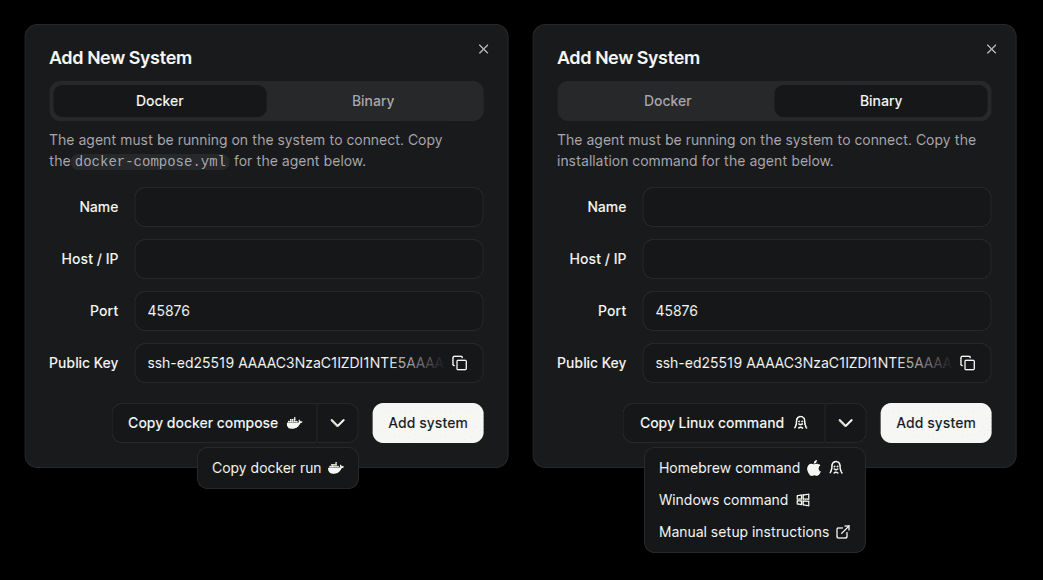
The `docker-compose.yml` or binary install command is provided for copy/paste in the hub's web UI.

Click the **Add System** button to manually configure the agent, or use a universal token (`/settings/tokens`) to connect the agent without needing to set it up ahead of time.

<div class="vp-doc _guide_agent-installation" data-v-e6f2a212=""><div>[![Add system dialog](https://www.beszel.dev/image/add-system-install.png)](https://www.beszel.dev/image/add-system-install.png)</div></div>## Docker or Podman

TIP

Preconfigured `docker-compose.yml` content can be copied the hub's web UI when adding a new system, so in most cases you do not need to set this up manually.

<div class="vp-doc _guide_agent-installation" data-v-e6f2a212=""><div><div class="tip custom-block">  
</div><div class="vp-code-group vp-adaptive-theme"><div class="tabs"><label data-title="docker-compose.yml" for="tab-xBSn7pY">docker-compose.yml</label><label data-title="docker run" for="tab-g_gHpXQ">docker run</label><label data-title="podman run" for="tab-YkyY4-3">podman run</label></div><div class="blocks"><div class="language-yaml vp-adaptive-theme active"><button class="copy" title="Copy Code"></button></div></div></div></div></div>```
services:
  beszel-agent:
    image: henrygd/beszel-agent
    container_name: beszel-agent
    restart: unless-stopped
    network_mode: host
    volumes:
      - ./beszel_agent_data:/var/lib/beszel-agent
      - /var/run/docker.sock:/var/run/docker.sock:ro
      # monitor other disks / partitions by mounting a folder in /extra-filesystems
      # - /mnt/disk1/.beszel:/extra-filesystems/disk1:ro
    environment:
      LISTEN: 45876
      KEY: "<public key>"
      HUB_URL: "<hub url>"
      TOKEN: "<token>"
```

### Why host network mode?

The agent must use host network mode to access the host's network interface stats. This automatically exposes the port, so change the port using an environment variable if needed.

If you don't need host network stats, you can remove that line from the compose file and map the port manually.

### Connecting to a local agent

When connecting to a local agent, `localhost` will not work because the containers are in different networks. The recommended way to connect them is to use a unix socket.

<div class="vp-doc _guide_agent-installation" data-v-e6f2a212=""><div><details class="details custom-block">IMPORTANT

This configuration should work out of the box, but you must follow these steps when adding the system in the web UI:

<div class="tip custom-block">1. Update the `KEY` and `TOKEN` environment variables with your public key and token, then restart the agent:

<div class="language- vp-adaptive-theme"><button class="copy" title="Copy Code"></button></div></div>```
docker compose up -d
```

<div class="tip custom-block"><div class="language- vp-adaptive-theme"></div>2. Use the unix socket path as the **Host / IP** in the web UI:

<div class="language- vp-adaptive-theme"><button class="copy" title="Copy Code"></button></div></div>```
/beszel_socket/beszel.sock
```

<div class="vp-code-group vp-adaptive-theme"><div class="tabs"><label data-title="docker-compose.yml" for="tab-8Kft5Sz">docker-compose.yml</label></div><div class="blocks"><div class="language-yaml vp-adaptive-theme active"><button class="copy" title="Copy Code"></button></div></div></div>```
services:
  beszel:
    image: henrygd/beszel:latest
    container_name: beszel
    restart: unless-stopped
    environment:
      APP_URL: http://localhost:8090
    ports:
      - 8090:8090
    volumes:
      - ./beszel_data:/beszel_data
      - ./beszel_socket:/beszel_socket

  beszel-agent:
    image: henrygd/beszel-agent:latest
    container_name: beszel-agent
    restart: unless-stopped
    network_mode: host
    volumes:
      - ./beszel_agent_data:/var/lib/beszel-agent
      - ./beszel_socket:/beszel_socket
      - /var/run/docker.sock:/var/run/docker.sock:ro
    environment:
      LISTEN: /beszel_socket/beszel.sock
      HUB_URL: http://localhost:8090
      TOKEN: <token>
      KEY: "<key>"
```

</details><details class="details custom-block">NOTE

If you prefer to set up containers in a different way, please feel free to do so.

1. Install [Docker](https://docs.docker.com/engine/install/) and [Docker Compose](https://docs.docker.com/compose/install/) if you haven't already.
2. Copy the `docker-compose.yml` content.
3. Create a directory somewhere to store the `docker-compose.yml` file.

```
mkdir beszel
cd beszel
```

4. Create a `docker-compose.yml` file, paste in the content, and save it.

<div class="vp-code-group vp-adaptive-theme"><div class="tabs"><label data-title="nano" for="tab-G-GhG3k">nano</label><label data-title="vim" for="tab-Z9XvDM3">vim</label><label data-title="emacs" for="tab-_QeROhO">emacs</label><label data-title="vscode" for="tab-ky_9cF6">vscode</label></div><div class="blocks"><div class="language-bash vp-adaptive-theme active"><button class="copy" title="Copy Code"></button></div></div></div>```
nano docker-compose.yml
```

5. Change the `APP_URL` environment variable to the URL you’ll use to access the Hub (for example, a domain name or public IP including port if needed)
6. Start the service.

```
docker compose up -d
```

</details></div></div>## Binary

Beszel is written in pure Go and can be easily compiled (or cross-compiled) if a prebuilt binary isn't available.

### 1. Install script (Linux, FreeBSD)

Root privileges required

The script needs root privileges to create a `beszel` user and set up a service to keep the agent running after reboot. The agent process itself does not run as root.

The script installs the latest binary and optionally enables automatic daily updates.

<div class="vp-doc _guide_agent-installation" data-v-e6f2a212=""><div>- `-k`: Public key (enclose in quotes; interactive if not provided)
- `-p`: Port or address (default: 45876)
- `-t`: Token (optional for backwards compatibility)
- `-url`: Hub URL (optional for backwards compatibility)
- `-v`: Version (default: latest)
- `-u`: Uninstall
- `--auto-update`: Enable or disable automatic daily updates (interactive if not provided)
- `--china-mirrors`: Use GitHub mirror to resolve network issues in mainland China
- `-h`: Show help

<div class="language-bash vp-adaptive-theme"><button class="copy" title="Copy Code"></button></div></div></div>```
curl -sL https://get.beszel.dev -o /tmp/install-agent.sh && chmod +x /tmp/install-agent.sh && /tmp/install-agent.sh
```

### 2. Manual download and start (Linux, FreeBSD, others)

<div class="vp-doc _guide_agent-installation" data-v-e6f2a212=""><div><details class="details custom-block">#### Download the binary

Download the latest binary from [releases](https://github.com/henrygd/beszel/releases) that matches your server's OS / architecture.

```
curl -sL "https://github.com/henrygd/beszel/releases/latest/download/beszel-agent_$(uname -s)_$(uname -m | sed -e 's/x86_64/amd64/' -e 's/armv6l/arm/' -e 's/armv7l/arm/' -e 's/aarch64/arm64/').tar.gz" | tar -xz beszel-agent
```

#### Start the agent

Use `-h` to see all available options.

```
./beszel-agent -key "<public key>" -token "<token>" -url "<hub url>"
```

#### Update the agent

```
./beszel-agent update
```

#### Create a service (optional)

If your system uses systemd, you can create a service to keep the agent running after reboot.

1. Create a service file in `/etc/systemd/system/beszel-agent.service`. Replace the placeholder values (e.g., `<path-to-binary>`, `<public key>`) with your actual configuration. You can also use `KEY_FILE` and `TOKEN_FILE` to load secrets from protected files (see [issue #1627](https://github.com/henrygd/beszel/issues/1627)).

```
[Unit]
Description=Beszel Agent Service
After=network-online.target
Wants=network-online.target

[Service]
ExecStart=<path-to-binary>/beszel-agent
Environment="LISTEN=45876"
Environment="KEY=<public key>"
Environment="TOKEN=<token>"
Environment="HUB_URL=<hub url>"
# Environment="EXTRA_FILESYSTEMS=sdb"
Restart=on-failure
RestartSec=5
StateDirectory=beszel-agent

# Security/sandboxing settings
KeyringMode=private
LockPersonality=yes
NoNewPrivileges=yes
ProtectClock=yes
ProtectHome=read-only
ProtectHostname=yes
ProtectKernelLogs=yes
ProtectSystem=strict
RemoveIPC=yes
RestrictSUIDSGID=true

[Install]
WantedBy=multi-user.target
```

2. Enable and start the service.

```
sudo systemctl daemon-reload
sudo systemctl enable beszel-agent.service
sudo systemctl start beszel-agent.service
```

</details></div></div>### 3. Manual compile and start (any platform)

<div class="vp-doc _guide_agent-installation" data-v-e6f2a212=""><div><details class="details custom-block">#### Compile

See [Compiling](https://www.beszel.dev/guide/compiling) for information on how to compile the agent yourself.

#### Start the agent

Use `-h` to see all available options.

```
./beszel-agent -key "<public key>" -token "<token>" -url "<hub url>"
```

#### Update the agent

```
./beszel-agent update
```

#### Create a service (optional)

If your system uses systemd, you can create a service to keep the agent running after reboot.

1. Create a service file in `/etc/systemd/system/beszel-agent.service`. Replace the placeholder values (e.g., `<path-to-binary>`, `<public key>`) with your actual configuration. You can also use `KEY_FILE` and `TOKEN_FILE` to load secrets from protected files (see [issue #1627](https://github.com/henrygd/beszel/issues/1627)).

```
[Unit]
Description=Beszel Agent Service
After=network-online.target
Wants=network-online.target

[Service]
ExecStart=<path-to-binary>/beszel-agent
Environment="LISTEN=45876"
Environment="KEY=<public key>"
Environment="TOKEN=<token>"
Environment="HUB_URL=<hub url>"
# Environment="EXTRA_FILESYSTEMS=sdb"
Restart=on-failure
RestartSec=5
StateDirectory=beszel-agent

# Security/sandboxing settings
KeyringMode=private
LockPersonality=yes
NoNewPrivileges=yes
ProtectClock=yes
ProtectHome=read-only
ProtectHostname=yes
ProtectKernelLogs=yes
ProtectSystem=strict
RemoveIPC=yes
RestrictSUIDSGID=true

[Install]
WantedBy=multi-user.target
```

2. Enable and start the service.

```
sudo systemctl daemon-reload
sudo systemctl enable beszel-agent.service
sudo systemctl start beszel-agent.service
```

</details></div></div>## Homebrew (macOS, Linux)

Environment variables can be changed in `~/.config/beszel/beszel-agent.env`.

Logs are written to `~/.cache/beszel/beszel-agent.log`.

### Homebrew install script

<div class="vp-doc _guide_agent-installation" data-v-e6f2a212=""><div>- `-k`: SSH key (interactive if not provided)
- `-p`: Port (default: 45876)
- `-t`: Token (optional for backwards compatibility)
- `-url`: Hub URL (optional for backwards compatibility)
- `-h`: Show help

<div class="language-bash vp-adaptive-theme"><button class="copy" title="Copy Code"></button></div></div></div>```
curl -sL https://get.beszel.dev/brew -o /tmp/install-agent.sh && chmod +x /tmp/install-agent.sh && /tmp/install-agent.sh
```

### Homebrew manual install

```
mkdir -p ~/.config/beszel ~/.cache/beszel
echo 'KEY="ssh-ed25519 AAAA..."' > ~/.config/beszel/beszel-agent.env
brew tap henrygd/beszel
brew install beszel-agent
brew services start beszel-agent
```

## WinGet / Scoop (Windows)

The agent is available as a package in [WinGet](https://winstall.app/apps/henrygd.beszel-agent) and [Scoop](https://scoop.sh/).

The script below uses Scoop if you have it installed, otherwise it uses WinGet if that's installed. If neither are available, it will install both Scoop and the agent.

It also installs [NSSM](https://nssm.cc/usage) and creates a service to keep the agent running after reboot.

<div class="vp-doc _guide_agent-installation" data-v-e6f2a212=""><div>- `-Key`: SSH key (interactive if not provided)
- `-Port`: Port (default: 45876)
- `-Url`: Hub URL
- `-Token`: Token
- `-InstallMethod`: "Auto", "WinGet", or "Scoop"
- `-ConfigureFirewall`: Add an incoming firewall rule.

<div class="language-powershell vp-adaptive-theme"><button class="copy" title="Copy Code"></button></div></div></div>```
& iwr -useb https://get.beszel.dev -OutFile "$env:TEMP\install-agent.ps1"; & Powershell -ExecutionPolicy Bypass -File "$env:TEMP\install-agent.ps1"
```

> The script's source code is available [on GitHub](https://github.com/henrygd/beszel/blob/main/supplemental/scripts/install-agent.ps1).

There are also community-developed GUI applications to install and manage the agent:

<div class="vp-doc _guide_agent-installation" data-v-e6f2a212=""><div>- [vmhomelab/beszel-agent-installer](https://github.com/vmhomelab/beszel-agent-installer) which uses [Chocolatey](https://chocolatey.org/).
- [MiranoVerhoef/BeszelAgentManager](https://github.com/MiranoVerhoef/BeszelAgentManager) which uses WinGet.

</div></div>### Edit configuration

Edit the service in NSSM by running the command below. Scroll to the right in the GUI to find environment variables.

```
nssm edit beszel-agent
```

You can also change options directly from the command line:

```
nssm set beszel-agent AppEnvironmentExtra "+EXTRA_FILESYSTEMS=D:,E:"
```

Restart the service when finished: `nssm restart beszel-agent`

### Logs

Logs are saved in `C:\ProgramData\beszel-agent\logs`.

### Upgrade

#### Scoop

```
nssm stop beszel-agent; & scoop update beszel-agent; & nssm start beszel-agent
```

#### WinGet

See [Upgrading with WinGet](https://www.beszel.dev/guide/upgrade-winget).

### Uninstall

#### Scoop

```
nssm stop beszel-agent
nssm remove beszel-agent confirm
scoop uninstall beszel-agent
```

#### WinGet

```
nssm stop beszel-agent
nssm remove beszel-agent confirm
winget uninstall henrygd.beszel-agent
```

## Home Assistant

See the [Home Assistant Agent page](https://www.beszel.dev/guide/third-party-integrations/home-assistant) for instructions on setting up the agent as a Home Assistant add-on.

</main><footer class="VPDocFooter" data-v-1bcd8184="" data-v-e6f2a212="" id="bkmrk-edit-this-page-on-gi"><div class="edit-info" data-v-1bcd8184="" style="text-align: justify;"><div class="edit-link" data-v-1bcd8184="">[Edit this page on GitHub](https://github.com/henrygd/beszel-docs/edit/main/en/guide/agent-installation.md)</div><div class="last-updated" data-v-1bcd8184="">  
</div></div>Last updated: <time data-v-1bb0c8a8="" datetime="2026-03-31T23:10:11.000Z">31/03/2026, 20:10</time>

<nav aria-labelledby="doc-footer-aria-label" class="prev-next" data-v-1bcd8184=""><span class="visually-hidden" data-v-1bcd8184="" id="bkmrk-pager">Pager</span><div class="pager" data-v-1bcd8184="" style="text-align: justify;">[<span class="desc" data-v-1bcd8184="">Previous page</span><span class="title" data-v-1bcd8184="">Hub Installation</span>](https://www.beszel.dev/guide/hub-installation)</div><div class="pager" data-v-1bcd8184="" style="text-align: justify;">[<span class="desc" data-v-1bcd8184="">Next page</span><span class="title" data-v-1bcd8184="">Advanced Deployment</span>](https://www.beszel.dev/guide/advanced-deployment)</div></nav></footer>