# Aplicações do Authentik

Modelos de aplicação do Authentik

# Authentik com Nextcloud

Link: [https://integrations.goauthentik.io/chat-communication-collaboration/nextcloud/](https://integrations.goauthentik.io/chat-communication-collaboration/nextcloud/)

<section class="text-token-text-primary w-full focus:outline-none [--shadow-height:45px] has-data-writing-block:pointer-events-none has-data-writing-block:-mt-(--shadow-height) has-data-writing-block:pt-(--shadow-height) [&:has([data-writing-block])>*]:pointer-events-auto scroll-mt-(--header-height)" data-scroll-anchor="false" data-testid="conversation-turn-7" data-turn="user" data-turn-id="eb786df6-50d4-4a56-a639-2f2fe556602b" dir="auto" id="bkmrk-o-que-significa-o-te"><div class="text-base my-auto mx-auto pt-12 [--thread-content-margin:var(--thread-content-margin-xs,calc(var(--spacing)*4))] @w-sm/main:[--thread-content-margin:var(--thread-content-margin-sm,calc(var(--spacing)*6))] @w-lg/main:[--thread-content-margin:var(--thread-content-margin-lg,calc(var(--spacing)*16))] px-(--thread-content-margin)"><div class="[--thread-content-max-width:40rem] @w-lg/main:[--thread-content-max-width:48rem] mx-auto max-w-(--thread-content-max-width) flex-1 group/turn-messages focus-visible:outline-hidden relative flex w-full min-w-0 flex-col"><div class="flex max-w-full flex-col gap-4 grow"><div class="min-h-8 text-message relative flex w-full flex-col items-end gap-2 text-start break-words whitespace-normal outline-none keyboard-focused:focus-ring [.text-message+&]:mt-1" data-message-author-role="user" data-message-id="eb786df6-50d4-4a56-a639-2f2fe556602b" dir="auto"><div class="flex w-full flex-col gap-1 empty:hidden items-end rtl:items-start"><div class="user-message-bubble-color corner-superellipse/0.98 relative rounded-[22px] px-4 py-2.5 leading-6 max-w-(--user-chat-width,70%)"><div class="whitespace-pre-wrap">O que significa o texto abaixo referente ao Nextcloud e o Authentik: aviso Se você precisa de criptografia do lado do servidor, deve usar LDAP. OpenID e SAML causarão perda irrevogável de dados. A criptografia do lado do servidor Nextcloud requer acesso à senha em texto claro do usuário, à qual o Nextcloud só tem acesso quando usa LDAP porque o usuário insere sua senha diretamente no Nextcloud.</div></div></div></div></div><div class="z-0 flex justify-end">  
</div></div></div></section><section class="text-token-text-primary w-full focus:outline-none [--shadow-height:45px] has-data-writing-block:pointer-events-none has-data-writing-block:-mt-(--shadow-height) has-data-writing-block:pt-(--shadow-height) [&:has([data-writing-block])>*]:pointer-events-auto scroll-mt-[calc(var(--header-height)+min(200px,max(70px,20svh)))]" data-scroll-anchor="false" data-testid="conversation-turn-8" data-turn="assistant" data-turn-id="request-WEB:dcc01d79-47e4-481d-bf57-8049f5d84f4d-3" dir="auto" id="bkmrk-esse-aviso-%C3%A9-muito-i">Esse aviso é **muito importante** — ele fala de uma limitação séria entre o <span class="hover:entity-accent entity-underline inline cursor-pointer align-baseline"><span class="whitespace-normal">Nextcloud</span></span> e provedores de identidade como o <span class="hover:entity-accent entity-underline inline cursor-pointer align-baseline"><span class="whitespace-normal">Authentik</span></span>.

Vamos traduzir e explicar de forma clara 👇

<div class="text-base my-auto mx-auto [--thread-content-margin:var(--thread-content-margin-xs,calc(var(--spacing)*4))] @w-sm/main:[--thread-content-margin:var(--thread-content-margin-sm,calc(var(--spacing)*6))] @w-lg/main:[--thread-content-margin:var(--thread-content-margin-lg,calc(var(--spacing)*16))] px-(--thread-content-margin)"><div class="[--thread-content-max-width:40rem] @w-lg/main:[--thread-content-max-width:48rem] mx-auto max-w-(--thread-content-max-width) flex-1 group/turn-messages focus-visible:outline-hidden relative flex w-full min-w-0 flex-col agent-turn"><div class="flex max-w-full flex-col gap-4 grow"><div class="min-h-8 text-message relative flex w-full flex-col items-end gap-2 text-start break-words whitespace-normal outline-none keyboard-focused:focus-ring [.text-message+&]:mt-1" data-message-author-role="assistant" data-message-id="9a931f8e-40ef-47b5-8ef0-eeaddd67becb" data-message-model-slug="gpt-5-3" dir="auto"><div class="flex w-full flex-col gap-1 empty:hidden"><div class="markdown prose dark:prose-invert w-full wrap-break-word dark markdown-new-styling">---

</div></div></div></div></div></div>#### 🧠 💡 Ideia central

O problema é a **criptografia do lado do servidor (Server-Side Encryption)** do Nextcloud.

👉 Esse tipo de criptografia **precisa da senha do usuário em texto claro**.

<div class="text-base my-auto mx-auto [--thread-content-margin:var(--thread-content-margin-xs,calc(var(--spacing)*4))] @w-sm/main:[--thread-content-margin:var(--thread-content-margin-sm,calc(var(--spacing)*6))] @w-lg/main:[--thread-content-margin:var(--thread-content-margin-lg,calc(var(--spacing)*16))] px-(--thread-content-margin)"><div class="[--thread-content-max-width:40rem] @w-lg/main:[--thread-content-max-width:48rem] mx-auto max-w-(--thread-content-max-width) flex-1 group/turn-messages focus-visible:outline-hidden relative flex w-full min-w-0 flex-col agent-turn"><div class="flex max-w-full flex-col gap-4 grow"><div class="min-h-8 text-message relative flex w-full flex-col items-end gap-2 text-start break-words whitespace-normal outline-none keyboard-focused:focus-ring [.text-message+&]:mt-1" data-message-author-role="assistant" data-message-id="9a931f8e-40ef-47b5-8ef0-eeaddd67becb" data-message-model-slug="gpt-5-3" dir="auto"><div class="flex w-full flex-col gap-1 empty:hidden"><div class="markdown prose dark:prose-invert w-full wrap-break-word dark markdown-new-styling">---

</div></div></div></div></div></div>#### 🔐 O que o aviso quer dizer

#### ✔️ Com LDAP (funciona)

Quando você usa LDAP:

<div class="text-base my-auto mx-auto [--thread-content-margin:var(--thread-content-margin-xs,calc(var(--spacing)*4))] @w-sm/main:[--thread-content-margin:var(--thread-content-margin-sm,calc(var(--spacing)*6))] @w-lg/main:[--thread-content-margin:var(--thread-content-margin-lg,calc(var(--spacing)*16))] px-(--thread-content-margin)"><div class="[--thread-content-max-width:40rem] @w-lg/main:[--thread-content-max-width:48rem] mx-auto max-w-(--thread-content-max-width) flex-1 group/turn-messages focus-visible:outline-hidden relative flex w-full min-w-0 flex-col agent-turn"><div class="flex max-w-full flex-col gap-4 grow"><div class="min-h-8 text-message relative flex w-full flex-col items-end gap-2 text-start break-words whitespace-normal outline-none keyboard-focused:focus-ring [.text-message+&]:mt-1" data-message-author-role="assistant" data-message-id="9a931f8e-40ef-47b5-8ef0-eeaddd67becb" data-message-model-slug="gpt-5-3" dir="auto"><div class="flex w-full flex-col gap-1 empty:hidden"><div class="markdown prose dark:prose-invert w-full wrap-break-word dark markdown-new-styling">- O usuário digita a senha **direto no Nextcloud**
- O Nextcloud recebe a senha em texto claro
- Ele usa essa senha para: 
    - gerar chaves
    - descriptografar arquivos

</div></div></div></div></div></div>👉 Exemplo:

<div class="text-base my-auto mx-auto [--thread-content-margin:var(--thread-content-margin-xs,calc(var(--spacing)*4))] @w-sm/main:[--thread-content-margin:var(--thread-content-margin-sm,calc(var(--spacing)*6))] @w-lg/main:[--thread-content-margin:var(--thread-content-margin-lg,calc(var(--spacing)*16))] px-(--thread-content-margin)"><div class="[--thread-content-max-width:40rem] @w-lg/main:[--thread-content-max-width:48rem] mx-auto max-w-(--thread-content-max-width) flex-1 group/turn-messages focus-visible:outline-hidden relative flex w-full min-w-0 flex-col agent-turn"><div class="flex max-w-full flex-col gap-4 grow"><div class="min-h-8 text-message relative flex w-full flex-col items-end gap-2 text-start break-words whitespace-normal outline-none keyboard-focused:focus-ring [.text-message+&]:mt-1" data-message-author-role="assistant" data-message-id="9a931f8e-40ef-47b5-8ef0-eeaddd67becb" data-message-model-slug="gpt-5-3" dir="auto"><div class="flex w-full flex-col gap-1 empty:hidden"><div class="markdown prose dark:prose-invert w-full wrap-break-word dark markdown-new-styling">- <span class="hover:entity-accent entity-underline inline cursor-pointer align-baseline"><span class="whitespace-normal">LDAP</span></span> ou Active Directory

---

</div></div></div></div></div></div>#### ❌ Com OpenID / SAML (problema)

Quando você usa:

<div class="text-base my-auto mx-auto [--thread-content-margin:var(--thread-content-margin-xs,calc(var(--spacing)*4))] @w-sm/main:[--thread-content-margin:var(--thread-content-margin-sm,calc(var(--spacing)*6))] @w-lg/main:[--thread-content-margin:var(--thread-content-margin-lg,calc(var(--spacing)*16))] px-(--thread-content-margin)"><div class="[--thread-content-max-width:40rem] @w-lg/main:[--thread-content-max-width:48rem] mx-auto max-w-(--thread-content-max-width) flex-1 group/turn-messages focus-visible:outline-hidden relative flex w-full min-w-0 flex-col agent-turn"><div class="flex max-w-full flex-col gap-4 grow"><div class="min-h-8 text-message relative flex w-full flex-col items-end gap-2 text-start break-words whitespace-normal outline-none keyboard-focused:focus-ring [.text-message+&]:mt-1" data-message-author-role="assistant" data-message-id="9a931f8e-40ef-47b5-8ef0-eeaddd67becb" data-message-model-slug="gpt-5-3" dir="auto"><div class="flex w-full flex-col gap-1 empty:hidden"><div class="markdown prose dark:prose-invert w-full wrap-break-word dark markdown-new-styling">- OpenID Connect (OIDC)
- SAML

</div></div></div></div></div></div>👉 O que acontece:

<div class="text-base my-auto mx-auto [--thread-content-margin:var(--thread-content-margin-xs,calc(var(--spacing)*4))] @w-sm/main:[--thread-content-margin:var(--thread-content-margin-sm,calc(var(--spacing)*6))] @w-lg/main:[--thread-content-margin:var(--thread-content-margin-lg,calc(var(--spacing)*16))] px-(--thread-content-margin)"><div class="[--thread-content-max-width:40rem] @w-lg/main:[--thread-content-max-width:48rem] mx-auto max-w-(--thread-content-max-width) flex-1 group/turn-messages focus-visible:outline-hidden relative flex w-full min-w-0 flex-col agent-turn"><div class="flex max-w-full flex-col gap-4 grow"><div class="min-h-8 text-message relative flex w-full flex-col items-end gap-2 text-start break-words whitespace-normal outline-none keyboard-focused:focus-ring [.text-message+&]:mt-1" data-message-author-role="assistant" data-message-id="9a931f8e-40ef-47b5-8ef0-eeaddd67becb" data-message-model-slug="gpt-5-3" dir="auto"><div class="flex w-full flex-col gap-1 empty:hidden"><div class="markdown prose dark:prose-invert w-full wrap-break-word dark markdown-new-styling">- O login é redirecionado para o Authentik
- O Nextcloud **NUNCA vê a senha**
- Ele só recebe um **token de autenticação**

---

</div></div></div></div></div></div>#### 💣 Consequência grave

Sem a senha:

<div class="text-base my-auto mx-auto [--thread-content-margin:var(--thread-content-margin-xs,calc(var(--spacing)*4))] @w-sm/main:[--thread-content-margin:var(--thread-content-margin-sm,calc(var(--spacing)*6))] @w-lg/main:[--thread-content-margin:var(--thread-content-margin-lg,calc(var(--spacing)*16))] px-(--thread-content-margin)"><div class="[--thread-content-max-width:40rem] @w-lg/main:[--thread-content-max-width:48rem] mx-auto max-w-(--thread-content-max-width) flex-1 group/turn-messages focus-visible:outline-hidden relative flex w-full min-w-0 flex-col agent-turn"><div class="flex max-w-full flex-col gap-4 grow"><div class="min-h-8 text-message relative flex w-full flex-col items-end gap-2 text-start break-words whitespace-normal outline-none keyboard-focused:focus-ring [.text-message+&]:mt-1" data-message-author-role="assistant" data-message-id="9a931f8e-40ef-47b5-8ef0-eeaddd67becb" data-message-model-slug="gpt-5-3" dir="auto"><div class="flex w-full flex-col gap-1 empty:hidden"><div class="markdown prose dark:prose-invert w-full wrap-break-word dark markdown-new-styling">- o Nextcloud **não consegue descriptografar os dados**
- arquivos podem ficar inacessíveis

</div></div></div></div></div></div>👉 Daí o aviso:

> **“perda irrevogável de dados”**

Ou seja:

<div class="text-base my-auto mx-auto [--thread-content-margin:var(--thread-content-margin-xs,calc(var(--spacing)*4))] @w-sm/main:[--thread-content-margin:var(--thread-content-margin-sm,calc(var(--spacing)*6))] @w-lg/main:[--thread-content-margin:var(--thread-content-margin-lg,calc(var(--spacing)*16))] px-(--thread-content-margin)"><div class="[--thread-content-max-width:40rem] @w-lg/main:[--thread-content-max-width:48rem] mx-auto max-w-(--thread-content-max-width) flex-1 group/turn-messages focus-visible:outline-hidden relative flex w-full min-w-0 flex-col agent-turn"><div class="flex max-w-full flex-col gap-4 grow"><div class="min-h-8 text-message relative flex w-full flex-col items-end gap-2 text-start break-words whitespace-normal outline-none keyboard-focused:focus-ring [.text-message+&]:mt-1" data-message-author-role="assistant" data-message-id="9a931f8e-40ef-47b5-8ef0-eeaddd67becb" data-message-model-slug="gpt-5-3" dir="auto"><div class="flex w-full flex-col gap-1 empty:hidden"><div class="markdown prose dark:prose-invert w-full wrap-break-word dark markdown-new-styling">- você pode perder acesso aos arquivos criptografados
- mesmo sendo o administrador

---

</div></div></div></div></div></div>#### 📊 Resumo simples

<div class="text-base my-auto mx-auto [--thread-content-margin:var(--thread-content-margin-xs,calc(var(--spacing)*4))] @w-sm/main:[--thread-content-margin:var(--thread-content-margin-sm,calc(var(--spacing)*6))] @w-lg/main:[--thread-content-margin:var(--thread-content-margin-lg,calc(var(--spacing)*16))] px-(--thread-content-margin)"><div class="[--thread-content-max-width:40rem] @w-lg/main:[--thread-content-max-width:48rem] mx-auto max-w-(--thread-content-max-width) flex-1 group/turn-messages focus-visible:outline-hidden relative flex w-full min-w-0 flex-col agent-turn"><div class="flex max-w-full flex-col gap-4 grow"><div class="min-h-8 text-message relative flex w-full flex-col items-end gap-2 text-start break-words whitespace-normal outline-none keyboard-focused:focus-ring [.text-message+&]:mt-1" data-message-author-role="assistant" data-message-id="9a931f8e-40ef-47b5-8ef0-eeaddd67becb" data-message-model-slug="gpt-5-3" dir="auto"><div class="flex w-full flex-col gap-1 empty:hidden"><div class="markdown prose dark:prose-invert w-full wrap-break-word dark markdown-new-styling"><div class="TyagGW_tableContainer"><div class="group TyagGW_tableWrapper flex flex-col-reverse w-fit" tabindex="-1"><table class="w-fit min-w-(--thread-content-width)" data-end="1501" data-start="1298"><thead data-end="1357" data-start="1298"><tr data-end="1357" data-start="1298"><th class="" data-col-size="sm" data-end="1307" data-start="1298">Método</th><th class="" data-col-size="sm" data-end="1331" data-start="1307">Nextcloud vê a senha?</th><th class="" data-col-size="sm" data-end="1357" data-start="1331">Criptografia funciona?</th></tr></thead><tbody data-end="1501" data-start="1413"><tr data-end="1437" data-start="1413"><td data-col-size="sm" data-end="1420" data-start="1413">LDAP</td><td data-col-size="sm" data-end="1428" data-start="1420">✅ Sim</td><td data-col-size="sm" data-end="1437" data-start="1428">✅ Sim</td></tr><tr data-end="1462" data-start="1438"><td data-col-size="sm" data-end="1445" data-start="1438">SAML</td><td data-col-size="sm" data-end="1453" data-start="1445">❌ Não</td><td data-col-size="sm" data-end="1462" data-start="1453">❌ Não</td></tr><tr data-end="1501" data-start="1463"><td data-col-size="sm" data-end="1484" data-start="1463">OpenID (Authentik)</td><td data-col-size="sm" data-end="1492" data-start="1484">❌ Não</td><td data-col-size="sm" data-end="1501" data-start="1492">❌ Não</td></tr></tbody></table>

</div></div>---

</div></div></div></div></div></div>#### ⚠️ Importante (muita gente ignora isso)

Esse problema não é bug:  
👉 é **limitação de design** do Nextcloud

<div class="text-base my-auto mx-auto [--thread-content-margin:var(--thread-content-margin-xs,calc(var(--spacing)*4))] @w-sm/main:[--thread-content-margin:var(--thread-content-margin-sm,calc(var(--spacing)*6))] @w-lg/main:[--thread-content-margin:var(--thread-content-margin-lg,calc(var(--spacing)*16))] px-(--thread-content-margin)"><div class="[--thread-content-max-width:40rem] @w-lg/main:[--thread-content-max-width:48rem] mx-auto max-w-(--thread-content-max-width) flex-1 group/turn-messages focus-visible:outline-hidden relative flex w-full min-w-0 flex-col agent-turn"><div class="flex max-w-full flex-col gap-4 grow"><div class="min-h-8 text-message relative flex w-full flex-col items-end gap-2 text-start break-words whitespace-normal outline-none keyboard-focused:focus-ring [.text-message+&]:mt-1" data-message-author-role="assistant" data-message-id="9a931f8e-40ef-47b5-8ef0-eeaddd67becb" data-message-model-slug="gpt-5-3" dir="auto"><div class="flex w-full flex-col gap-1 empty:hidden"><div class="markdown prose dark:prose-invert w-full wrap-break-word dark markdown-new-styling">---

</div></div></div></div></div></div>#### 🚀 O que você deve fazer

#### ✔️ Opção 1 — Usar Authentik + Nextcloud (sem criptografia)

<div class="text-base my-auto mx-auto [--thread-content-margin:var(--thread-content-margin-xs,calc(var(--spacing)*4))] @w-sm/main:[--thread-content-margin:var(--thread-content-margin-sm,calc(var(--spacing)*6))] @w-lg/main:[--thread-content-margin:var(--thread-content-margin-lg,calc(var(--spacing)*16))] px-(--thread-content-margin)"><div class="[--thread-content-max-width:40rem] @w-lg/main:[--thread-content-max-width:48rem] mx-auto max-w-(--thread-content-max-width) flex-1 group/turn-messages focus-visible:outline-hidden relative flex w-full min-w-0 flex-col agent-turn"><div class="flex max-w-full flex-col gap-4 grow"><div class="min-h-8 text-message relative flex w-full flex-col items-end gap-2 text-start break-words whitespace-normal outline-none keyboard-focused:focus-ring [.text-message+&]:mt-1" data-message-author-role="assistant" data-message-id="9a931f8e-40ef-47b5-8ef0-eeaddd67becb" data-message-model-slug="gpt-5-3" dir="auto"><div class="flex w-full flex-col gap-1 empty:hidden"><div class="markdown prose dark:prose-invert w-full wrap-break-word dark markdown-new-styling">- Pode usar OIDC/SAML normalmente
- **NÃO ativar Server-Side Encryption**

</div></div></div></div></div></div>👉 recomendado na maioria dos casos

<div class="text-base my-auto mx-auto [--thread-content-margin:var(--thread-content-margin-xs,calc(var(--spacing)*4))] @w-sm/main:[--thread-content-margin:var(--thread-content-margin-sm,calc(var(--spacing)*6))] @w-lg/main:[--thread-content-margin:var(--thread-content-margin-lg,calc(var(--spacing)*16))] px-(--thread-content-margin)"><div class="[--thread-content-max-width:40rem] @w-lg/main:[--thread-content-max-width:48rem] mx-auto max-w-(--thread-content-max-width) flex-1 group/turn-messages focus-visible:outline-hidden relative flex w-full min-w-0 flex-col agent-turn"><div class="flex max-w-full flex-col gap-4 grow"><div class="min-h-8 text-message relative flex w-full flex-col items-end gap-2 text-start break-words whitespace-normal outline-none keyboard-focused:focus-ring [.text-message+&]:mt-1" data-message-author-role="assistant" data-message-id="9a931f8e-40ef-47b5-8ef0-eeaddd67becb" data-message-model-slug="gpt-5-3" dir="auto"><div class="flex w-full flex-col gap-1 empty:hidden"><div class="markdown prose dark:prose-invert w-full wrap-break-word dark markdown-new-styling">---

</div></div></div></div></div></div>#### ✔️ Opção 2 — Usar criptografia

<div class="text-base my-auto mx-auto [--thread-content-margin:var(--thread-content-margin-xs,calc(var(--spacing)*4))] @w-sm/main:[--thread-content-margin:var(--thread-content-margin-sm,calc(var(--spacing)*6))] @w-lg/main:[--thread-content-margin:var(--thread-content-margin-lg,calc(var(--spacing)*16))] px-(--thread-content-margin)"><div class="[--thread-content-max-width:40rem] @w-lg/main:[--thread-content-max-width:48rem] mx-auto max-w-(--thread-content-max-width) flex-1 group/turn-messages focus-visible:outline-hidden relative flex w-full min-w-0 flex-col agent-turn"><div class="flex max-w-full flex-col gap-4 grow"><div class="min-h-8 text-message relative flex w-full flex-col items-end gap-2 text-start break-words whitespace-normal outline-none keyboard-focused:focus-ring [.text-message+&]:mt-1" data-message-author-role="assistant" data-message-id="9a931f8e-40ef-47b5-8ef0-eeaddd67becb" data-message-model-slug="gpt-5-3" dir="auto"><div class="flex w-full flex-col gap-1 empty:hidden"><div class="markdown prose dark:prose-invert w-full wrap-break-word dark markdown-new-styling">- Usar LDAP/AD direto no Nextcloud
- Não usar SSO via OIDC/SAML

---

</div></div></div></div></div></div>#### ✔️ Opção 3 — Alternativa moderna

<div class="text-base my-auto mx-auto [--thread-content-margin:var(--thread-content-margin-xs,calc(var(--spacing)*4))] @w-sm/main:[--thread-content-margin:var(--thread-content-margin-sm,calc(var(--spacing)*6))] @w-lg/main:[--thread-content-margin:var(--thread-content-margin-lg,calc(var(--spacing)*16))] px-(--thread-content-margin)"><div class="[--thread-content-max-width:40rem] @w-lg/main:[--thread-content-max-width:48rem] mx-auto max-w-(--thread-content-max-width) flex-1 group/turn-messages focus-visible:outline-hidden relative flex w-full min-w-0 flex-col agent-turn"><div class="flex max-w-full flex-col gap-4 grow"><div class="min-h-8 text-message relative flex w-full flex-col items-end gap-2 text-start break-words whitespace-normal outline-none keyboard-focused:focus-ring [.text-message+&]:mt-1" data-message-author-role="assistant" data-message-id="9a931f8e-40ef-47b5-8ef0-eeaddd67becb" data-message-model-slug="gpt-5-3" dir="auto"><div class="flex w-full flex-col gap-1 empty:hidden"><div class="markdown prose dark:prose-invert w-full wrap-break-word dark markdown-new-styling">- Não usar criptografia do Nextcloud
- Usar: 
    - criptografia no disco (LUKS, ZFS, etc.)
    - criptografia no storage

</div></div></div></div></div></div>👉 mais seguro e sem esse problema

<div class="text-base my-auto mx-auto [--thread-content-margin:var(--thread-content-margin-xs,calc(var(--spacing)*4))] @w-sm/main:[--thread-content-margin:var(--thread-content-margin-sm,calc(var(--spacing)*6))] @w-lg/main:[--thread-content-margin:var(--thread-content-margin-lg,calc(var(--spacing)*16))] px-(--thread-content-margin)"><div class="[--thread-content-max-width:40rem] @w-lg/main:[--thread-content-max-width:48rem] mx-auto max-w-(--thread-content-max-width) flex-1 group/turn-messages focus-visible:outline-hidden relative flex w-full min-w-0 flex-col agent-turn"><div class="flex max-w-full flex-col gap-4 grow"><div class="min-h-8 text-message relative flex w-full flex-col items-end gap-2 text-start break-words whitespace-normal outline-none keyboard-focused:focus-ring [.text-message+&]:mt-1" data-message-author-role="assistant" data-message-id="9a931f8e-40ef-47b5-8ef0-eeaddd67becb" data-message-model-slug="gpt-5-3" dir="auto"><div class="flex w-full flex-col gap-1 empty:hidden"><div class="markdown prose dark:prose-invert w-full wrap-break-word dark markdown-new-styling">---

</div></div></div></div></div></div>#### 🧠 Insight importante

A criptografia do Nextcloud:

<div class="text-base my-auto mx-auto [--thread-content-margin:var(--thread-content-margin-xs,calc(var(--spacing)*4))] @w-sm/main:[--thread-content-margin:var(--thread-content-margin-sm,calc(var(--spacing)*6))] @w-lg/main:[--thread-content-margin:var(--thread-content-margin-lg,calc(var(--spacing)*16))] px-(--thread-content-margin)"><div class="[--thread-content-max-width:40rem] @w-lg/main:[--thread-content-max-width:48rem] mx-auto max-w-(--thread-content-max-width) flex-1 group/turn-messages focus-visible:outline-hidden relative flex w-full min-w-0 flex-col agent-turn"><div class="flex max-w-full flex-col gap-4 grow"><div class="min-h-8 text-message relative flex w-full flex-col items-end gap-2 text-start break-words whitespace-normal outline-none keyboard-focused:focus-ring [.text-message+&]:mt-1" data-message-author-role="assistant" data-message-id="9a931f8e-40ef-47b5-8ef0-eeaddd67becb" data-message-model-slug="gpt-5-3" dir="auto"><div class="flex w-full flex-col gap-1 empty:hidden"><div class="markdown prose dark:prose-invert w-full wrap-break-word dark markdown-new-styling">- é considerada **limitada**
- não é “zero-knowledge”
- depende da senha do usuário

---

</div></div></div></div></div></div>#### 🔚 Conclusão

O aviso basicamente diz:

👉 **Se você usar Authentik com OpenID ou SAML, NÃO ative a criptografia do Nextcloud, ou você pode perder seus dados.**

<div class="text-base my-auto mx-auto [--thread-content-margin:var(--thread-content-margin-xs,calc(var(--spacing)*4))] @w-sm/main:[--thread-content-margin:var(--thread-content-margin-sm,calc(var(--spacing)*6))] @w-lg/main:[--thread-content-margin:var(--thread-content-margin-lg,calc(var(--spacing)*16))] px-(--thread-content-margin)"><div class="[--thread-content-max-width:40rem] @w-lg/main:[--thread-content-max-width:48rem] mx-auto max-w-(--thread-content-max-width) flex-1 group/turn-messages focus-visible:outline-hidden relative flex w-full min-w-0 flex-col agent-turn"><div class="flex max-w-full flex-col gap-4 grow"><div class="min-h-8 text-message relative flex w-full flex-col items-end gap-2 text-start break-words whitespace-normal outline-none keyboard-focused:focus-ring [.text-message+&]:mt-1" data-message-author-role="assistant" data-message-id="9a931f8e-40ef-47b5-8ef0-eeaddd67becb" data-message-model-slug="gpt-5-3" dir="auto"><div class="flex w-full flex-col gap-1 empty:hidden"><div class="markdown prose dark:prose-invert w-full wrap-break-word dark markdown-new-styling">---

</div></div></div></div></div></div>Se quiser, posso te orientar na melhor arquitetura:

<div class="text-base my-auto mx-auto [--thread-content-margin:var(--thread-content-margin-xs,calc(var(--spacing)*4))] @w-sm/main:[--thread-content-margin:var(--thread-content-margin-sm,calc(var(--spacing)*6))] @w-lg/main:[--thread-content-margin:var(--thread-content-margin-lg,calc(var(--spacing)*16))] px-(--thread-content-margin)"><div class="[--thread-content-max-width:40rem] @w-lg/main:[--thread-content-max-width:48rem] mx-auto max-w-(--thread-content-max-width) flex-1 group/turn-messages focus-visible:outline-hidden relative flex w-full min-w-0 flex-col agent-turn"><div class="flex max-w-full flex-col gap-4 grow"><div class="min-h-8 text-message relative flex w-full flex-col items-end gap-2 text-start break-words whitespace-normal outline-none keyboard-focused:focus-ring [.text-message+&]:mt-1" data-message-author-role="assistant" data-message-id="9a931f8e-40ef-47b5-8ef0-eeaddd67becb" data-message-model-slug="gpt-5-3" dir="auto"><div class="flex w-full flex-col gap-1 empty:hidden"><div class="markdown prose dark:prose-invert w-full wrap-break-word dark markdown-new-styling">- Authentik + Nextcloud seguro ✅
- com SSO funcionando
- sem risco de perda de dados

</div></div></div></div></div></div>Só me diz como você pretende usar 👍

</section><section class="text-token-text-primary w-full focus:outline-none [--shadow-height:45px] has-data-writing-block:pointer-events-none has-data-writing-block:-mt-(--shadow-height) has-data-writing-block:pt-(--shadow-height) [&:has([data-writing-block])>*]:pointer-events-auto scroll-mt-(--header-height)" data-scroll-anchor="false" data-testid="conversation-turn-9" data-turn="user" data-turn-id="c8382c65-52d7-4ae7-8d60-fa27f201415e" dir="auto" id="bkmrk-authentik-com-nextcl"><div class="text-base my-auto mx-auto pt-12 [--thread-content-margin:var(--thread-content-margin-xs,calc(var(--spacing)*4))] @w-sm/main:[--thread-content-margin:var(--thread-content-margin-sm,calc(var(--spacing)*6))] @w-lg/main:[--thread-content-margin:var(--thread-content-margin-lg,calc(var(--spacing)*16))] px-(--thread-content-margin)"><div class="[--thread-content-max-width:40rem] @w-lg/main:[--thread-content-max-width:48rem] mx-auto max-w-(--thread-content-max-width) flex-1 group/turn-messages focus-visible:outline-hidden relative flex w-full min-w-0 flex-col"><div class="flex max-w-full flex-col gap-4 grow"><div class="min-h-8 text-message relative flex w-full flex-col items-end gap-2 text-start break-words whitespace-normal outline-none keyboard-focused:focus-ring [.text-message+&]:mt-1" data-message-author-role="user" data-message-id="c8382c65-52d7-4ae7-8d60-fa27f201415e" dir="auto"><div class="flex w-full flex-col gap-1 empty:hidden items-end rtl:items-start"><div class="user-message-bubble-color corner-superellipse/0.98 relative rounded-[22px] px-4 py-2.5 leading-6 max-w-(--user-chat-width,70%)"><div class="whitespace-pre-wrap">Authentik com Nextcloud seguro</div></div></div></div></div><div class="z-0 flex justify-end">  
</div></div></div></section><section class="text-token-text-primary w-full focus:outline-none [--shadow-height:45px] has-data-writing-block:pointer-events-none has-data-writing-block:-mt-(--shadow-height) has-data-writing-block:pt-(--shadow-height) [&:has([data-writing-block])>*]:pointer-events-auto scroll-mt-[calc(var(--header-height)+min(200px,max(70px,20svh)))]" data-scroll-anchor="true" data-testid="conversation-turn-10" data-turn="assistant" data-turn-id="request-WEB:dcc01d79-47e4-481d-bf57-8049f5d84f4d-4" dir="auto" id="bkmrk-perfeito-%E2%80%94-d%C3%A1-pra-mo">Perfeito — dá pra montar uma integração **segura e moderna** entre <span class="hover:entity-accent entity-underline inline cursor-pointer align-baseline"><span class="whitespace-normal">Authentik</span></span> e <span class="hover:entity-accent entity-underline inline cursor-pointer align-baseline"><span class="whitespace-normal">Nextcloud</span></span> sem cair naquele problema da criptografia.

Vou te passar o **modelo recomendado hoje (produção)** 👇

<div class="text-base my-auto mx-auto pb-10 [--thread-content-margin:var(--thread-content-margin-xs,calc(var(--spacing)*4))] @w-sm/main:[--thread-content-margin:var(--thread-content-margin-sm,calc(var(--spacing)*6))] @w-lg/main:[--thread-content-margin:var(--thread-content-margin-lg,calc(var(--spacing)*16))] px-(--thread-content-margin)" style="text-align: justify;"><div class="[--thread-content-max-width:40rem] @w-lg/main:[--thread-content-max-width:48rem] mx-auto max-w-(--thread-content-max-width) flex-1 group/turn-messages focus-visible:outline-hidden relative flex w-full min-w-0 flex-col agent-turn"><div class="flex max-w-full flex-col gap-4 grow"><div class="min-h-8 text-message relative flex w-full flex-col items-end gap-2 text-start break-words whitespace-normal outline-none keyboard-focused:focus-ring [.text-message+&]:mt-1" data-message-author-role="assistant" data-message-id="1583bfeb-a60f-4524-98e2-52ed97813551" data-message-model-slug="gpt-5-3" data-turn-start-message="true" dir="auto" tabindex="0"><div class="flex w-full flex-col gap-1 empty:hidden"><div class="markdown prose dark:prose-invert w-full wrap-break-word dark markdown-new-styling">---

</div></div></div></div></div></div>#### 🧠 Arquitetura segura (recomendada)

#### 🔐 Autenticação

<div class="text-base my-auto mx-auto pb-10 [--thread-content-margin:var(--thread-content-margin-xs,calc(var(--spacing)*4))] @w-sm/main:[--thread-content-margin:var(--thread-content-margin-sm,calc(var(--spacing)*6))] @w-lg/main:[--thread-content-margin:var(--thread-content-margin-lg,calc(var(--spacing)*16))] px-(--thread-content-margin)" style="text-align: justify;"><div class="[--thread-content-max-width:40rem] @w-lg/main:[--thread-content-max-width:48rem] mx-auto max-w-(--thread-content-max-width) flex-1 group/turn-messages focus-visible:outline-hidden relative flex w-full min-w-0 flex-col agent-turn"><div class="flex max-w-full flex-col gap-4 grow"><div class="min-h-8 text-message relative flex w-full flex-col items-end gap-2 text-start break-words whitespace-normal outline-none keyboard-focused:focus-ring [.text-message+&]:mt-1" data-message-author-role="assistant" data-message-id="1583bfeb-a60f-4524-98e2-52ed97813551" data-message-model-slug="gpt-5-3" data-turn-start-message="true" dir="auto" tabindex="0"><div class="flex w-full flex-col gap-1 empty:hidden"><div class="markdown prose dark:prose-invert w-full wrap-break-word dark markdown-new-styling">- Authentik → **OpenID Connect (OIDC)**
- Nextcloud → login via SSO

---

</div></div></div></div></div></div>#### 🔒 Criptografia (IMPORTANTE)

❌ **NÃO usar**:

<div class="text-base my-auto mx-auto pb-10 [--thread-content-margin:var(--thread-content-margin-xs,calc(var(--spacing)*4))] @w-sm/main:[--thread-content-margin:var(--thread-content-margin-sm,calc(var(--spacing)*6))] @w-lg/main:[--thread-content-margin:var(--thread-content-margin-lg,calc(var(--spacing)*16))] px-(--thread-content-margin)" style="text-align: justify;"><div class="[--thread-content-max-width:40rem] @w-lg/main:[--thread-content-max-width:48rem] mx-auto max-w-(--thread-content-max-width) flex-1 group/turn-messages focus-visible:outline-hidden relative flex w-full min-w-0 flex-col agent-turn"><div class="flex max-w-full flex-col gap-4 grow"><div class="min-h-8 text-message relative flex w-full flex-col items-end gap-2 text-start break-words whitespace-normal outline-none keyboard-focused:focus-ring [.text-message+&]:mt-1" data-message-author-role="assistant" data-message-id="1583bfeb-a60f-4524-98e2-52ed97813551" data-message-model-slug="gpt-5-3" data-turn-start-message="true" dir="auto" tabindex="0"><div class="flex w-full flex-col gap-1 empty:hidden"><div class="markdown prose dark:prose-invert w-full wrap-break-word dark markdown-new-styling">- criptografia do lado do servidor do Nextcloud

</div></div></div></div></div></div>✅ **Usar no lugar**:

<div class="text-base my-auto mx-auto pb-10 [--thread-content-margin:var(--thread-content-margin-xs,calc(var(--spacing)*4))] @w-sm/main:[--thread-content-margin:var(--thread-content-margin-sm,calc(var(--spacing)*6))] @w-lg/main:[--thread-content-margin:var(--thread-content-margin-lg,calc(var(--spacing)*16))] px-(--thread-content-margin)" style="text-align: justify;"><div class="[--thread-content-max-width:40rem] @w-lg/main:[--thread-content-max-width:48rem] mx-auto max-w-(--thread-content-max-width) flex-1 group/turn-messages focus-visible:outline-hidden relative flex w-full min-w-0 flex-col agent-turn"><div class="flex max-w-full flex-col gap-4 grow"><div class="min-h-8 text-message relative flex w-full flex-col items-end gap-2 text-start break-words whitespace-normal outline-none keyboard-focused:focus-ring [.text-message+&]:mt-1" data-message-author-role="assistant" data-message-id="1583bfeb-a60f-4524-98e2-52ed97813551" data-message-model-slug="gpt-5-3" data-turn-start-message="true" dir="auto" tabindex="0"><div class="flex w-full flex-col gap-1 empty:hidden"><div class="markdown prose dark:prose-invert w-full wrap-break-word dark markdown-new-styling">- criptografia de disco: 
    - LUKS (Linux)
    - ZFS encryption
- ou criptografia no storage (cloud, NAS, etc.)

---

</div></div></div></div></div></div>#### 🧩 Componentes

<div class="text-base my-auto mx-auto pb-10 [--thread-content-margin:var(--thread-content-margin-xs,calc(var(--spacing)*4))] @w-sm/main:[--thread-content-margin:var(--thread-content-margin-sm,calc(var(--spacing)*6))] @w-lg/main:[--thread-content-margin:var(--thread-content-margin-lg,calc(var(--spacing)*16))] px-(--thread-content-margin)" style="text-align: justify;"><div class="[--thread-content-max-width:40rem] @w-lg/main:[--thread-content-max-width:48rem] mx-auto max-w-(--thread-content-max-width) flex-1 group/turn-messages focus-visible:outline-hidden relative flex w-full min-w-0 flex-col agent-turn"><div class="flex max-w-full flex-col gap-4 grow"><div class="min-h-8 text-message relative flex w-full flex-col items-end gap-2 text-start break-words whitespace-normal outline-none keyboard-focused:focus-ring [.text-message+&]:mt-1" data-message-author-role="assistant" data-message-id="1583bfeb-a60f-4524-98e2-52ed97813551" data-message-model-slug="gpt-5-3" data-turn-start-message="true" dir="auto" tabindex="0"><div class="flex w-full flex-col gap-1 empty:hidden"><div class="markdown prose dark:prose-invert w-full wrap-break-word dark markdown-new-styling">- Nextcloud
- Authentik (IdP)
- <span class="hover:entity-accent entity-underline inline cursor-pointer align-baseline"><span class="whitespace-normal">PostgreSQL</span></span> (recomendado para ambos)
- <span class="hover:entity-accent entity-underline inline cursor-pointer align-baseline"><span class="whitespace-normal">Redis</span></span> (performance)
- Reverse proxy (Traefik ou Nginx)

---

</div></div></div></div></div></div>#### 🔐 Fluxo de login

<div class="text-base my-auto mx-auto pb-10 [--thread-content-margin:var(--thread-content-margin-xs,calc(var(--spacing)*4))] @w-sm/main:[--thread-content-margin:var(--thread-content-margin-sm,calc(var(--spacing)*6))] @w-lg/main:[--thread-content-margin:var(--thread-content-margin-lg,calc(var(--spacing)*16))] px-(--thread-content-margin)" style="text-align: justify;"><div class="[--thread-content-max-width:40rem] @w-lg/main:[--thread-content-max-width:48rem] mx-auto max-w-(--thread-content-max-width) flex-1 group/turn-messages focus-visible:outline-hidden relative flex w-full min-w-0 flex-col agent-turn"><div class="flex max-w-full flex-col gap-4 grow"><div class="min-h-8 text-message relative flex w-full flex-col items-end gap-2 text-start break-words whitespace-normal outline-none keyboard-focused:focus-ring [.text-message+&]:mt-1" data-message-author-role="assistant" data-message-id="1583bfeb-a60f-4524-98e2-52ed97813551" data-message-model-slug="gpt-5-3" data-turn-start-message="true" dir="auto" tabindex="0"><div class="flex w-full flex-col gap-1 empty:hidden"><div class="markdown prose dark:prose-invert w-full wrap-break-word dark markdown-new-styling">1. Usuário acessa Nextcloud
2. Redireciona para Authentik
3. Login no Authentik
4. Volta autenticado via token (OIDC)

</div></div></div></div></div></div>👉 senha nunca passa pelo Nextcloud (isso é bom)

<div class="text-base my-auto mx-auto pb-10 [--thread-content-margin:var(--thread-content-margin-xs,calc(var(--spacing)*4))] @w-sm/main:[--thread-content-margin:var(--thread-content-margin-sm,calc(var(--spacing)*6))] @w-lg/main:[--thread-content-margin:var(--thread-content-margin-lg,calc(var(--spacing)*16))] px-(--thread-content-margin)" style="text-align: justify;"><div class="[--thread-content-max-width:40rem] @w-lg/main:[--thread-content-max-width:48rem] mx-auto max-w-(--thread-content-max-width) flex-1 group/turn-messages focus-visible:outline-hidden relative flex w-full min-w-0 flex-col agent-turn"><div class="flex max-w-full flex-col gap-4 grow"><div class="min-h-8 text-message relative flex w-full flex-col items-end gap-2 text-start break-words whitespace-normal outline-none keyboard-focused:focus-ring [.text-message+&]:mt-1" data-message-author-role="assistant" data-message-id="1583bfeb-a60f-4524-98e2-52ed97813551" data-message-model-slug="gpt-5-3" data-turn-start-message="true" dir="auto" tabindex="0"><div class="flex w-full flex-col gap-1 empty:hidden"><div class="markdown prose dark:prose-invert w-full wrap-break-word dark markdown-new-styling">---

</div></div></div></div></div></div>#### ⚙️ Configuração resumida

#### 1. No Authentik

Criar:

<div class="text-base my-auto mx-auto pb-10 [--thread-content-margin:var(--thread-content-margin-xs,calc(var(--spacing)*4))] @w-sm/main:[--thread-content-margin:var(--thread-content-margin-sm,calc(var(--spacing)*6))] @w-lg/main:[--thread-content-margin:var(--thread-content-margin-lg,calc(var(--spacing)*16))] px-(--thread-content-margin)" style="text-align: justify;"><div class="[--thread-content-max-width:40rem] @w-lg/main:[--thread-content-max-width:48rem] mx-auto max-w-(--thread-content-max-width) flex-1 group/turn-messages focus-visible:outline-hidden relative flex w-full min-w-0 flex-col agent-turn"><div class="flex max-w-full flex-col gap-4 grow"><div class="min-h-8 text-message relative flex w-full flex-col items-end gap-2 text-start break-words whitespace-normal outline-none keyboard-focused:focus-ring [.text-message+&]:mt-1" data-message-author-role="assistant" data-message-id="1583bfeb-a60f-4524-98e2-52ed97813551" data-message-model-slug="gpt-5-3" data-turn-start-message="true" dir="auto" tabindex="0"><div class="flex w-full flex-col gap-1 empty:hidden"><div class="markdown prose dark:prose-invert w-full wrap-break-word dark markdown-new-styling">- **Application**
- **Provider → OpenID Connect**

</div></div></div></div></div></div>Configurar:

<div class="text-base my-auto mx-auto pb-10 [--thread-content-margin:var(--thread-content-margin-xs,calc(var(--spacing)*4))] @w-sm/main:[--thread-content-margin:var(--thread-content-margin-sm,calc(var(--spacing)*6))] @w-lg/main:[--thread-content-margin:var(--thread-content-margin-lg,calc(var(--spacing)*16))] px-(--thread-content-margin)" style="text-align: justify;"><div class="[--thread-content-max-width:40rem] @w-lg/main:[--thread-content-max-width:48rem] mx-auto max-w-(--thread-content-max-width) flex-1 group/turn-messages focus-visible:outline-hidden relative flex w-full min-w-0 flex-col agent-turn"><div class="flex max-w-full flex-col gap-4 grow"><div class="min-h-8 text-message relative flex w-full flex-col items-end gap-2 text-start break-words whitespace-normal outline-none keyboard-focused:focus-ring [.text-message+&]:mt-1" data-message-author-role="assistant" data-message-id="1583bfeb-a60f-4524-98e2-52ed97813551" data-message-model-slug="gpt-5-3" data-turn-start-message="true" dir="auto" tabindex="0"><div class="flex w-full flex-col gap-1 empty:hidden"><div class="markdown prose dark:prose-invert w-full wrap-break-word dark markdown-new-styling">- Redirect URI:

<div class="relative w-full mt-4 mb-1"><div class=""><div class="relative"><div class="h-full min-h-0 min-w-0"><div class="h-full min-h-0 min-w-0"><div class="border border-token-border-light border-radius-3xl corner-superellipse/1.1 rounded-3xl"><div class="h-full w-full border-radius-3xl bg-token-bg-elevated-secondary corner-superellipse/1.1 overflow-clip rounded-3xl lxnfua_clipPathFallback"><div class="w-full overflow-x-hidden overflow-y-auto pe-11 pt-3"><div class="relative z-0 flex max-w-full"><div class="q9tKkq_viewer cm-editor z-10 light:cm-light dark:cm-light flex h-full w-full flex-col items-stretch ͼk ͼy" dir="ltr" id="bkmrk-https%3A%2F%2Fcloud.seudom"><div class="cm-scroller"><div class="cm-content q9tKkq_readonly">https://cloud.seudominio.com/apps/user_oidc/code</div></div></div></div></div></div></div></div></div><div class=""></div></div></div></div></div></div></div></div></div></div>Scopes:

<div class="text-base my-auto mx-auto pb-10 [--thread-content-margin:var(--thread-content-margin-xs,calc(var(--spacing)*4))] @w-sm/main:[--thread-content-margin:var(--thread-content-margin-sm,calc(var(--spacing)*6))] @w-lg/main:[--thread-content-margin:var(--thread-content-margin-lg,calc(var(--spacing)*16))] px-(--thread-content-margin)" style="text-align: justify;"><div class="[--thread-content-max-width:40rem] @w-lg/main:[--thread-content-max-width:48rem] mx-auto max-w-(--thread-content-max-width) flex-1 group/turn-messages focus-visible:outline-hidden relative flex w-full min-w-0 flex-col agent-turn"><div class="flex max-w-full flex-col gap-4 grow"><div class="min-h-8 text-message relative flex w-full flex-col items-end gap-2 text-start break-words whitespace-normal outline-none keyboard-focused:focus-ring [.text-message+&]:mt-1" data-message-author-role="assistant" data-message-id="1583bfeb-a60f-4524-98e2-52ed97813551" data-message-model-slug="gpt-5-3" data-turn-start-message="true" dir="auto" tabindex="0"><div class="flex w-full flex-col gap-1 empty:hidden"><div class="markdown prose dark:prose-invert w-full wrap-break-word dark markdown-new-styling"><div class="relative w-full mt-4 mb-1"><div class=""><div class="relative"><div class="h-full min-h-0 min-w-0"><div class="h-full min-h-0 min-w-0"><div class="border border-token-border-light border-radius-3xl corner-superellipse/1.1 rounded-3xl"><div class="h-full w-full border-radius-3xl bg-token-bg-elevated-secondary corner-superellipse/1.1 overflow-clip rounded-3xl lxnfua_clipPathFallback"><div class="w-full overflow-x-hidden overflow-y-auto pe-11 pt-3"><div class="relative z-0 flex max-w-full"><div class="q9tKkq_viewer cm-editor z-10 light:cm-light dark:cm-light flex h-full w-full flex-col items-stretch ͼk ͼy" dir="ltr" id="bkmrk-openid-profile-email"><div class="cm-scroller"><div class="cm-content q9tKkq_readonly">openid profile email</div></div></div></div></div></div></div></div></div><div class=""><div class="">  
</div></div></div></div></div>---

</div></div></div></div></div></div>#### 2. No Nextcloud

Instalar app:

<div class="text-base my-auto mx-auto pb-10 [--thread-content-margin:var(--thread-content-margin-xs,calc(var(--spacing)*4))] @w-sm/main:[--thread-content-margin:var(--thread-content-margin-sm,calc(var(--spacing)*6))] @w-lg/main:[--thread-content-margin:var(--thread-content-margin-lg,calc(var(--spacing)*16))] px-(--thread-content-margin)" style="text-align: justify;"><div class="[--thread-content-max-width:40rem] @w-lg/main:[--thread-content-max-width:48rem] mx-auto max-w-(--thread-content-max-width) flex-1 group/turn-messages focus-visible:outline-hidden relative flex w-full min-w-0 flex-col agent-turn"><div class="flex max-w-full flex-col gap-4 grow"><div class="min-h-8 text-message relative flex w-full flex-col items-end gap-2 text-start break-words whitespace-normal outline-none keyboard-focused:focus-ring [.text-message+&]:mt-1" data-message-author-role="assistant" data-message-id="1583bfeb-a60f-4524-98e2-52ed97813551" data-message-model-slug="gpt-5-3" data-turn-start-message="true" dir="auto" tabindex="0"><div class="flex w-full flex-col gap-1 empty:hidden"><div class="markdown prose dark:prose-invert w-full wrap-break-word dark markdown-new-styling">- **"OpenID Connect Login"**

</div></div></div></div></div></div>Configurar algo assim:

<div class="text-base my-auto mx-auto pb-10 [--thread-content-margin:var(--thread-content-margin-xs,calc(var(--spacing)*4))] @w-sm/main:[--thread-content-margin:var(--thread-content-margin-sm,calc(var(--spacing)*6))] @w-lg/main:[--thread-content-margin:var(--thread-content-margin-lg,calc(var(--spacing)*16))] px-(--thread-content-margin)" style="text-align: justify;"><div class="[--thread-content-max-width:40rem] @w-lg/main:[--thread-content-max-width:48rem] mx-auto max-w-(--thread-content-max-width) flex-1 group/turn-messages focus-visible:outline-hidden relative flex w-full min-w-0 flex-col agent-turn"><div class="flex max-w-full flex-col gap-4 grow"><div class="min-h-8 text-message relative flex w-full flex-col items-end gap-2 text-start break-words whitespace-normal outline-none keyboard-focused:focus-ring [.text-message+&]:mt-1" data-message-author-role="assistant" data-message-id="1583bfeb-a60f-4524-98e2-52ed97813551" data-message-model-slug="gpt-5-3" data-turn-start-message="true" dir="auto" tabindex="0"><div class="flex w-full flex-col gap-1 empty:hidden"><div class="markdown prose dark:prose-invert w-full wrap-break-word dark markdown-new-styling"><div class="relative w-full mt-4 mb-1"><div class=""><div class="relative"><div class="h-full min-h-0 min-w-0"><div class="h-full min-h-0 min-w-0"><div class="border border-token-border-light border-radius-3xl corner-superellipse/1.1 rounded-3xl"><div class="h-full w-full border-radius-3xl bg-token-bg-elevated-secondary corner-superellipse/1.1 overflow-clip rounded-3xl lxnfua_clipPathFallback"><div class="w-full overflow-x-hidden overflow-y-auto"><div class="relative z-0 flex max-w-full"><div class="q9tKkq_viewer cm-editor z-10 light:cm-light dark:cm-light flex h-full w-full flex-col items-stretch ͼk ͼy" dir="ltr" id="bkmrk-%27oidc_login_provider"><div class="cm-scroller"><div class="cm-content q9tKkq_readonly">'oidc_login_provider_url' =&gt; 'https://auth.seudominio.com/application/o/',  
'oidc_login_client_id' =&gt; 'nextcloud',  
'oidc_login_client_secret' =&gt; 'SECRET',  
'oidc_login_auto_redirect' =&gt; true,  
'oidc_login_end_session_redirect' =&gt; true,  
'oidc_login_button_text' =&gt; 'Login com SSO',  
'oidc_login_attributes' =&gt; [  
'id' =&gt; 'sub',  
'name' =&gt; 'name',  
'mail' =&gt; 'email',  
],</div></div></div></div></div></div></div></div></div><div class=""><div class="">  
</div></div></div></div></div>---

</div></div></div></div></div></div>#### 🛡️ Hardening (segurança de verdade)

#### ✅ No Authentik

<div class="text-base my-auto mx-auto pb-10 [--thread-content-margin:var(--thread-content-margin-xs,calc(var(--spacing)*4))] @w-sm/main:[--thread-content-margin:var(--thread-content-margin-sm,calc(var(--spacing)*6))] @w-lg/main:[--thread-content-margin:var(--thread-content-margin-lg,calc(var(--spacing)*16))] px-(--thread-content-margin)" style="text-align: justify;"><div class="[--thread-content-max-width:40rem] @w-lg/main:[--thread-content-max-width:48rem] mx-auto max-w-(--thread-content-max-width) flex-1 group/turn-messages focus-visible:outline-hidden relative flex w-full min-w-0 flex-col agent-turn"><div class="flex max-w-full flex-col gap-4 grow"><div class="min-h-8 text-message relative flex w-full flex-col items-end gap-2 text-start break-words whitespace-normal outline-none keyboard-focused:focus-ring [.text-message+&]:mt-1" data-message-author-role="assistant" data-message-id="1583bfeb-a60f-4524-98e2-52ed97813551" data-message-model-slug="gpt-5-3" data-turn-start-message="true" dir="auto" tabindex="0"><div class="flex w-full flex-col gap-1 empty:hidden"><div class="markdown prose dark:prose-invert w-full wrap-break-word dark markdown-new-styling">- ativar MFA (2FA)
- políticas de senha forte
- limitar tentativas de login

---

</div></div></div></div></div></div>#### ✅ No Nextcloud

<div class="text-base my-auto mx-auto pb-10 [--thread-content-margin:var(--thread-content-margin-xs,calc(var(--spacing)*4))] @w-sm/main:[--thread-content-margin:var(--thread-content-margin-sm,calc(var(--spacing)*6))] @w-lg/main:[--thread-content-margin:var(--thread-content-margin-lg,calc(var(--spacing)*16))] px-(--thread-content-margin)" style="text-align: justify;"><div class="[--thread-content-max-width:40rem] @w-lg/main:[--thread-content-max-width:48rem] mx-auto max-w-(--thread-content-max-width) flex-1 group/turn-messages focus-visible:outline-hidden relative flex w-full min-w-0 flex-col agent-turn"><div class="flex max-w-full flex-col gap-4 grow"><div class="min-h-8 text-message relative flex w-full flex-col items-end gap-2 text-start break-words whitespace-normal outline-none keyboard-focused:focus-ring [.text-message+&]:mt-1" data-message-author-role="assistant" data-message-id="1583bfeb-a60f-4524-98e2-52ed97813551" data-message-model-slug="gpt-5-3" data-turn-start-message="true" dir="auto" tabindex="0"><div class="flex w-full flex-col gap-1 empty:hidden"><div class="markdown prose dark:prose-invert w-full wrap-break-word dark markdown-new-styling">- HTTPS obrigatório
- headers de segurança
- usar Redis para cache
- usar PostgreSQL (evitar SQLite)

---

</div></div></div></div></div></div>#### ✅ Infraestrutura

<div class="text-base my-auto mx-auto pb-10 [--thread-content-margin:var(--thread-content-margin-xs,calc(var(--spacing)*4))] @w-sm/main:[--thread-content-margin:var(--thread-content-margin-sm,calc(var(--spacing)*6))] @w-lg/main:[--thread-content-margin:var(--thread-content-margin-lg,calc(var(--spacing)*16))] px-(--thread-content-margin)" style="text-align: justify;"><div class="[--thread-content-max-width:40rem] @w-lg/main:[--thread-content-max-width:48rem] mx-auto max-w-(--thread-content-max-width) flex-1 group/turn-messages focus-visible:outline-hidden relative flex w-full min-w-0 flex-col agent-turn"><div class="flex max-w-full flex-col gap-4 grow"><div class="min-h-8 text-message relative flex w-full flex-col items-end gap-2 text-start break-words whitespace-normal outline-none keyboard-focused:focus-ring [.text-message+&]:mt-1" data-message-author-role="assistant" data-message-id="1583bfeb-a60f-4524-98e2-52ed97813551" data-message-model-slug="gpt-5-3" data-turn-start-message="true" dir="auto" tabindex="0"><div class="flex w-full flex-col gap-1 empty:hidden"><div class="markdown prose dark:prose-invert w-full wrap-break-word dark markdown-new-styling">- backup frequente
- snapshots
- firewall (ex: só portas 80/443 abertas)

---

</div></div></div></div></div></div>#### ⚠️ Coisas que você NÃO deve fazer

❌ Ativar:

<div class="text-base my-auto mx-auto pb-10 [--thread-content-margin:var(--thread-content-margin-xs,calc(var(--spacing)*4))] @w-sm/main:[--thread-content-margin:var(--thread-content-margin-sm,calc(var(--spacing)*6))] @w-lg/main:[--thread-content-margin:var(--thread-content-margin-lg,calc(var(--spacing)*16))] px-(--thread-content-margin)" style="text-align: justify;"><div class="[--thread-content-max-width:40rem] @w-lg/main:[--thread-content-max-width:48rem] mx-auto max-w-(--thread-content-max-width) flex-1 group/turn-messages focus-visible:outline-hidden relative flex w-full min-w-0 flex-col agent-turn"><div class="flex max-w-full flex-col gap-4 grow"><div class="min-h-8 text-message relative flex w-full flex-col items-end gap-2 text-start break-words whitespace-normal outline-none keyboard-focused:focus-ring [.text-message+&]:mt-1" data-message-author-role="assistant" data-message-id="1583bfeb-a60f-4524-98e2-52ed97813551" data-message-model-slug="gpt-5-3" data-turn-start-message="true" dir="auto" tabindex="0"><div class="flex w-full flex-col gap-1 empty:hidden"><div class="markdown prose dark:prose-invert w-full wrap-break-word dark markdown-new-styling">- Server-Side Encryption do Nextcloud

</div></div></div></div></div></div>❌ Misturar:

<div class="text-base my-auto mx-auto pb-10 [--thread-content-margin:var(--thread-content-margin-xs,calc(var(--spacing)*4))] @w-sm/main:[--thread-content-margin:var(--thread-content-margin-sm,calc(var(--spacing)*6))] @w-lg/main:[--thread-content-margin:var(--thread-content-margin-lg,calc(var(--spacing)*16))] px-(--thread-content-margin)" style="text-align: justify;"><div class="[--thread-content-max-width:40rem] @w-lg/main:[--thread-content-max-width:48rem] mx-auto max-w-(--thread-content-max-width) flex-1 group/turn-messages focus-visible:outline-hidden relative flex w-full min-w-0 flex-col agent-turn"><div class="flex max-w-full flex-col gap-4 grow"><div class="min-h-8 text-message relative flex w-full flex-col items-end gap-2 text-start break-words whitespace-normal outline-none keyboard-focused:focus-ring [.text-message+&]:mt-1" data-message-author-role="assistant" data-message-id="1583bfeb-a60f-4524-98e2-52ed97813551" data-message-model-slug="gpt-5-3" data-turn-start-message="true" dir="auto" tabindex="0"><div class="flex w-full flex-col gap-1 empty:hidden"><div class="markdown prose dark:prose-invert w-full wrap-break-word dark markdown-new-styling">- LDAP + OIDC ao mesmo tempo (gera conflito)

---

</div></div></div></div></div></div>#### 🚀 Extras (opcional, mas top)

<div class="text-base my-auto mx-auto pb-10 [--thread-content-margin:var(--thread-content-margin-xs,calc(var(--spacing)*4))] @w-sm/main:[--thread-content-margin:var(--thread-content-margin-sm,calc(var(--spacing)*6))] @w-lg/main:[--thread-content-margin:var(--thread-content-margin-lg,calc(var(--spacing)*16))] px-(--thread-content-margin)" style="text-align: justify;"><div class="[--thread-content-max-width:40rem] @w-lg/main:[--thread-content-max-width:48rem] mx-auto max-w-(--thread-content-max-width) flex-1 group/turn-messages focus-visible:outline-hidden relative flex w-full min-w-0 flex-col agent-turn"><div class="flex max-w-full flex-col gap-4 grow"><div class="min-h-8 text-message relative flex w-full flex-col items-end gap-2 text-start break-words whitespace-normal outline-none keyboard-focused:focus-ring [.text-message+&]:mt-1" data-message-author-role="assistant" data-message-id="1583bfeb-a60f-4524-98e2-52ed97813551" data-message-model-slug="gpt-5-3" data-turn-start-message="true" dir="auto" tabindex="0"><div class="flex w-full flex-col gap-1 empty:hidden"><div class="markdown prose dark:prose-invert w-full wrap-break-word dark markdown-new-styling">- Provisionamento automático de usuários via Authentik
- Grupos → roles no Nextcloud
- Logout único (Single Logout)

---

</div></div></div></div></div></div>#### 📊 Resumo final

✔️ Authentik + OIDC = melhor UX  
✔️ Sem criptografia interna do Nextcloud  
✔️ Segurança via infra (disco + rede)  
✔️ Escalável e moderno

</section>

# Authentik com SAML - Youtube

Link: [https://www.youtube.com/watch?v=BHtL3Gvn31o](https://www.youtube.com/watch?v=BHtL3Gvn31o)

# Authentik LDAP Provider

**LDAP Provider:** Link: [https://docs.goauthentik.io/add-secure-apps/providers/ldap/](https://docs.goauthentik.io/add-secure-apps/providers/ldap/)

**Create LDAP Provider:** Link: [https://docs.goauthentik.io/add-secure-apps/providers/ldap/create-ldap-provider/](https://docs.goauthentik.io/add-secure-apps/providers/ldap/create-ldap-provider/)

**Outposts:** Link: [https://docs.goauthentik.io/add-secure-apps/outposts/](https://docs.goauthentik.io/add-secure-apps/outposts/)

**Outposts Compose:** link: [https://docs.goauthentik.io/add-secure-apps/outposts/](https://docs.goauthentik.io/add-secure-apps/outposts/)

<div class="theme-doc-markdown markdown" id="bkmrk-create-an-ldap-provi"><header>### Create an LDAP provider

</header></div>Creating an authentik LDAP provider requires the following steps:

<div class="theme-doc-markdown markdown" id="bkmrk-create-an-ldap-authe">1. [Create an LDAP authentication flow *(optional)*](https://docs.goauthentik.io/add-secure-apps/providers/ldap/create-ldap-provider/#create-an-ldap-authentication-flow-optional)
2. [Create an LDAP application and provider](https://docs.goauthentik.io/add-secure-apps/providers/ldap/create-ldap-provider/#create-an-ldap-application-and-provider)
3. [Create a service account and assign the LDAP search permission](https://docs.goauthentik.io/add-secure-apps/providers/ldap/create-ldap-provider/#create-a-service-account)
4. [Create an LDAP Outpost](https://docs.goauthentik.io/add-secure-apps/providers/ldap/create-ldap-provider/#create-an-ldap-outpost)

</div>### Create an LDAP authentication flow *(optional)*

The `default-authentication-flow` validates MFA by default. Duo, TOTP, and static authenticators are supported by the LDAP provider. WebAuthn and SMS are not supported.

If you plan to use only dedicated service accounts to bind to LDAP, or only use LDAP supported MFA authenticators, then you can use the default authentication flow and skip this section and continue with the [Create an LDAP application and provider](https://docs.goauthentik.io/add-secure-apps/providers/ldap/create-ldap-provider/#create-an-ldap-application-and-provider) section.

Refer to [Code-Based MFA support](https://docs.goauthentik.io/add-secure-apps/providers/ldap/#code-based-mfa-support) for more information on LDAP and MFA.

### Create custom stages

You'll need to create the stages that make up the flow.

<div class="theme-doc-markdown markdown" id="bkmrk-log-in-to-authentik-">1. Log in to authentik as an administrator and open the authentik Admin interface.
2. Navigate to **Flows and Stages** &gt; **Stages**, and click **Create**.

</div>#### Password Stage

First, you'll need to create a Password Stage.

<div class="theme-doc-markdown markdown" id="bkmrk-select-password-stag">3. Select **Password Stage** as the stage type, click **Next**, and set the following required configurations: 
    - Provide a **Name** for the stage (e.g. `ldap-authentication-password-stage`).
    - For **Backends**, leave the default settings.
4. Click **Finish**

</div>#### Identification Stage

Next, you'll need to create an Identification Stage.

<div class="theme-doc-markdown markdown" id="bkmrk-on-the-stages-page%2C-">5. On the **Stages** page, click **Create**.
6. Select **Identification Stage** as the stage type, click **Next**, and set the following required configurations: 
    - Provide a **Name** for the stage (e.g. `ldap-identification-stage`).
    - For **User fields**, select `Username` and `Email` (and UPN if it is relevant to your setup).
    - Set **Password stage** to the Password Stage created in the previous section (e.g. `ldap-authentication-password-stage`)
7. Click **Finish**

</div>#### User Login Stage

Finally, you'll need to create a User Login Stage.

<div class="theme-doc-markdown markdown" id="bkmrk-on-the-stages-page%2C--1">8. On the **Stages** page, click **Create**.
9. Select **User Login Stage** as the stage type, click **Next**, and set the following required configurations: 
    - Provide a **Name** for the stage (e.g. `ldap-authentication-login-stage`).
10. Click **Finish**

</div>### Create an LDAP authentication flow

Now you'll need to create the LDAP authentication flow and bind the previously created stages.

<div class="theme-doc-markdown markdown" id="bkmrk-log-in-to-authentik--1">1. Log in to authentik as an administrator and open the authentik Admin interface.
2. Navigate to **Flows and Stages** &gt; **Flows**, click **Create**, and set the following required configurations: 
    - Provide a **Name**, **Title** and **Slug** for the flow (e.g. `ldap-authentication-flow`).
    - Set **Designation** to `Authentication`.
3. Click **Create**.
4. Click the name of the newly created flow, open the **Stage Bindings** tab, and click **Bind existing stage**.
5. Select the previously created LDAP Identification Stage (e.g.`ldap-identification-stage`), set the order to `10`, and click **Create**.
6. Click **Bind existing stage**.
7. Select the previously created LDAP User Login Stage (e.g.`ldap-authentication-login-stage`), set the order to `30`, and click **Create**.

</div>## Create an LDAP application and provider

The LDAP application and provider can now be created.

<div class="theme-doc-markdown markdown" id="bkmrk-log-in-to-authentik--2">1. Log in to authentik as an administrator and open the authentik Admin interface.
2. Navigate to **Applications** &gt; **Applications**, click **Create with Provider** to create an application and provider pair.
3. On the **New application** page, define the application details, and then click **Next**.
4. Select **LDAP Provider** as the **Provider Type**, and then click **Next**.
5. On the **Configure LDAP Provider** page, provide the configuration settings and then click **Submit** to create both the application and the provider.

<div class="theme-admonition theme-admonition-info admonition_WCGJ alert alert--info"><div class="admonitionContent_pbrs">**INFO**</div></div></div>If you followed the optional [Create an LDAP authentication flow](https://docs.goauthentik.io/add-secure-apps/providers/ldap/create-ldap-provider/#create-an-ldap-authentication-flow-optional) section, ensure that you set **Bind flow** to newly created authentication flow (e.g. `ldap-authentication-flow`).

## Create a service account

Create a service account to bind to LDAP with.

<div class="theme-doc-markdown markdown" id="bkmrk-log-in-to-authentik--3">1. Log in to authentik as an administrator and open the authentik Admin interface.
2. Navigate to **Directory** &gt; **Users** and click **New User**.
3. Provide a name for the service account (e.g. `ldapservice`) and click **Create**.
4. Click the name of the newly created service account.
5. Under **Recovery**, click **Set password**, provide a secure password for the account, and click **Update password**.

<div class="theme-admonition theme-admonition-info admonition_WCGJ alert alert--info"><div class="admonitionHeading_GCBg">**Default DN of service account**</div></div></div>The default DN of this user will be `cn=ldapservice,ou=users,dc=ldap,dc=goauthentik,dc=io`

### Assign the LDAP search permission to the service account

The service account needs permissions to search the LDAP directory. You'll need to create a role with the permission and assign the service account to that role.

<div class="theme-doc-markdown markdown" id="bkmrk-log-in-to-authentik--4">1. Log in to authentik as an administrator and open the authentik Admin interface.
2. Navigate to **Directory** &gt; **Roles** and click **Create**.
3. Provide a name for the role (e.g. `LDAP search`) and then click **Create**.
4. Click on the newly created role and open the **Users** tab.
5. Click **Add existing user**, select the service account, and then click **Assign**.
6. Navigate to **Applications** &gt; **Providers**.
7. Click on the name of the newly created LDAP provider and open the **Permissions** tab.
8. Click **Assign Object Permissions**.
9. Select the role that you created (e.g. `LDAP search`), enable the **Search full LDAP directory** permission, and then click **Assign**.

</div>## Create an LDAP Outpost

The LDAP provider requires the deployment of an LDAP [Outpost](https://docs.goauthentik.io/add-secure-apps/outposts/).

<div class="theme-doc-markdown markdown" id="bkmrk-log-in-to-authentik--5">1. Log in to authentik as an administrator and open the authentik Admin interface.
2. Navigate to **Applications** &gt; **Outposts**, click **Create** and set the following required configurations:
    
    
    - Provide a **Name** for the outpost (e.g. `LDAP Outpost').
    - Set the **Type** as `LDAP`.
    - Set **Integration** to match your deployment method or manually deploy an outpost via [Docker-Compose](https://docs.goauthentik.io/add-secure-apps/outposts/manual-deploy-docker-compose/) or [Kubernetes](https://docs.goauthentik.io/add-secure-apps/outposts/manual-deploy-kubernetes/). For more information, refer to the [Outpost documentation](https://docs.goauthentik.io/add-secure-apps/outposts/).
    - Under **Applications**, select the LDAP application created in the previous section.
    - Under **Advanced settings**, set the required outpost configurations. For more information, refer to [Outpost Configuration](https://docs.goauthentik.io/add-secure-apps/outposts/#configuration)
3. Click **Create**.

<div class="theme-admonition theme-admonition-warning admonition_WCGJ alert alert--warning"><div class="admonitionContent_pbrs">**Multiple LDAP providers**</div></div></div>The LDAP Outpost selects different providers based on their Base DN. Adding multiple providers with the same Base DN will result in inconsistent access.

## Configuration verification

You can test the LDAP provider by using the `ldapsearch` tool on Linux and macOS, or the `dsquery` tool on Windows.

<div class="theme-doc-markdown markdown" id="bkmrk-ldapsearch-dsquery"><div class="theme-tabs-container tabs-container tabList_J5MA">- ldapsearch
- dsquery

<div class="margin-top--md"><div class="tabItem_wHwb" role="tabpanel">  
</div></div></div></div>To install the `ldapsearch` tool, use one of the following commands:

```shell
sudo apt-get install ldap-utils -y # Debian-based systems
sudo yum install openldap-clients -y # CentOS-based systems
brew install openldap #macOS based systems (requires Homebrew to be installed)
```

<div class="theme-doc-markdown markdown" id="bkmrk-"><div class="theme-tabs-container tabs-container tabList_J5MA"><div class="margin-top--md"><div class="tabItem_wHwb" role="tabpanel"><div class="language-shell codeBlockContainer_mQmQ theme-code-block"><div class="codeBlockContent_t_Hd"><div class="buttonGroup_B0hJ">  
</div></div></div></div></div></div></div>To search the LDAP directory using the previously created `ldapservice` service account, use the following command:

```shell
ldapsearch \
  -x \
  -H ldap://<LDAP outpost IP address>:389 \
  -D 'cn=ldapservice,ou=users,DC=ldap,DC=goauthentik,DC=io' \
  -w '<ldapuserpassword>' \
  -b 'DC=ldap,DC=goauthentik,DC=io' \
  '(objectClass=user)'
```

This example query will return all users and log the first successful attempt in an event in **Events** &gt; **Logs**. Subsequent successful logins from the same user are not logged by default, as they are cached in the outpost. For more details see [Bind modes](https://docs.goauthentik.io/add-secure-apps/providers/ldap/#bind-modes).

<div class="theme-doc-markdown markdown" id="bkmrk-ldaps"><div class="theme-tabs-container tabs-container tabList_J5MA"><div class="margin-top--md"><div class="tabItem_wHwb" role="tabpanel"><div class="theme-admonition theme-admonition-warning admonition_WCGJ alert alert--warning"><div class="admonitionContent_pbrs">**LDAPS**</div></div></div></div></div></div>In production it is recommended to use LDAPS, which requires `ldaps://` as the protocol, and port number `636` rather than `389`. See [LDAPS](https://docs.goauthentik.io/add-secure-apps/providers/ldap/#ldaps-via-ssl-or-starttls) for more information.

<footer class="theme-doc-footer docusaurus-mt-lg" id="bkmrk--1">---

</footer>

# Complete guide to Nextcloud OIDC authentication with Authentik

Link: [https://blog.cubieserver.de/2022/complete-guide-to-nextcloud-oidc-authentication-with-authentik/](https://blog.cubieserver.de/2022/complete-guide-to-nextcloud-oidc-authentication-with-authentik/)

<header id="bkmrk-posted-on%C2%A0nov-3%2C-202"><div class="post-meta clearfix"><div class="post-date pull-left">Posted on <time datetime="2022-11-03T00:00:00Z">Nov 3, 2022</time></div><div class="pull-right"><span class="post-tag small">[\#nextcloud](https://blog.cubieserver.de/tags/nextcloud/)</span> <span class="post-tag small">[\#authentik](https://blog.cubieserver.de/tags/authentik/)</span> <span class="post-tag small">[\#authz](https://blog.cubieserver.de/tags/authz/)</span> <span class="post-tag small">[\#oidc](https://blog.cubieserver.de/tags/oidc/)</span></div></div></header><section id="bkmrk-after%C2%A0migrating-my-u">After [migrating my user accounts from OpenLDAP to Authentik](https://blog.cubieserver.de/2022/migrating-users-from-ldap-to-authentik/), I still need to switch the Nextcloud authentication to a modern protocol, instead of relying on [Authentik’s built-in LDAP outpost](https://goauthentik.io/docs/providers/ldap) (which emulates an LDAP server). In [a previous post a couple of months ago](https://blog.cubieserver.de/2022/complete-guide-to-nextcloud-saml-authentication-with-authentik/) I explored how to connect [the Nextcloud file-hosting suite](https://github.com/nextcloud/server) to [the Authentik identity provider](https://github.com/goauthentik/authentik) with SAML. I managed to get the setup working, but in the end I was neither satisfied with the solution nor convinced by its long-term maintenance. For reference, at this point I have been running Nextcloud with the [LDAP user backend](https://docs.nextcloud.com/server/stable/admin_manual/configuration_user/user_auth_ldap.html) for six years, and it want any solution that is going to replace this setup to last at least that long, too.

Hence, in this post I am going through the setup of Nextcloud with OIDC to connect to Authentik. Specifically, I will go over the following aspects:

- [What is OIDC?](https://blog.cubieserver.de/2022/complete-guide-to-nextcloud-oidc-authentication-with-authentik/#oidc)
- [Which options are available for using OIDC with Nextcloud?](https://blog.cubieserver.de/2022/complete-guide-to-nextcloud-oidc-authentication-with-authentik/#options)
- [Authentik setup](https://blog.cubieserver.de/2022/complete-guide-to-nextcloud-oidc-authentication-with-authentik/#authentik)
- [Nextcloud setup](https://blog.cubieserver.de/2022/complete-guide-to-nextcloud-oidc-authentication-with-authentik/#nextcloud)
- [Advanced login and logout behavior](https://blog.cubieserver.de/2022/complete-guide-to-nextcloud-oidc-authentication-with-authentik/#auto-login-redirect)
- [Conclusion](https://blog.cubieserver.de/2022/complete-guide-to-nextcloud-oidc-authentication-with-authentik/#conclusion)

### [\# ](https://blog.cubieserver.de/2022/complete-guide-to-nextcloud-oidc-authentication-with-authentik/#oidc) OIDC

[*OpenID Connect*](https://openid.net/connect/) (or *OIDC* for short) is an identity layer based on the more extensive [OAuth2 authorization framework](https://oauth.net/2/). Whereas OAuth2 can handle many different authentication and authorization functions, OIDC is a trimmed down version that focuses on one aspect: user identification. Applications can use OIDC to authenticate a user (i.e. verify the identity of a user) and retrieve metadata about the user (name, email address etc.), but at the same time can use their own internal authorization mechanisms (i.e. what the user has access to). [JSON Web Tokens](https://jwt.io/) (*JWT*) are most commonly used to exchange *authentic* (meaning: *signed* and *verified*) information about a user.

In an OIDC authentication flow, there are generally three parties:

- the **subject** (the end user)
- the **identity provider** or **token issuer** (in my case this will be Authentik)
- the **relying party** (the secure application, here: Nextcloud)

If you want to learn more about it, I recommend looking into [this excellent quickstart guide to OIDC](https://frontegg.com/guides/oidc-authentication).

OIDC is seeing widespread adoption these days by many different types of applications. In fact, OIDC is what most of the popular “Social Login” methods are based on (e.g. *“Login with Google/Apple/…"*).

### [\# ](https://blog.cubieserver.de/2022/complete-guide-to-nextcloud-oidc-authentication-with-authentik/#options) Options

After establishing that OIDC looks like a solid and future proof authentication protocol, let’s take a look at the options we have for integrating it with Nextcloud.

There are no less than three plugins for Nextcloud that provide some sort of OIDC integration:

- [Social Login](https://github.com/zorn-v/nextcloud-social-login): focuses mainly on Google/Amazon/… identity providers, but since all of these are based OIDC internally, also custom providers can be used. The plugin is actively maintained, but unfortunately just by a single developer.
- [Nextcloud OIDC Login](https://github.com/pulsejet/nextcloud-oidc-login): a polished and well-documented plugin that [unfortunately is in maintenance-only mode](https://github.com/pulsejet/nextcloud-oidc-login/issues/182) due to lack of developers.
- [user\_oidc](https://github.com/nextcloud/user_oidc): least polished, but located under the `github.com/nextcloud` organization and seemingly maintained by Nextcloud developers.

### [\# ](https://blog.cubieserver.de/2022/complete-guide-to-nextcloud-oidc-authentication-with-authentik/#user_oidc) user\_oidc

Out of the three options presented above, I decided to give [user\_oidc](https://apps.nextcloud.com/apps/user_oidc) a try, simply because I’m hoping that it’s used by many enterprises and will therefore be supported for a long time by the Nextcloud developers (*we’ll see how this bet turns out in a couple of years - fingers crossed*). If it wasn’t for the state of maintenance, I would have opted for [Nextcloud OIDC Login](https://github.com/pulsejet/nextcloud-oidc-login).

Before we get to deep into the technical details, I should mention that `user_oidc` currently does not support group provisioning for users - if this is something that is required for your setup, you should check out one of the alternatives. However, [work is in progress](https://github.com/nextcloud/user_oidc/pull/502) to address this shortcoming.

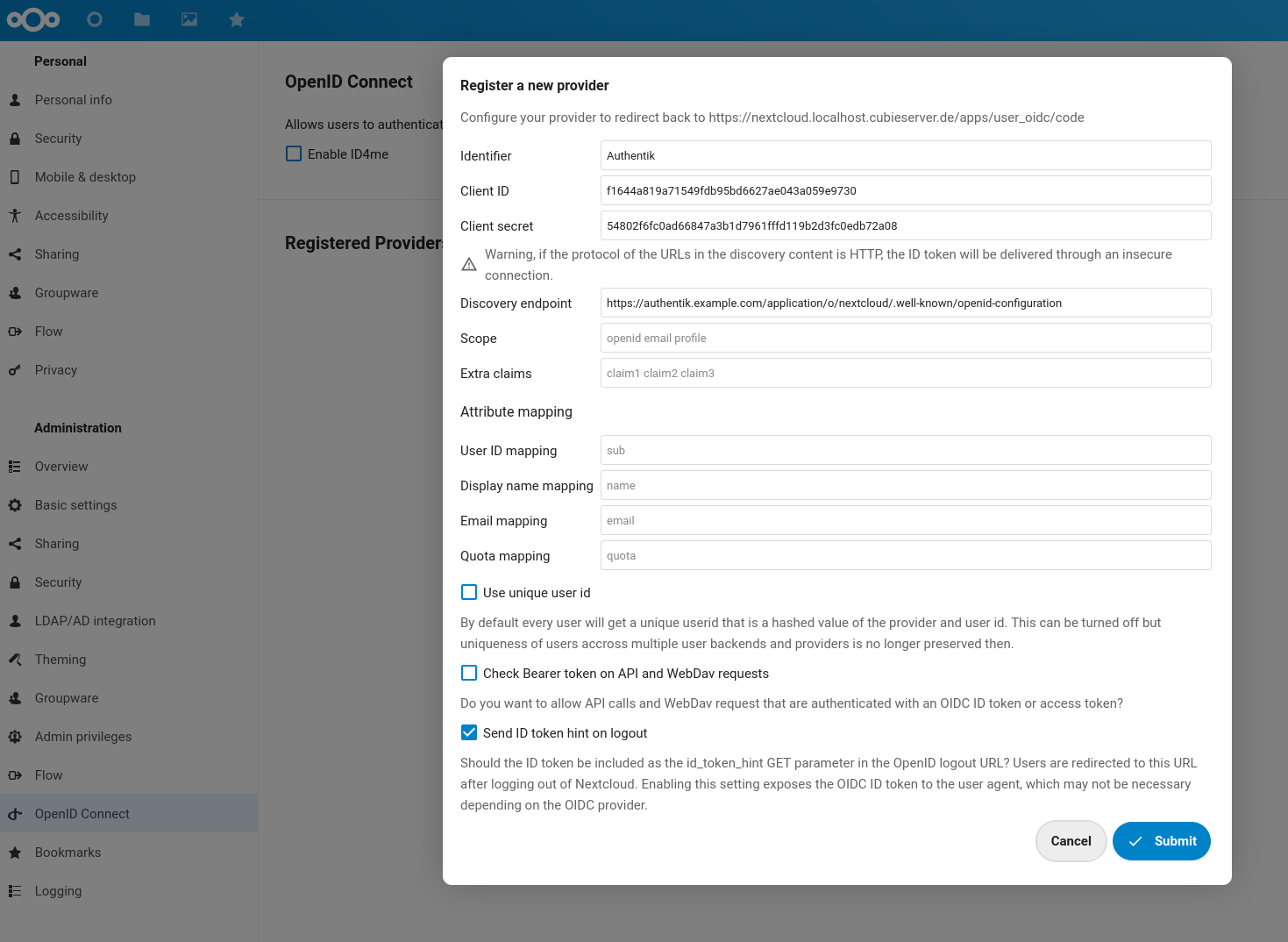
Another (slightly) negative aspect about `user_oidc` is the confusing configuration: as the following sections will show, some settings are configured via the Web UI, some via the `occ` CLI, others via Nextcloud’s `config.php`. In the end it works, but this aspect is handled much more consistently in the other plugins mentioned before.

In the next sections, we’ll first look at the configuration required on the Authentik side and then on the Nextcloud side.

### [\# ](https://blog.cubieserver.de/2022/complete-guide-to-nextcloud-oidc-authentication-with-authentik/#authentik) Authentik

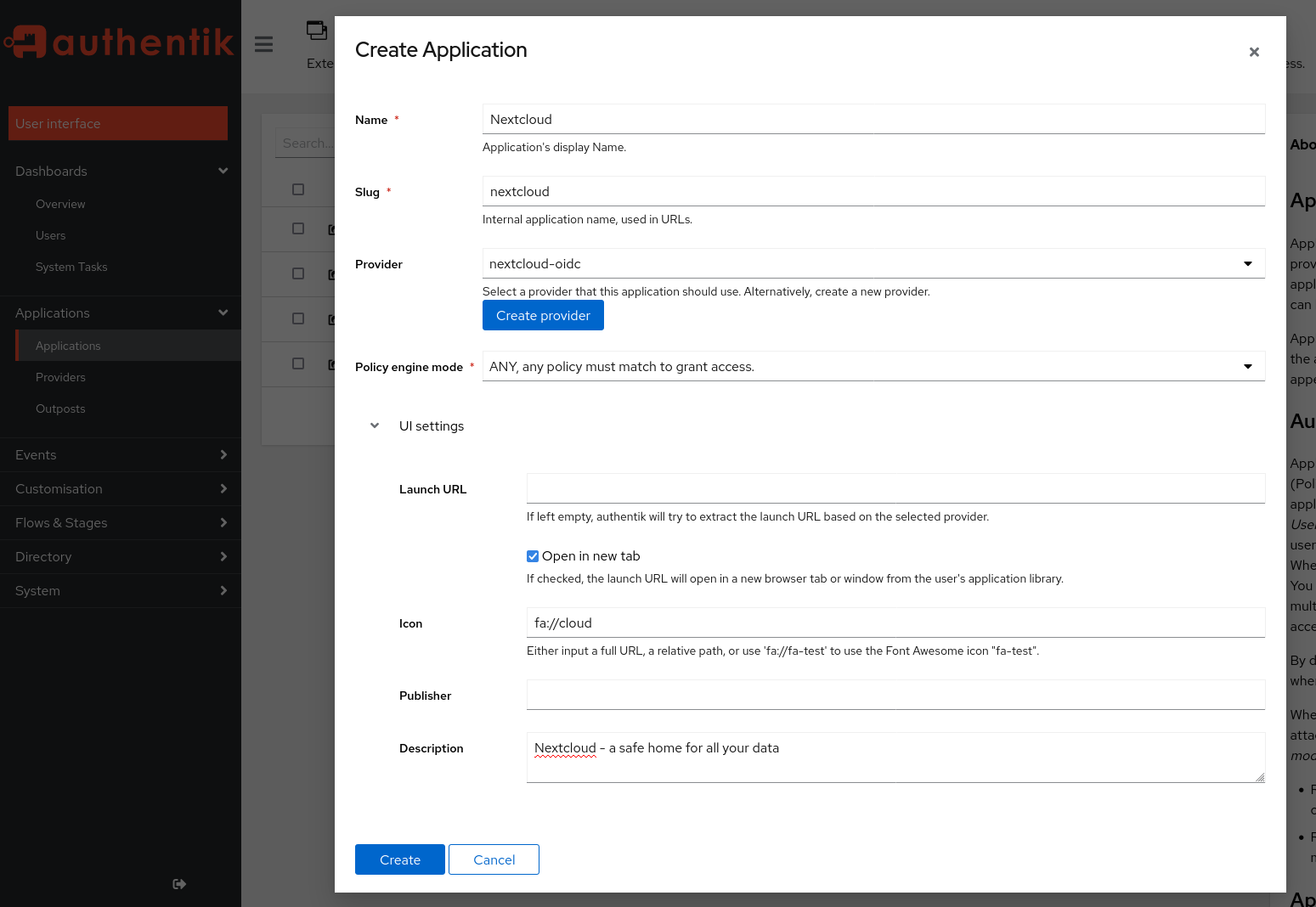
Since OIDC describes a trust relationship between the *identity provider* (Authentik) and the *relying party* (Nextcloud), we need to let Authentik know about the new application it should handle authentication for. To do this, log into your Authentik instance as an administrator and switch to the “Admin interface” (the button in the top-right corner). Go to the `Applications` menu and click on `Create`:

<figure><figcaption>Authentik ‘Application’ Creation Menu

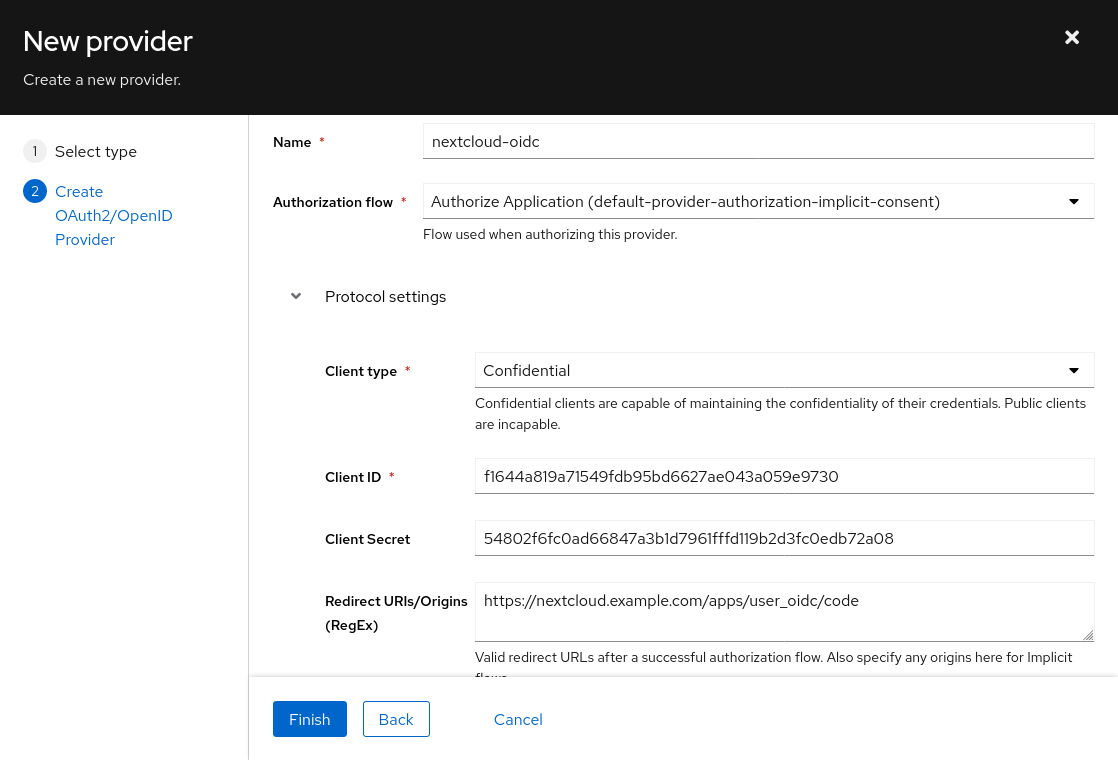
</figcaption>[![Authentik &lsquo;Application&rsquo; Creation Menu](https://blog.cubieserver.de/2022/complete-guide-to-nextcloud-oidc-authentication-with-authentik/authentik-create-application.png)](https://blog.cubieserver.de/2022/complete-guide-to-nextcloud-oidc-authentication-with-authentik/authentik-create-application.png)</figure>Click on the `Create Provider` button and fill the menu (shown below) with following settings:

- *Type*: Oauth2/OIDC Provider
- *Authorization flow*: implicit consent (otherwise your users need to confirm each login explicitly!)
- *Client type*: Confidential
- *Client ID*: (leave auto-generated value as-is) 
    - =&gt; copy this value for later use
- *Client Secret*: **\[IMPORTANT\]** trim the auto-generated value to 64 characters - there is currently [a bug in user\_oidc that prevents longer client secrets](https://github.com/nextcloud/user_oidc/issues/405). A client secret of 64 chars is still sufficient from a security perspective. 
    - =&gt; copy this value for later use
- *Redirect URIs*: `https://<NEXTCLOUD-HOSTNAME>/apps/user_oidc/code`
- *Advanced protocol settings* &gt; *Subject mode*: based on the username 
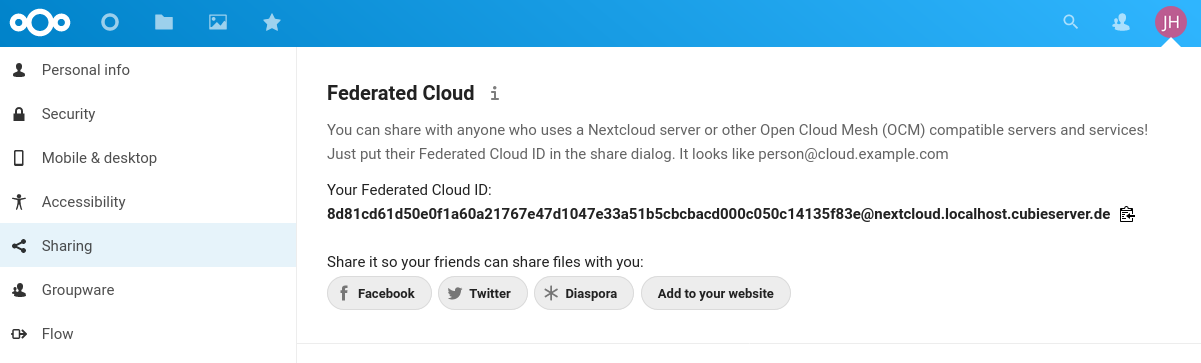
    - this setting should be used to ensure Nextcloud’s federated cloud ID will have a human-readable value, like `username@nextcloud-hostname.com`.
- Click on *Finish*

<figure><figcaption>Authentik ‘Provider’ Creation Menu

</figcaption>[![Authentik &lsquo;Provider&rsquo; Creation Menu](https://blog.cubieserver.de/2022/complete-guide-to-nextcloud-oidc-authentication-with-authentik/authentik-create-provider.png)](https://blog.cubieserver.de/2022/complete-guide-to-nextcloud-oidc-authentication-with-authentik/authentik-create-provider.png)</figure>Back in the **application creation menu**, click on `Create`.

Now switch to the “Providers” section, click on the newly created provider and copy the `OpenID Configuration URL` - it should look like `https://<AUTHENTIK-HOSTNAME>/application/o/nextcloud/.well-known/openid-configuration`.

### [\# ](https://blog.cubieserver.de/2022/complete-guide-to-nextcloud-oidc-authentication-with-authentik/#nextcloud) Nextcloud

Now we can switch to the Nextcloud instance. To get started, simply log in to your Nextcloud instance as an administrator, navigate to the “Apps” section and search for `OpenID Connect user backend`, then click on `Download and enable`. I’m using Nextcloud version 24 and `user_oidc` 1.2.1 at the time of writing.

Open the Admin Settings of Nextcloud (top-right behind the profile picture) and locate the `OpenID Connect` section (bottom-left corner). Click on the small `+` button next to “Registered Providers” and fill the following fields with the data obtained on the Authentik admin interface:

- *Identifier*: `Authentik` (you may choose any value here, but it will be shown to your users in the form of a `Login with <IDENTIFIER>` button)
- *Client ID*: (value copied from Authentik)
- *Client Secret*: (value copied from Authentik)
- *Discovery endpoint*: (OpenID Configuration URL copied from Authentik, should end with `.well-known/openid-configuration`)
- *Attribute mappings*: unless you have a non-standard identity provider setup (with custom fields / attributes), the placeholder values should work and can be left as-is.
- Uncheck `Use unique user ID` - when this option is enabled, Nextcloud will use the hash (checksum) of the provider identifier + user identifier as the internal user ID. Unfortunately, this creates rather ugly and long [federated cloud IDs](https://docs.nextcloud.com/server/latest/admin_manual/configuration_files/federated_cloud_sharing_configuration.html). Unless you are using multiple OIDC providers or multiple Nextcloud user backends, I believe it’s safe to disable (untick) this option, since there can be no name collision within a single OIDC provider.
- Click on *Submit*

<figure><figcaption>Nextcloud OIDC provider configuration

</figcaption>[![Nextcloud OIDC provider configuration](https://blog.cubieserver.de/2022/complete-guide-to-nextcloud-oidc-authentication-with-authentik/nextcloud-register-oidc-provider.png)](https://blog.cubieserver.de/2022/complete-guide-to-nextcloud-oidc-authentication-with-authentik/nextcloud-register-oidc-provider.png)</figure>Note that the same setup as described above can be achieved on the CLI with the following commands. This may be useful in case you want to automate the setup and avoid going through the manual steps in the web interface.

<div class="highlight"><div><table><tbody><tr><td>```
 1
 2
 3
 4
 5
 6
 7
 8
 9
10
11
12

```

</td><td>```sh
# assuming that your are in the root nextcloud folder and running this as the `www-data` user
php ./occ app:install user_oidc
php ./occ user_oidc:provider "Authentik" \
    --clientid="<CLIENT-ID>" \
    --clientsecret="<CLIENT-SECRET>" \
    --discoveryuri="<AUTHENTIK-OPENID-CONFIGURATION-URL>" \
    --unique-uid=0

# for help, refer to:
php ./occ user_oidc:provider -h
php ./occ user_oidc:provider:delete -h
php ./occ app -h
```

</td></tr></tbody></table>

</div></div><figure><figcaption>A long federated cloud ID caused by the ‘Use unique user ID’ setting

</figcaption>[![A long federated cloud ID caused by the &lsquo;Use unique user ID&rsquo; setting](https://blog.cubieserver.de/2022/complete-guide-to-nextcloud-oidc-authentication-with-authentik/nextcloud-hashed-federated-id.png)](https://blog.cubieserver.de/2022/complete-guide-to-nextcloud-oidc-authentication-with-authentik/nextcloud-hashed-federated-id.png)</figure>### [\# ](https://blog.cubieserver.de/2022/complete-guide-to-nextcloud-oidc-authentication-with-authentik/#first-try) First try

Since all the configuration settings are in place now, it’s time for a first test. Open a new browser session / private window and navigate to your Nextcloud instance.

<video controls="controls" height="150" src="https://blog.cubieserver.de/2022/complete-guide-to-nextcloud-oidc-authentication-with-authentik/login-flow.webm" width="100%"></video>

The short video shows that I am not able to use my credentials to log in as a regular (local) user to Nextcloud (in the same way as I could previously with the LDAP backend). That is actually desirable, because this way the authentication provider (in this case: Authentik) can take care of the entire authentication flow, including any possible password, 2-FA or MFA prompts. In addition, if the user is already logged in, there is no need to re-enter the credentials - hence this is proper *Single Sign-On* (not just *Single-password*).

When clicking on the `Login with Authentik` button, I get redirected to Authentik, where I can log in. Finally, Authentik redirects me to Nextcloud (including an authentication token in the URL) and I get automatically logged in to Nextcloud. If the `Redirect URIs` setting was not configured properly, an error will occur during this last step.

### [\# ](https://blog.cubieserver.de/2022/complete-guide-to-nextcloud-oidc-authentication-with-authentik/#auto-login--redirect) Auto-login / redirect

At this point the setup is working – *yay!* – but still a bit confusing for users. How are the users supposed to know that they need to click on `Login with X` instead of using the built-in username and password fields (especially because these seem much more inviting)?

There are two ways this can be addressed:

- 1: disabling the built-in login form by setting `'hide_login_form' => false` in the `config.php` (see [Nextcloud documentation](https://docs.nextcloud.com/server/stable/admin_manual/configuration_server/config_sample_php_parameters.html#default-parameters)). This will show a slightly ugly warning message on the login page, but at least it’s clear for users that they need to click on the `Login with X` button. The login form is just *hidden*, because it can still be accessed at `https://<NEXTCLOUD-HOSTNAME>/login?direct=1` - this is required when you want to access Nextcloud with your local admin account.

<figure><figcaption>Nextcloud with disabled login form

</figcaption>[![Nextcloud with disabled login form](https://blog.cubieserver.de/2022/complete-guide-to-nextcloud-oidc-authentication-with-authentik/nextcloud-disable-login-form.png)](https://blog.cubieserver.de/2022/complete-guide-to-nextcloud-oidc-authentication-with-authentik/nextcloud-disable-login-form.png)</figure>- 2: Making OIDC the default login method. This only works if you have *just a single* OIDC provider configured and no other login methods in Nextcloud (no SAML, external users etc.). With this option, any unauthenticated request to the Nextcloud instance immediately gets redirect to the authentication provider (with an HTTP Status Code `302 Found` and an appropriate `Location` header). Like in the previous case, admins can still use the regular login by appending `?direct=1` to the login URL. At the time of writing, this setting can only be enabled from the command line:

<div class="highlight"><div><table><tbody><tr><td>```
1

```

</td><td>```sh
php ./occ config:app:set user_oidc allow_multiple_user_backends --value=1
```

</td></tr></tbody></table>

</div></div>For now, I’m sticking with the `hide_login_form` method, even though it requires an additional click from the user, because it’s less “automagic”. I might switch to the automatic redirect in the future once I’m more comfortable with the setup.

### [\# ](https://blog.cubieserver.de/2022/complete-guide-to-nextcloud-oidc-authentication-with-authentik/#advanced-logout) Advanced logout

The `user_oidc` plugin provides two options for customizing how the logout is handled.

The first one is *single logout*: if this option is enabled (which it is by default), the user is also logged out of the entire SSO session (instead of *just* Nextcloud). However, Authentik will still ask the user if they want to log out of their SSO session, therefore we can [leave this setting as-is](https://github.com/nextcloud/user_oidc#single-logout).

<figure><figcaption>Single logout is enabled, but Authentik still asks if the user want to end all SSO sessions

</figcaption>[![Single logout is enabled, but Authentik still asks if the user want to end all SSO sessions](https://blog.cubieserver.de/2022/complete-guide-to-nextcloud-oidc-authentication-with-authentik/single-signout.png)](https://blog.cubieserver.de/2022/complete-guide-to-nextcloud-oidc-authentication-with-authentik/single-signout.png)</figure>The second one is *backchannel logout*: if a user signs out of their SSO session at the identity provider level (instead of just a single application), the identity provider can notify all other applications that the user should be logged out now (so they can invalidate their sessions, too). Unfortunately, this feature is [currently not supported in Authentik](https://github.com/goauthentik/authentik/issues/2023) (as far as I can tell), but you can use it if you have a different identity provider (e.g. Keycloak). Note that this feature requires that the identity provider can make a direct POST request to the applications (e.g. Nextcloud instance), which may not always be the case depending on your firewall settings or network topology.

Learn more about [OIDC Single Logout](https://curity.io/resources/learn/openid-connect-logout/).

### [\# ](https://blog.cubieserver.de/2022/complete-guide-to-nextcloud-oidc-authentication-with-authentik/#conclusion) Conclusion

While this blog post turned out much longer than I initially expected, I would still say that overall this setup was much simpler than the [Nextcloud SAML integration I wrote about previously](https://blog.cubieserver.de/2022/complete-guide-to-nextcloud-saml-authentication-with-authentik/). Even though the documentation of the “official” OIDC app (official as-in provided by the core maintainers) is quite sparse, with a bit of experience in the OpenID Connect realm it is pretty straightforward. (The lack of official documentation is also the reason I made sure to describe all the details in this post.)

I’m relatively confident that this setup will be stable over the next couple of years and will put me in a good position to roll out 2FA in [my homelab](https://blog.cubieserver.de/tags/homelab/).

</section><footer id="bkmrk-author%3A-%C2%A0%C2%A0jack-hensc"><section class="author-info"><div class="author-container"><div class="avatar author-avatar">![Author Avatar](https://blog.cubieserver.de/images/wheel.jpg)</div><div class="name">Author: [<span class="author-name text-primary">Jack Henschel</span>](https://blog.cubieserver.de/)</div><div class="contact">[ Contact me](mailto:jack.henschel@mailbox.org)</div><div class="bio">Cloud computing engineer, IT security specialist, avid cyclist.</div></div></section><section class="related-content-box" id="bkmrk-more-posts-like-this"><div>More posts like this: <div><span class="post-tag small">[\#nextcloud](https://blog.cubieserver.de/tags/nextcloud/)</span> <span class="post-tag small">[\#authentik](https://blog.cubieserver.de/tags/authentik/)</span> <span class="post-tag small">[\#authz](https://blog.cubieserver.de/tags/authz/)</span> <span class="post-tag small">[\#oidc](https://blog.cubieserver.de/tags/oidc/)</span></div><div></div></div><article>[Complete guide to Nextcloud SAML authentication with Authentik](https://blog.cubieserver.de/2022/complete-guide-to-nextcloud-saml-authentication-with-authentik/)<time datetime="2022-02-04T00:00:00Z">2022-02-04</time>

</article><article>[Migrating users from LDAP to Authentik](https://blog.cubieserver.de/2022/migrating-users-from-ldap-to-authentik/)<time datetime="2022-02-02T00:00:00Z">2022-02-02</time>

</article><article>[Remove Nextcloud Share from Database](https://blog.cubieserver.de/2018/remove-nextcloud-share-from-database/)<time datetime="2018-03-11T18:57:00+01:00">2018-03-11</time>

</article></section></footer>

# Migrating users from LDAP to Authentik

Link: [https://blog.cubieserver.de/2022/migrating-users-from-ldap-to-authentik/](https://blog.cubieserver.de/2022/migrating-users-from-ldap-to-authentik/)

<header id="bkmrk-posted-on%C2%A0feb-2%2C-202"><div class="post-meta clearfix"><div class="post-date pull-left">Posted on <time datetime="2022-02-02T00:00:00Z">Feb 2, 2022</time></div><div class="pull-right"><span class="post-tag small">[\#ldap](https://blog.cubieserver.de/tags/ldap/)</span> <span class="post-tag small">[\#authentik](https://blog.cubieserver.de/tags/authentik/)</span> <span class="post-tag small">[\#authz](https://blog.cubieserver.de/tags/authz/)</span></div></div></header><section id="bkmrk-for-several-years-%28t">For several years (*the earliest timestamp I could find is from 2016*), I have been using [OpenLDAP](https://www.openldap.org/) (a.k.a [slapd](https://www.openldap.org/software/man.cgi?query=slapd)) as the source of truth for user accounts in my homelab. The initial setup was tricky – especially figuring out the “memberOf” overlay to get group memberships – but once I had it nailed down and [put it into Puppet manifests](https://git.cubieserver.de/Cubieserver/puppet-control/src/branch/master/site/profile/manifests/openldap.pp), it was rock solid. The setup is still rock solid, but definitely starts showing its age: friendly user-interfaces for self-service are rare (I’ve been using [LTB’s *Self Service Password*](https://github.com/ltb-project/self-service-password), but it only allows users to change their password, not email address etc.), and modern features like multi-factor authentication need to be re-implemented by each application, instead of being centrally managed by the authentication source.

Thus, in 2022 it was time to look for something new. There are lots of choices available in this space, but [Authentik](https://goauthentik.io/) in particular struck me as simple to set up and use. For this reason it seems that in recent months Authentik has become a bit of a “secret tip” in self-hosting circles.

Despite the small number of users of my homelab, I was reluctant to start from scratch with my authentication source. I was looking for a way to automatically import the user accounts from OpenLDAP into Authentik – and it turns out that Authentik makes this super easy, if you know what to look for. The following guide shows how to set up and use an *LDAP Source* in Authentik, and that it can simply be removed again without deleting the user accounts, thereby acting as an import functionality.

## [\# ](https://blog.cubieserver.de/2022/migrating-users-from-ldap-to-authentik/#setup) Setup

My (old) setup consists of an OpenLDAP server (`slapd 2.4.47` on Debian 10 Buster) with TLS encryption (i.e. `ldaps` instead of StartTLS).

Authentik is version `2021.12.5` and installed with their official Helm chart `5.2.1`:

<div class="highlight"><div><table><tbody><tr><td>```
 1
 2
 3
 4
 5
 6
 7
 8
 9
10
11
12
13
14
15
16
17
18
19
20
21

```

</td><td>```yaml
authentik:
  secret_key: "ThisIsNotASecretKey"
  error_reporting:
    enabled: false
  postgresql:
    password: "ThisIsNotASecurePassword"

ingress:
  enabled: true
  hosts:
    - host: auth.example.com
      paths:
        - path: "/"
          pathType: Prefix


postgresql:
  enabled: true
  postgresqlPassword: "ThisIsNotASecurePassword"
redis:
  enabled: true

```

</td></tr></tbody></table>

</div></div>After adding the Helm repository , run `helm install authentik authentik/authentik` and then open `https://auth.example.com/if/flow/initial-setup/` to set a password for the admin user.

## [\# ](https://blog.cubieserver.de/2022/migrating-users-from-ldap-to-authentik/#syncing-with-openldap) Syncing with OpenLDAP

After logging in as the admin user, you should be greeted with the following dashboard. Navigate to the “Directory” section in the left sidebar and choose “Federation &amp; Social Login”. Then, click the blue “Create” button and select “LDAP Source”.

<figure><figcaption>Authentik Dashboard Overview

</figcaption>[![Authentik Dashboard Overview](https://blog.cubieserver.de/2022/migrating-users-from-ldap-to-authentik/authentik-default-dashboard.png)](https://blog.cubieserver.de/2022/migrating-users-from-ldap-to-authentik/authentik-default-dashboard.png)</figure>Give your LDAP Source a human-friendly *name* and a unique identifier (*slug*). Then, scroll down to the *Connection settings* section.

Here is the full configuration I used. Below you will find detailed explanations for each field.

<figure><figcaption>Authentik LDAP Source configuration

</figcaption>[![Authentik LDAP Source configuration](https://blog.cubieserver.de/2022/migrating-users-from-ldap-to-authentik/ldap-source.png)](https://blog.cubieserver.de/2022/migrating-users-from-ldap-to-authentik/ldap-source.png)</figure>For the *Server URI* you can either use `ldap://1.2.3.4` or `ldap://example.com` if your server is un-encrypted *OR* uses StartTLS (in this case tick the checkbox below), or `ldaps://example.com` if your [server uses regular TLS encryption](https://blog.cubieserver.de/2019/openldap-implementation-specific-error-80-when-adding-tls-certificate/). Optionally, you can specify a port if your server uses a non-default port (add `:386` for regular connections or `:686` for TLS-encrypted connections at the end).

If your server uses the encrypted LDAP protocol and does not use a publicly trusted (*self-signed*) TLS certificate, then you first need to import this certificate into Authentik and then select it in *TLS Verification Certificate*. Otherwise, you can leave this field empty.

Enter the *CN* and *Password* of a user account that can [bind to the LDAP server](https://ldap.com/the-ldap-bind-operation/).

Enter the *Base DN* for your LDAP directory – this can be used to only import part of your user tree.

Next, we configure the *LDAP Attribute Mapping* section. To do this correctly, you should first take a look at your LDAP schema to figure out which attributes are present for your users and groups.

If your are running OpenLDAP (like me), one excellent way to do this is simply dumping the entire LDAP database with [slapcat](https://manpages.debian.org/buster/slapd/slapd.8.en.html):

```
slapcat -b "$BASE_DN"

...
dn: cn=Git,ou=Groups,dc=cubieserver,dc=de
cn: Git
objectClass: groupOfNames
objectClass: top
owner: cn=admin,dc=cubieserver,dc=de
structuralObjectClass: groupOfNames
entryUUID: 55e6b8f6-7370-1035-8c1d-b5b0eb6b5c72
creatorsName: cn=admin,dc=cubieserver,dc=de
createTimestamp: 20160229203955Z
member: cn=Mr Cubie,ou=People,dc=cubieserver,dc=de
modifiersName: cn=admin,dc=cubieserver,dc=de
modifyTimestamp: 20170506200330Z

...
dn: cn=Mr Cubie,ou=People,dc=cubieserver,dc=de
objectClass: posixAccount
objectClass: inetOrgPerson
objectClass: organizationalPerson
objectClass: person
uid: cubie
cn: Mr Cubie
structuralObjectClass: inetOrgPerson
entryUUID: f05f8080-7752-1035-8092-8fc71d8bef3a
creatorsName: cn=admin,dc=cubieserver,dc=de
createTimestamp: 20160305191934Z
mail: cubie@example.com
memberOf: cn=Git,ou=Groups,dc=cubieserver,dc=de
userPassword:: XXXXXXXXXXXXXXXXXXXXXXXXXXXFpHSmg=
modifiersName: cn=admin,dc=cubieserver,dc=de
modifyTimestamp: 20190723062033Z

```

In the example above I have included one user and one group of my schema. Among all the noise, there are a couple of important fields to note here:

- users have `cn`, `uid` and `mail` attributes ⟶ select these fields in *User Property Mappings*.
- groups have just the `cn` attribute ⟶ select this field in *Group Property Mappings*.
- groups have `objectClass: groupOfNames` ⟶ use *Group object filter* `(objectClass=groupOfNames)`.
- users have `objectClass: posixAccount` ⟶ use *User object filter* `(objectClass=posixAccount)`.
- group membership is indicated by the `member` attribute ⟶ use *Group membership field* `member`.
- users are uniquely identified by the `uid` attribute, but groups don’t have that. However, both have the `cn` (*Common Name*) attribute ⟶ use as the *Object uniqueness field*.

Finally, after you filled in all those fields, click the blue *Create* button at the bottom.

Choose the newly created authentication source and click the blue *Run Sync* button. Depending on the size of your LDAP database, this might take a while (in my case it’s pretty insignificant). Authentik will helpfully display the number of synced users, groups and group memberships. If there are any errors, it will also report them here. In that case, you need to go back to edit your LDAP source and fiddle with the attributes and mappings.

<figure><figcaption>Successful LDAP Synchronization

</figcaption>[![Successful LDAP Synchronization](https://blog.cubieserver.de/2022/migrating-users-from-ldap-to-authentik/successful-sync.png)](https://blog.cubieserver.de/2022/migrating-users-from-ldap-to-authentik/successful-sync.png)</figure>After a successful synchronization, you should see the users and groups by clicking on *Users* under *Directory* in the left sidebar. Here you should check that the user attributes have been imported fully and mapped correctly.

<figure><figcaption>Users after import into Authentik

</figcaption>[![Users after import into Authentik](https://blog.cubieserver.de/2022/migrating-users-from-ldap-to-authentik/imported-users.png)](https://blog.cubieserver.de/2022/migrating-users-from-ldap-to-authentik/imported-users.png)</figure>## [\# ](https://blog.cubieserver.de/2022/migrating-users-from-ldap-to-authentik/#removing-the-sync) Removing the Sync

After you verified all users, groups and membership have been imported correctly, you can return to the *Federation &amp; Social Login* and simply remove the LDAP Source created previously.

*Yes, that’s it.* I’m not sure if its a feature or a bug (because the first time I did this I was expecting all the LDAP users to be deleted from the database again, since the process is called *Synchronization* and not *Import* or *Migration*), but I’m really happy about this behavior. Now I can simply turn off my OpenLDAP server after 6 years of service – it has served me well and I hope Authentik will serve me just as long.

</section><footer id="bkmrk-author%3A-%C2%A0%C2%A0jack-hensc"><section class="author-info"><div class="author-container"><div class="avatar author-avatar">![Author Avatar](https://blog.cubieserver.de/images/wheel.jpg)</div><div class="name">Author: [<span class="author-name text-primary">Jack Henschel</span>](https://blog.cubieserver.de/)</div><div class="contact">[ Contact me](mailto:jack.henschel@mailbox.org)</div><div class="bio">Cloud computing engineer, IT security specialist, avid cyclist.</div></div></section></footer>