# Instalação e Configuração Appflowy docker

# Step-by-step Self Hosting Guides - From Zero to Production Appflowy

Link:[https://appflowy.com/docs/Local-Host-Deployment](https://appflowy.com/docs/Local-Host-Deployment)  
[https://appflowy.com/docs/Step-by-step-Self-Hosting-Guide---From-Zero-to-Production](https://appflowy.com/docs/Step-by-step-Self-Hosting-Guide---From-Zero-to-Production)  
EM 23/08/2026

In this guide, we will deploy AppFlowy Cloud entirely on local machine. This deployment will not be accessible outside of the machine, and no collaboration is possible. However, it does allow a self hoster to quickly explore the editing functions offered by AppFlowy.

# Local Host Deployment

[https://youtu.be/V222xugM7oY?si=RIr-rPjkj73Ue0-Q](https://youtu.be/V222xugM7oY?si=RIr-rPjkj73Ue0-Q)

[![image.png](https://capacita.multiautomacoes.com.br/uploads/images/gallery/2026-08/scaled-1680-/ZBhimage.png)](https://capacita.multiautomacoes.com.br/uploads/images/gallery/2026-08/ZBhimage.png)
<div class="block-element flex-col relative flex rounded-[4px] " data-block-type="heading" data-slate-node="element" id="bkmrk-prerequisite" style="scroll-margin-top: 100px; text-align: justify;"><div class="flex w-full flex-col heading level-2" id="bkmrk-prerequisite-1" style="scroll-margin-top: 48px;"><span class="text-element relative flex w-full whitespace-pre-wrap break-word" data-slate-node="element"><span class="relative text-content leading-[1.5em] "><span data-slate-node="text"><span class="" data-slate-leaf="true"><span data-slate-string="true">Prerequisite</span></span></span></span></span></div></div><div class="block-element flex-col relative flex rounded-[4px] " data-block-type="bulleted_list" data-slate-node="element" id="bkmrk-docker-compose-and-g" style="scroll-margin-top: 100px; text-align: justify;"><div class="flex w-full flex-col"><span class="text-element relative flex w-full whitespace-pre-wrap break-word has-start-icon" data-slate-node="element"><span class="text-block-icon relative select-none w-6 h-6 pr-1 text-xl" contenteditable="false" data-playwright-selected="false"><svg fill="none" height="1em" role="img" viewbox="0 0 20 20" width="1em" xmlns="http://www.w3.org/2000/svg"><path d="M10 13a3 3 0 1 0 0-6 3 3 0 0 0 0 6" fill="currentColor"></path></svg></span><span class="relative text-content leading-[1.5em] "><span data-slate-node="text"><span class="" data-slate-leaf="true"><span class="href-link cursor-pointer select-auto py-0.5 underline" style="color: var(--text-action);"><span data-slate-string="true">Docker compose</span></span></span></span><span data-slate-node="text"><span class="" data-slate-leaf="true"><span data-slate-string="true"> and Git are installed on your local machine.</span></span></span></span></span></div></div><div class="block-element flex-col relative flex rounded-[4px] " data-block-type="bulleted_list" data-slate-node="element" id="bkmrk-familiarity-with-com" style="scroll-margin-top: 100px; text-align: justify;"><div class="flex w-full flex-col"><span class="text-element relative flex w-full whitespace-pre-wrap break-word has-start-icon" data-slate-node="element"><span class="text-block-icon relative select-none w-6 h-6 pr-1 text-xl" contenteditable="false" data-playwright-selected="false"><svg fill="none" height="1em" role="img" viewbox="0 0 20 20" width="1em" xmlns="http://www.w3.org/2000/svg"><path d="M10 13a3 3 0 1 0 0-6 3 3 0 0 0 0 6" fill="currentColor"></path></svg></span><span class="relative text-content leading-[1.5em] "><span data-slate-node="text"><span class="" data-slate-leaf="true"><span data-slate-string="true">Familiarity with command line.</span></span></span></span></span></div></div><div class="block-element flex-col relative flex rounded-[4px] " data-block-type="bulleted_list" data-slate-node="element" id="bkmrk-appflowy-desktop-app" style="scroll-margin-top: 100px; text-align: justify;"><div class="flex w-full flex-col"><span class="text-element relative flex w-full whitespace-pre-wrap break-word has-start-icon" data-slate-node="element"><span class="text-block-icon relative select-none w-6 h-6 pr-1 text-xl" contenteditable="false" data-playwright-selected="false"><svg fill="none" height="1em" role="img" viewbox="0 0 20 20" width="1em" xmlns="http://www.w3.org/2000/svg"><path d="M10 13a3 3 0 1 0 0-6 3 3 0 0 0 0 6" fill="currentColor"></path></svg></span><span class="relative text-content leading-[1.5em] "><span data-slate-node="text"><span class="" data-slate-leaf="true"><span data-slate-string="true">AppFlowy desktop application is already installed.</span></span></span></span></span></div></div><div class="block-element flex-col relative flex rounded-[4px] " data-block-type="heading" data-slate-node="element" id="bkmrk-setting-up-the-web-s" style="scroll-margin-top: 100px; text-align: justify;"><div class="flex w-full flex-col heading level-2" id="bkmrk-setting-up-the-web-s-1" style="scroll-margin-top: 48px;"><span class="text-element relative flex w-full whitespace-pre-wrap break-word" data-slate-node="element"><span class="relative text-content leading-[1.5em] "><span data-slate-node="text"><span class="" data-slate-leaf="true"><span data-slate-string="true">Setting up the web services</span></span></span></span></span></div></div><div class="block-element flex-col relative flex rounded-[4px] " data-block-type="bulleted_list" data-slate-node="element" id="bkmrk-clone-the-appflowy-c" style="scroll-margin-top: 100px; text-align: justify;"><div class="flex w-full flex-col"><span class="text-element relative flex w-full whitespace-pre-wrap break-word has-start-icon" data-slate-node="element"><span class="text-block-icon relative select-none w-6 h-6 pr-1 text-xl" contenteditable="false" data-playwright-selected="false"><svg fill="none" height="1em" role="img" viewbox="0 0 20 20" width="1em" xmlns="http://www.w3.org/2000/svg"><path d="M10 13a3 3 0 1 0 0-6 3 3 0 0 0 0 6" fill="currentColor"></path></svg></span><span class="relative text-content leading-[1.5em] "><span data-slate-node="text"><span class="" data-slate-leaf="true"><span data-slate-string="true">Clone the AppFlowy Cloud repository.</span></span></span></span></span></div></div><div class="block-element flex-col relative flex rounded-[4px] " data-block-type="code" data-slate-node="element" id="bkmrk-auto" style="scroll-margin-top: 100px; text-align: justify;"><div class="relative my-0.5 w-full"><div class="absolute flex h-12 w-full select-none items-center px-2" contenteditable="false" style="visibility: hidden;"><button class="MuiButtonBase-root MuiButton-root MuiButton-text MuiButton-textInherit MuiButton-sizeSmall MuiButton-textSizeSmall MuiButton-colorInherit MuiButton-root MuiButton-text MuiButton-textInherit MuiButton-sizeSmall MuiButton-textSizeSmall MuiButton-colorInherit px-4 css-eb363p" tabindex="0" type="button">Auto</button></div><div class="flex w-full flex-col flex w-full">  
</div></div></div>```
git clone https://github.com/AppFlowy-IO/AppFlowy-Cloud.git
```

<div class="block-element flex-col relative flex rounded-[4px] " data-block-type="bulleted_list" data-slate-node="element" id="bkmrk-from-the-root-of-the" style="scroll-margin-top: 100px; text-align: justify;"><div class="flex w-full flex-col"><span class="text-element relative flex w-full whitespace-pre-wrap break-word has-start-icon" data-slate-node="element"><span class="text-block-icon relative select-none w-6 h-6 pr-1 text-xl" contenteditable="false" data-playwright-selected="false"><svg fill="none" height="1em" role="img" viewbox="0 0 20 20" width="1em" xmlns="http://www.w3.org/2000/svg"><path d="M10 13a3 3 0 1 0 0-6 3 3 0 0 0 0 6" fill="currentColor"></path></svg></span><span class="relative text-content leading-[1.5em] "><span data-slate-node="text"><span class="" data-slate-leaf="true"><span data-slate-string="true">From the root of the directory, copy </span></span></span><span data-slate-node="text"><span class="" data-slate-leaf="true"><span class="bg-border-primary font-medium text-[#EB5757]"><span data-slate-string="true">deploy.env</span></span></span></span><span data-slate-node="text"><span class="" data-slate-leaf="true"><span data-slate-string="true"> to </span></span></span><span data-slate-node="text"><span class="" data-slate-leaf="true"><span class="bg-border-primary font-medium text-[#EB5757]"><span data-slate-string="true">.env</span></span></span></span><span data-slate-node="text"><span class="" data-slate-leaf="true"><span data-slate-string="true">.</span></span></span></span></span></div></div><div class="block-element flex-col relative flex rounded-[4px] " data-block-type="code" data-slate-node="element" id="bkmrk-auto-1" style="scroll-margin-top: 100px; text-align: justify;"><div class="relative my-0.5 w-full"><div class="absolute flex h-12 w-full select-none items-center px-2" contenteditable="false" style="visibility: hidden;"><button class="MuiButtonBase-root MuiButton-root MuiButton-text MuiButton-textInherit MuiButton-sizeSmall MuiButton-textSizeSmall MuiButton-colorInherit MuiButton-root MuiButton-text MuiButton-textInherit MuiButton-sizeSmall MuiButton-textSizeSmall MuiButton-colorInherit px-4 css-eb363p" tabindex="0" type="button">Auto</button></div><div class="flex w-full flex-col flex w-full">  
</div></div></div>```
cp deploy.env .env
```

<div class="block-element flex-col relative flex rounded-[4px] " data-block-type="bulleted_list" data-slate-node="element" id="bkmrk-%28optional%29-if-port-8" style="scroll-margin-top: 100px; text-align: justify;"><div class="flex w-full flex-col"><span class="text-element relative flex w-full whitespace-pre-wrap break-word has-start-icon" data-slate-node="element"><span class="text-block-icon relative select-none w-6 h-6 pr-1 text-xl" contenteditable="false" data-playwright-selected="false"><svg fill="none" height="1em" role="img" viewbox="0 0 20 20" width="1em" xmlns="http://www.w3.org/2000/svg"><path d="M10 13a3 3 0 1 0 0-6 3 3 0 0 0 0 6" fill="currentColor"></path></svg></span><span class="relative text-content leading-[1.5em] "><span data-slate-node="text"><span class="" data-slate-leaf="true"><span data-slate-string="true">(Optional) If port 80 or 443 are already occupied by another service, such as Nginx, then modify the port binding via the following env variables.</span></span></span></span></span></div></div><div class="block-element flex-col relative flex rounded-[4px] " data-block-type="code" data-slate-node="element" id="bkmrk-bash" style="scroll-margin-top: 100px; text-align: justify;"><div class="relative my-0.5 w-full"><div class="absolute flex h-12 w-full select-none items-center px-2" contenteditable="false" style="visibility: hidden;"><button class="MuiButtonBase-root MuiButton-root MuiButton-text MuiButton-textInherit MuiButton-sizeSmall MuiButton-textSizeSmall MuiButton-colorInherit MuiButton-root MuiButton-text MuiButton-textInherit MuiButton-sizeSmall MuiButton-textSizeSmall MuiButton-colorInherit px-4 css-eb363p" tabindex="0" type="button">Bash</button></div><div class="flex w-full flex-col flex w-full">  
</div></div></div>```
NGINX_PORT=80
NGINX_TLS_PORT=443
```

<div class="block-element flex-col relative flex rounded-[4px] " data-block-type="bulleted_list" data-slate-node="element" id="bkmrk-run-the-services-via" style="scroll-margin-top: 100px; text-align: justify;"><div class="flex w-full flex-col"><span class="text-element relative flex w-full whitespace-pre-wrap break-word has-start-icon" data-slate-node="element"><span class="text-block-icon relative select-none w-6 h-6 pr-1 text-xl" contenteditable="false" data-playwright-selected="false"><svg fill="none" height="1em" role="img" viewbox="0 0 20 20" width="1em" xmlns="http://www.w3.org/2000/svg"><path d="M10 13a3 3 0 1 0 0-6 3 3 0 0 0 0 6" fill="currentColor"></path></svg></span><span class="relative text-content leading-[1.5em] "><span data-slate-node="text"><span class="" data-slate-leaf="true"><span data-slate-string="true">Run the services via docker compose, in the background.</span></span></span></span></span></div></div><div class="block-element flex-col relative flex rounded-[4px] " data-block-type="code" data-slate-node="element" id="bkmrk-auto-2" style="scroll-margin-top: 100px; text-align: justify;"><div class="relative my-0.5 w-full"><div class="absolute flex h-12 w-full select-none items-center px-2" contenteditable="false" style="visibility: hidden;"><button class="MuiButtonBase-root MuiButton-root MuiButton-text MuiButton-textInherit MuiButton-sizeSmall MuiButton-textSizeSmall MuiButton-colorInherit MuiButton-root MuiButton-text MuiButton-textInherit MuiButton-sizeSmall MuiButton-textSizeSmall MuiButton-colorInherit px-4 css-eb363p" tabindex="0" type="button">Auto</button></div><div class="flex w-full flex-col flex w-full">  
</div></div></div>```
docker compose up -d
```

<div class="block-element flex-col relative flex rounded-[4px] " data-block-type="bulleted_list" data-slate-node="element" id="bkmrk-check-if-all-service" style="scroll-margin-top: 100px; text-align: justify;"><div class="flex w-full flex-col"><span class="text-element relative flex w-full whitespace-pre-wrap break-word has-start-icon" data-slate-node="element"><span class="text-block-icon relative select-none w-6 h-6 pr-1 text-xl" contenteditable="false" data-playwright-selected="false"><svg fill="none" height="1em" role="img" viewbox="0 0 20 20" width="1em" xmlns="http://www.w3.org/2000/svg"><path d="M10 13a3 3 0 1 0 0-6 3 3 0 0 0 0 6" fill="currentColor"></path></svg></span><span class="relative text-content leading-[1.5em] "><span data-slate-node="text"><span class="" data-slate-leaf="true"><span data-slate-string="true">Check if all services are running and healthy.</span></span></span></span></span></div></div><div class="block-element flex-col relative flex rounded-[4px] " data-block-type="code" data-slate-node="element" id="bkmrk-c" style="scroll-margin-top: 100px; text-align: justify;"><div class="relative my-0.5 w-full"><div class="absolute flex h-12 w-full select-none items-center px-2" contenteditable="false" style="visibility: hidden;"><button class="MuiButtonBase-root MuiButton-root MuiButton-text MuiButton-textInherit MuiButton-sizeSmall MuiButton-textSizeSmall MuiButton-colorInherit MuiButton-root MuiButton-text MuiButton-textInherit MuiButton-sizeSmall MuiButton-textSizeSmall MuiButton-colorInherit px-4 css-eb363p" tabindex="0" type="button">C</button></div><div class="flex w-full flex-col flex w-full">  
</div></div></div>```
docker compose ps
```

<div class="block-element flex-col relative flex rounded-[4px] " data-block-type="bulleted_list" data-slate-fragment="JTVCJTdCJTIyYmxvY2tJZCUyMiUzQSUyMmxDOEhxUSUyMiUyQyUyMmNoaWxkcmVuJTIyJTNBJTVCJTdCJTIyY2hpbGRyZW4lMjIlM0ElNUIlN0IlMjJ0ZXh0JTIyJTNBJTIyUHJlcmVxdWlzaXRlJTIyJTdEJTVEJTJDJTIydGV4dElkJTIyJTNBJTIyckFOVEt3JTIyJTJDJTIydHlwZSUyMiUzQSUyMnRleHQlMjIlN0QlNUQlMkMlMjJkYXRhJTIyJTNBJTdCJTIybGV2ZWwlMjIlM0EyJTdEJTJDJTIycmVsYXRpb25JZCUyMiUzQSUyMkVPUGpnNiUyMiUyQyUyMnR5cGUlMjIlM0ElMjJoZWFkaW5nJTIyJTdEJTJDJTdCJTIyYmxvY2tJZCUyMiUzQSUyMkRNMFJxZyUyMiUyQyUyMmNoaWxkcmVuJTIyJTNBJTVCJTdCJTIyY2hpbGRyZW4lMjIlM0ElNUIlN0IlMjJocmVmJTIyJTNBJTIyaHR0cHMlM0ElMkYlMkZkb2NzLmRvY2tlci5jb20lMkZjb21wb3NlJTJGJTIyJTJDJTIydGV4dCUyMiUzQSUyMkRvY2tlciUyMGNvbXBvc2UlMjIlN0QlMkMlN0IlMjJ0ZXh0JTIyJTNBJTIyJTIwYW5kJTIwR2l0JTIwYXJlJTIwaW5zdGFsbGVkJTIwb24lMjB5b3VyJTIwbG9jYWwlMjBtYWNoaW5lLiUyMiU3RCU1RCUyQyUyMnRleHRJZCUyMiUzQSUyMi1sMWR0cyUyMiUyQyUyMnR5cGUlMjIlM0ElMjJ0ZXh0JTIyJTdEJTVEJTJDJTIyZGF0YSUyMiUzQSU3QiU3RCUyQyUyMnJlbGF0aW9uSWQlMjIlM0ElMjJvTkNHWi0lMjIlMkMlMjJ0eXBlJTIyJTNBJTIyYnVsbGV0ZWRfbGlzdCUyMiU3RCUyQyU3QiUyMmJsb2NrSWQlMjIlM0ElMjJlYS1RTEYlMjIlMkMlMjJjaGlsZHJlbiUyMiUzQSU1QiU3QiUyMmNoaWxkcmVuJTIyJTNBJTVCJTdCJTIydGV4dCUyMiUzQSUyMkZhbWlsaWFyaXR5JTIwd2l0aCUyMGNvbW1hbmQlMjBsaW5lLiUyMiU3RCU1RCUyQyUyMnRleHRJZCUyMiUzQSUyMkhnSVZjeSUyMiUyQyUyMnR5cGUlMjIlM0ElMjJ0ZXh0JTIyJTdEJTVEJTJDJTIyZGF0YSUyMiUzQSU3QiU3RCUyQyUyMnJlbGF0aW9uSWQlMjIlM0ElMjJ5THhsWnMlMjIlMkMlMjJ0eXBlJTIyJTNBJTIyYnVsbGV0ZWRfbGlzdCUyMiU3RCUyQyU3QiUyMmJsb2NrSWQlMjIlM0ElMjJBUndrS0UlMjIlMkMlMjJjaGlsZHJlbiUyMiUzQSU1QiU3QiUyMmNoaWxkcmVuJTIyJTNBJTVCJTdCJTIydGV4dCUyMiUzQSUyMkFwcEZsb3d5JTIwZGVza3RvcCUyMGFwcGxpY2F0aW9uJTIwaXMlMjBhbHJlYWR5JTIwaW5zdGFsbGVkLiUyMiU3RCU1RCUyQyUyMnRleHRJZCUyMiUzQSUyMnJ1NmZHbCUyMiUyQyUyMnR5cGUlMjIlM0ElMjJ0ZXh0JTIyJTdEJTVEJTJDJTIyZGF0YSUyMiUzQSU3QiU3RCUyQyUyMnJlbGF0aW9uSWQlMjIlM0ElMjJ0M0ZhOVclMjIlMkMlMjJ0eXBlJTIyJTNBJTIyYnVsbGV0ZWRfbGlzdCUyMiU3RCUyQyU3QiUyMmJsb2NrSWQlMjIlM0ElMjJjVkIxMTMlMjIlMkMlMjJjaGlsZHJlbiUyMiUzQSU1QiU3QiUyMmNoaWxkcmVuJTIyJTNBJTVCJTdCJTIydGV4dCUyMiUzQSUyMlNldHRpbmclMjB1cCUyMHRoZSUyMHdlYiUyMHNlcnZpY2VzJTIyJTdEJTVEJTJDJTIydGV4dElkJTIyJTNBJTIyaTNVZF9VJTIyJTJDJTIydHlwZSUyMiUzQSUyMnRleHQlMjIlN0QlNUQlMkMlMjJkYXRhJTIyJTNBJTdCJTIybGV2ZWwlMjIlM0EyJTdEJTJDJTIycmVsYXRpb25JZCUyMiUzQSUyMnRZb2FwWCUyMiUyQyUyMnR5cGUlMjIlM0ElMjJoZWFkaW5nJTIyJTdEJTJDJTdCJTIyYmxvY2tJZCUyMiUzQSUyMlRxcWRONCUyMiUyQyUyMmNoaWxkcmVuJTIyJTNBJTVCJTdCJTIyY2hpbGRyZW4lMjIlM0ElNUIlN0IlMjJ0ZXh0JTIyJTNBJTIyQ2xvbmUlMjB0aGUlMjBBcHBGbG93eSUyMENsb3VkJTIwcmVwb3NpdG9yeS4lMjIlN0QlNUQlMkMlMjJ0ZXh0SWQlMjIlM0ElMjJ2LTRqcTIlMjIlMkMlMjJ0eXBlJTIyJTNBJTIydGV4dCUyMiU3RCU1RCUyQyUyMmRhdGElMjIlM0ElN0IlN0QlMkMlMjJyZWxhdGlvbklkJTIyJTNBJTIyU3U5RTlaJTIyJTJDJTIydHlwZSUyMiUzQSUyMmJ1bGxldGVkX2xpc3QlMjIlN0QlMkMlN0IlMjJibG9ja0lkJTIyJTNBJTIyRURxN1VvJTIyJTJDJTIyY2hpbGRyZW4lMjIlM0ElNUIlN0IlMjJjaGlsZHJlbiUyMiUzQSU1QiU3QiUyMnRleHQlMjIlM0ElMjJnaXQlMjBjbG9uZSUyMGh0dHBzJTNBJTJGJTJGZ2l0aHViLmNvbSUyRkFwcEZsb3d5LUlPJTJGQXBwRmxvd3ktQ2xvdWQuZ2l0JTIyJTdEJTVEJTJDJTIydGV4dElkJTIyJTNBJTIycW1lV283JTIyJTJDJTIydHlwZSUyMiUzQSUyMnRleHQlMjIlN0QlNUQlMkMlMjJkYXRhJTIyJTNBJTdCJTdEJTJDJTIycmVsYXRpb25JZCUyMiUzQSUyMlpnRXlDZiUyMiUyQyUyMnR5cGUlMjIlM0ElMjJjb2RlJTIyJTdEJTJDJTdCJTIyYmxvY2tJZCUyMiUzQSUyMlBRZTkySyUyMiUyQyUyMmNoaWxkcmVuJTIyJTNBJTVCJTdCJTIyY2hpbGRyZW4lMjIlM0ElNUIlN0IlMjJ0ZXh0JTIyJTNBJTIyRnJvbSUyMHRoZSUyMHJvb3QlMjBvZiUyMHRoZSUyMGRpcmVjdG9yeSUyQyUyMGNvcHklMjAlMjIlN0QlMkMlN0IlMjJjb2RlJTIyJTNBdHJ1ZSUyQyUyMnRleHQlMjIlM0ElMjJkZXBsb3kuZW52JTIyJTdEJTJDJTdCJTIydGV4dCUyMiUzQSUyMiUyMHRvJTIwJTIyJTdEJTJDJTdCJTIyY29kZSUyMiUzQXRydWUlMkMlMjJ0ZXh0JTIyJTNBJTIyLmVudiUyMiU3RCUyQyU3QiUyMnRleHQlMjIlM0ElMjIuJTIyJTdEJTVEJTJDJTIydGV4dElkJTIyJTNBJTIyVzNoLUZpJTIyJTJDJTIydHlwZSUyMiUzQSUyMnRleHQlMjIlN0QlNUQlMkMlMjJkYXRhJTIyJTNBJTdCJTdEJTJDJTIycmVsYXRpb25JZCUyMiUzQSUyMmZJNG1SUSUyMiUyQyUyMnR5cGUlMjIlM0ElMjJidWxsZXRlZF9saXN0JTIyJTdEJTJDJTdCJTIyYmxvY2tJZCUyMiUzQSUyMllOS0hOaiUyMiUyQyUyMmNoaWxkcmVuJTIyJTNBJTVCJTdCJTIyY2hpbGRyZW4lMjIlM0ElNUIlN0IlMjJ0ZXh0JTIyJTNBJTIyY3AlMjBkZXBsb3kuZW52JTIwLmVudiUyMiU3RCU1RCUyQyUyMnRleHRJZCUyMiUzQSUyMlNqN1lDaSUyMiUyQyUyMnR5cGUlMjIlM0ElMjJ0ZXh0JTIyJTdEJTVEJTJDJTIyZGF0YSUyMiUzQSU3QiU3RCUyQyUyMnJlbGF0aW9uSWQlMjIlM0ElMjJDUlNsT0clMjIlMkMlMjJ0eXBlJTIyJTNBJTIyY29kZSUyMiU3RCUyQyU3QiUyMmJsb2NrSWQlMjIlM0ElMjJTbGZlZV8lMjIlMkMlMjJjaGlsZHJlbiUyMiUzQSU1QiU3QiUyMmNoaWxkcmVuJTIyJTNBJTVCJTdCJTIydGV4dCUyMiUzQSUyMihPcHRpb25hbCklMjBJZiUyMHBvcnQlMjA4MCUyMG9yJTIwNDQzJTIwYXJlJTIwYWxyZWFkeSUyMG9jY3VwaWVkJTIwYnklMjBhbm90aGVyJTIwc2VydmljZSUyQyUyMHN1Y2glMjBhcyUyME5naW54JTJDJTIwdGhlbiUyMG1vZGlmeSUyMHRoZSUyMHBvcnQlMjBiaW5kaW5nJTIwdmlhJTIwdGhlJTIwZm9sbG93aW5nJTIwZW52JTIwdmFyaWFibGVzLiUyMiU3RCU1RCUyQyUyMnRleHRJZCUyMiUzQSUyMnc3cnFkayUyMiUyQyUyMnR5cGUlMjIlM0ElMjJ0ZXh0JTIyJTdEJTVEJTJDJTIyZGF0YSUyMiUzQSU3QiU3RCUyQyUyMnJlbGF0aW9uSWQlMjIlM0ElMjJYLXY1ZFIlMjIlMkMlMjJ0eXBlJTIyJTNBJTIyYnVsbGV0ZWRfbGlzdCUyMiU3RCUyQyU3QiUyMmJsb2NrSWQlMjIlM0ElMjJvZVFBRjElMjIlMkMlMjJjaGlsZHJlbiUyMiUzQSU1QiU3QiUyMmNoaWxkcmVuJTIyJTNBJTVCJTdCJTIydGV4dCUyMiUzQSUyMk5HSU5YX1BPUlQlM0Q4MCU1Q25OR0lOWF9UTFNfUE9SVCUzRDQ0MyUyMiU3RCU1RCUyQyUyMnRleHRJZCUyMiUzQSUyMnVSM3VoRSUyMiUyQyUyMnR5cGUlMjIlM0ElMjJ0ZXh0JTIyJTdEJTVEJTJDJTIyZGF0YSUyMiUzQSU3QiUyMmxhbmd1YWdlJTIyJTNBJTIyYmFzaCUyMiU3RCUyQyUyMnJlbGF0aW9uSWQlMjIlM0ElMjJ3X1h6SmQlMjIlMkMlMjJ0eXBlJTIyJTNBJTIyY29kZSUyMiU3RCUyQyU3QiUyMmJsb2NrSWQlMjIlM0ElMjJGakppZnMlMjIlMkMlMjJjaGlsZHJlbiUyMiUzQSU1QiU3QiUyMmNoaWxkcmVuJTIyJTNBJTVCJTdCJTIydGV4dCUyMiUzQSUyMlJ1biUyMHRoZSUyMHNlcnZpY2VzJTIwdmlhJTIwZG9ja2VyJTIwY29tcG9zZSUyQyUyMGluJTIwdGhlJTIwYmFja2dyb3VuZC4lMjIlN0QlNUQlMkMlMjJ0ZXh0SWQlMjIlM0ElMjJlZnVWS1AlMjIlMkMlMjJ0eXBlJTIyJTNBJTIydGV4dCUyMiU3RCU1RCUyQyUyMmRhdGElMjIlM0ElN0IlN0QlMkMlMjJyZWxhdGlvbklkJTIyJTNBJTIyb3VlcjNnJTIyJTJDJTIydHlwZSUyMiUzQSUyMmJ1bGxldGVkX2xpc3QlMjIlN0QlMkMlN0IlMjJibG9ja0lkJTIyJTNBJTIyN0czS3FHJTIyJTJDJTIyY2hpbGRyZW4lMjIlM0ElNUIlN0IlMjJjaGlsZHJlbiUyMiUzQSU1QiU3QiUyMnRleHQlMjIlM0ElMjJkb2NrZXIlMjBjb21wb3NlJTIwdXAlMjAtZCUyMiU3RCU1RCUyQyUyMnRleHRJZCUyMiUzQSUyMnViSEFGcCUyMiUyQyUyMnR5cGUlMjIlM0ElMjJ0ZXh0JTIyJTdEJTVEJTJDJTIyZGF0YSUyMiUzQSU3QiU3RCUyQyUyMnJlbGF0aW9uSWQlMjIlM0ElMjJIX0RoYTUlMjIlMkMlMjJ0eXBlJTIyJTNBJTIyY29kZSUyMiU3RCUyQyU3QiUyMmJsb2NrSWQlMjIlM0ElMjJGQmdnNUElMjIlMkMlMjJjaGlsZHJlbiUyMiUzQSU1QiU3QiUyMmNoaWxkcmVuJTIyJTNBJTVCJTdCJTIydGV4dCUyMiUzQSUyMkNoZWNrJTIwaWYlMjBhbGwlMjBzZXJ2aWNlcyUyMGFyZSUyMHJ1bm5pbmclMjBhbmQlMjBoZWFsdGh5LiUyMiU3RCU1RCUyQyUyMnRleHRJZCUyMiUzQSUyMmlVN3NIVCUyMiUyQyUyMnR5cGUlMjIlM0ElMjJ0ZXh0JTIyJTdEJTVEJTJDJTIyZGF0YSUyMiUzQSU3QiU3RCUyQyUyMnJlbGF0aW9uSWQlMjIlM0ElMjJpc3VFZVklMjIlMkMlMjJ0eXBlJTIyJTNBJTIyYnVsbGV0ZWRfbGlzdCUyMiU3RCUyQyU3QiUyMmJsb2NrSWQlMjIlM0ElMjJEMDRIdnIlMjIlMkMlMjJjaGlsZHJlbiUyMiUzQSU1QiU3QiUyMmNoaWxkcmVuJTIyJTNBJTVCJTdCJTIydGV4dCUyMiUzQSUyMmRvY2tlciUyMGNvbXBvc2UlMjBwcyUyMiU3RCU1RCUyQyUyMnRleHRJZCUyMiUzQSUyMndDbWRMRyUyMiUyQyUyMnR5cGUlMjIlM0ElMjJ0ZXh0JTIyJTdEJTVEJTJDJTIyZGF0YSUyMiUzQSU3QiUyMmxhbmd1YWdlJTIyJTNBJTIyQyUyMiU3RCUyQyUyMnJlbGF0aW9uSWQlMjIlM0ElMjJHb0RaSDElMjIlMkMlMjJ0eXBlJTIyJTNBJTIyY29kZSUyMiU3RCUyQyU3QiUyMmJsb2NrSWQlMjIlM0ElMjI0cjBLX2klMjIlMkMlMjJjaGlsZHJlbiUyMiUzQSU1QiU3QiUyMmNoaWxkcmVuJTIyJTNBJTVCJTdCJTIydGV4dCUyMiUzQSUyMkZvciUyMHN1YnNlcXVlbnQlMjBzZWN0aW9ucyUyQyUyMHdlJTIwd2lsbCUyMGFzc3VtZSUyMHRoYXQlMjBwb3J0JTIwODAlMjBpcyUyMHVzZWQlMjBmb3IlMjB0aGUlMjBkZXBsb3ltZW50LiUyMElmJTIweW91JTIwaGF2ZSUyMGNoYW5nZWQlMjB0aGUlMjBwb3J0JTIwaW4lMjBlYXJsaWVyJTIwc3RlcHMlMkMlMjBwbGVhc2UlMjBjaGFuZ2UlMjB0aGUlMjBwb3J0JTIwYWNjb3JkaW5nbHkuJTIyJTdEJTVEJTJDJTIydGV4dElkJTIyJTNBJTIyLVBydkMxJTIyJTJDJTIydHlwZSUyMiUzQSUyMnRleHQlMjIlN0QlNUQlMkMlMjJkYXRhJTIyJTNBJTdCJTdEJTJDJTIycmVsYXRpb25JZCUyMiUzQSUyMmxEZWdycSUyMiUyQyUyMnR5cGUlMjIlM0ElMjJidWxsZXRlZF9saXN0JTIyJTdEJTVE" data-slate-node="element" id="bkmrk-for-subsequent-secti" style="scroll-margin-top: 100px; text-align: justify;"><div class="flex w-full flex-col"><span class="text-element relative flex w-full whitespace-pre-wrap break-word has-start-icon" data-slate-node="element"><span class="relative text-content leading-[1.5em] "><span data-slate-node="text"><span class="" data-slate-leaf="true"><span data-slate-string="true">For subsequent sections, we will assume that port 80 is used for the deployment. If you have changed the port in earlier steps, please change the port accordingly.</span></span></span></span></span></div></div><div class="flex w-full flex-col" id="bkmrk--1" style="text-align: justify;"></div><div class="flex w-full flex-col" id="bkmrk--2" style="text-align: justify;"></div><div class="block-element flex-col relative flex rounded-[4px] " data-block-type="heading" data-slate-node="element" id="bkmrk-setting-up-the-deskt" style="scroll-margin-top: 100px; text-align: justify;"><div class="flex w-full flex-col heading level-2" id="bkmrk-setting-up-the-deskt-1" style="scroll-margin-top: 48px;">**<span class="text-element relative flex w-full whitespace-pre-wrap break-word" data-slate-node="element"><span class="relative text-content leading-[1.5em] "><span data-slate-node="text"><span class="" data-slate-leaf="true"><span data-slate-string="true">Setting up the desktop client  
  
</span></span></span></span></span>**</div></div><div class="block-element flex-col relative flex rounded-[4px] " data-block-type="bulleted_list" data-slate-node="element" id="bkmrk-by-default%2C-the-desk" style="scroll-margin-top: 100px; text-align: justify;"><div class="flex w-full flex-col"><span class="text-element relative flex w-full whitespace-pre-wrap break-word has-start-icon" data-slate-node="element"><span class="text-block-icon relative select-none w-6 h-6 pr-1 text-xl" contenteditable="false" data-playwright-selected="false"><svg fill="none" height="1em" role="img" viewbox="0 0 20 20" width="1em" xmlns="http://www.w3.org/2000/svg"><path d="M10 13a3 3 0 1 0 0-6 3 3 0 0 0 0 6" fill="currentColor"></path></svg></span><span class="relative text-content leading-[1.5em] "><span data-slate-node="text"><span class="" data-slate-leaf="true"><span data-slate-string="true">By default, the desktop application will connect to the official server. You can change the server endpoint via the settings, which can be found at the bottom of the login page.</span></span></span></span></span></div></div><div class="block-element flex-col relative flex rounded-[4px] " data-block-type="bulleted_list" data-slate-fragment="JTVCJTdCJTIyYmxvY2tJZCUyMiUzQSUyMi02YjBpUCUyMiUyQyUyMmNoaWxkcmVuJTIyJTNBJTVCJTdCJTIyY2hpbGRyZW4lMjIlM0ElNUIlN0IlMjJ0ZXh0JTIyJTNBJTIyU2V0dGluZyUyMHVwJTIwdGhlJTIwZGVza3RvcCUyMGNsaWVudCUyMiU3RCU1RCUyQyUyMnRleHRJZCUyMiUzQSUyMm5UVnptbyUyMiUyQyUyMnR5cGUlMjIlM0ElMjJ0ZXh0JTIyJTdEJTVEJTJDJTIyZGF0YSUyMiUzQSU3QiUyMmxldmVsJTIyJTNBMiU3RCUyQyUyMnJlbGF0aW9uSWQlMjIlM0ElMjJCWXlSQUwlMjIlMkMlMjJ0eXBlJTIyJTNBJTIyaGVhZGluZyUyMiU3RCUyQyU3QiUyMmJsb2NrSWQlMjIlM0ElMjJGbm9QV08lMjIlMkMlMjJjaGlsZHJlbiUyMiUzQSU1QiU3QiUyMmNoaWxkcmVuJTIyJTNBJTVCJTdCJTIydGV4dCUyMiUzQSUyMkJ5JTIwZGVmYXVsdCUyQyUyMHRoZSUyMGRlc2t0b3AlMjBhcHBsaWNhdGlvbiUyMHdpbGwlMjBjb25uZWN0JTIwdG8lMjB0aGUlMjBvZmZpY2lhbCUyMHNlcnZlci4lMjBZb3UlMjBjYW4lMjBjaGFuZ2UlMjB0aGUlMjBzZXJ2ZXIlMjBlbmRwb2ludCUyMHZpYSUyMHRoZSUyMHNldHRpbmdzJTJDJTIwd2hpY2glMjBjYW4lMjBiZSUyMGZvdW5kJTIwYXQlMjB0aGUlMjBib3R0b20lMjBvZiUyMHRoZSUyMGxvZ2luJTIwcGFnZS4lMjIlN0QlNUQlMkMlMjJ0ZXh0SWQlMjIlM0ElMjJKSFZTT1olMjIlMkMlMjJ0eXBlJTIyJTNBJTIydGV4dCUyMiU3RCU1RCUyQyUyMmRhdGElMjIlM0ElN0IlN0QlMkMlMjJyZWxhdGlvbklkJTIyJTNBJTIyVHZlUVYwJTIyJTJDJTIydHlwZSUyMiUzQSUyMmJ1bGxldGVkX2xpc3QlMjIlN0QlMkMlN0IlMjJibG9ja0lkJTIyJTNBJTIycmNsUXFxJTIyJTJDJTIyY2hpbGRyZW4lMjIlM0ElNUIlN0IlMjJjaGlsZHJlbiUyMiUzQSU1QiU3QiUyMnRleHQlMjIlM0ElMjJVcGRhdGUlMjB0aGUlMjBiYXNlJTIwVVJMJTIwdG8lMjAlMjIlN0QlMkMlN0IlMjJjb2RlJTIyJTNBdHJ1ZSUyQyUyMnRleHQlMjIlM0ElMjJsb2NhbGhvc3QlM0E4MCUyMiU3RCUyQyU3QiUyMnRleHQlMjIlM0ElMjIuJTIwWW91JTIwbWF5JTIwaWdub3JlJTIwdGhlJTIwd2ViJTIwVVJMJTIwZm9yJTIwdGhlJTIwdGltZSUyMGJlaW5nLiUyMiU3RCU1RCUyQyUyMnRleHRJZCUyMiUzQSUyMmlIT3V3VCUyMiUyQyUyMnR5cGUlMjIlM0ElMjJ0ZXh0JTIyJTdEJTVEJTJDJTIyZGF0YSUyMiUzQSU3QiU3RCUyQyUyMnJlbGF0aW9uSWQlMjIlM0ElMjJEOWpSWHMlMjIlMkMlMjJ0eXBlJTIyJTNBJTIyYnVsbGV0ZWRfbGlzdCUyMiU3RCU1RA==" data-slate-node="element" id="bkmrk-update-the-base-url-" style="scroll-margin-top: 100px; text-align: justify;"><div class="flex w-full flex-col"><span class="text-element relative flex w-full whitespace-pre-wrap break-word has-start-icon" data-slate-node="element"><span class="text-block-icon relative select-none w-6 h-6 pr-1 text-xl" contenteditable="false" data-playwright-selected="false"><svg fill="none" height="1em" role="img" viewbox="0 0 20 20" width="1em" xmlns="http://www.w3.org/2000/svg"><path d="M10 13a3 3 0 1 0 0-6 3 3 0 0 0 0 6" fill="currentColor"></path></svg></span><span class="relative text-content leading-[1.5em] "><span data-slate-node="text"><span class="" data-slate-leaf="true"><span data-slate-string="true">Update the base URL to </span></span></span><span data-slate-node="text"><span class="" data-slate-leaf="true"><span class="bg-border-primary font-medium text-[#EB5757]"><span data-slate-string="true">localhost:80</span></span></span></span><span data-slate-node="text"><span class="" data-slate-leaf="true"><span data-slate-string="true">. You may ignore the web URL for the time being.  
  
</span></span></span></span></span></div></div>[![image.png](https://capacita.multiautomacoes.com.br/uploads/images/gallery/2026-08/scaled-1680-/wZSimage.png)](https://capacita.multiautomacoes.com.br/uploads/images/gallery/2026-08/wZSimage.png)

<div class="block-element flex-col relative flex rounded-[4px] " data-block-type="bulleted_list" data-slate-node="element" id="bkmrk-there-are-multiple-w" style="scroll-margin-top: 100px; text-align: justify;"><div class="flex w-full flex-col"><span class="text-element relative flex w-full whitespace-pre-wrap break-word has-start-icon" data-slate-node="element"><span class="relative text-content leading-[1.5em] "><span data-slate-node="text"><span class="" data-slate-leaf="true"><span data-slate-string="true">There are multiple ways to log in to AppFlowy. We will start with password login, which work out of the box with the default configuration.</span></span></span></span></span></div></div><div class="block-element flex-col relative flex rounded-[4px] " data-block-type="bulleted_list" data-slate-node="element" id="bkmrk-close-the-applicatio" style="scroll-margin-top: 100px; text-align: justify;"><div class="flex w-full flex-col"><span class="text-element relative flex w-full whitespace-pre-wrap break-word has-start-icon" data-slate-node="element"><span class="text-block-icon relative select-none w-6 h-6 pr-1 text-xl" contenteditable="false" data-playwright-selected="false"><svg fill="none" height="1em" role="img" viewbox="0 0 20 20" width="1em" xmlns="http://www.w3.org/2000/svg"><path d="M10 13a3 3 0 1 0 0-6 3 3 0 0 0 0 6" fill="currentColor"></path></svg></span><span class="relative text-content leading-[1.5em] "><span data-slate-node="text"><span class="" data-slate-leaf="true"><span data-slate-string="true">Close the application.</span></span></span></span></span></div><div class="flex w-full flex-col"></div></div><div class="block-element flex-col relative flex rounded-[4px] " data-block-type="heading" data-slate-node="element" id="bkmrk-log-in-via-username-" style="scroll-margin-top: 100px; text-align: justify;"><div class="flex w-full flex-col heading level-2" id="bkmrk-log-in-via-username--1" style="scroll-margin-top: 48px;">**<span class="text-element relative flex w-full whitespace-pre-wrap break-word" data-slate-node="element"><span class="relative text-content leading-[1.5em] "><span data-slate-node="text"><span class="" data-slate-leaf="true"><span data-slate-string="true">Log in via username and password  
  
</span></span></span></span></span>**</div></div><div class="block-element flex-col relative flex rounded-[4px] " data-block-type="bulleted_list" data-slate-node="element" id="bkmrk-currently%2C-appflowy-" style="scroll-margin-top: 100px; text-align: justify;"><div class="flex w-full flex-col"><span class="text-element relative flex w-full whitespace-pre-wrap break-word has-start-icon" data-slate-node="element"><span class="text-block-icon relative select-none w-6 h-6 pr-1 text-xl" contenteditable="false" data-playwright-selected="false"><svg fill="none" height="1em" role="img" viewbox="0 0 20 20" width="1em" xmlns="http://www.w3.org/2000/svg"><path d="M10 13a3 3 0 1 0 0-6 3 3 0 0 0 0 6" fill="currentColor"></path></svg></span><span class="relative text-content leading-[1.5em] "><span data-slate-node="text"><span class="" data-slate-leaf="true"><span data-slate-string="true">Currently, AppFlowy clients do not support password based login directly. However, it is still possible to login via username and password through the admin portal.</span></span></span></span></span></div></div><div class="block-element flex-col relative flex rounded-[4px] " data-block-type="bulleted_list" data-slate-fragment="JTVCJTdCJTIyYmxvY2tJZCUyMiUzQSUyMmJhVHBPOCUyMiUyQyUyMmNoaWxkcmVuJTIyJTNBJTVCJTdCJTIyY2hpbGRyZW4lMjIlM0ElNUIlN0IlMjJ0ZXh0JTIyJTNBJTIyVGhlcmUlMjBhcmUlMjBtdWx0aXBsZSUyMHdheXMlMjB0byUyMGxvZyUyMGluJTIwdG8lMjBBcHBGbG93eS4lMjBXZSUyMHdpbGwlMjBzdGFydCUyMHdpdGglMjBwYXNzd29yZCUyMGxvZ2luJTJDJTIwd2hpY2glMjB3b3JrJTIwb3V0JTIwb2YlMjB0aGUlMjBib3glMjB3aXRoJTIwdGhlJTIwZGVmYXVsdCUyMGNvbmZpZ3VyYXRpb24uJTIyJTdEJTVEJTJDJTIydGV4dElkJTIyJTNBJTIyS1dUUFVzJTIyJTJDJTIydHlwZSUyMiUzQSUyMnRleHQlMjIlN0QlNUQlMkMlMjJkYXRhJTIyJTNBJTdCJTdEJTJDJTIycmVsYXRpb25JZCUyMiUzQSUyMm81RWltZCUyMiUyQyUyMnR5cGUlMjIlM0ElMjJidWxsZXRlZF9saXN0JTIyJTdEJTJDJTdCJTIyYmxvY2tJZCUyMiUzQSUyMmlCWGxrbiUyMiUyQyUyMmNoaWxkcmVuJTIyJTNBJTVCJTdCJTIyY2hpbGRyZW4lMjIlM0ElNUIlN0IlMjJ0ZXh0JTIyJTNBJTIyQ2xvc2UlMjB0aGUlMjBhcHBsaWNhdGlvbi4lMjIlN0QlNUQlMkMlMjJ0ZXh0SWQlMjIlM0ElMjJRSlljczUlMjIlMkMlMjJ0eXBlJTIyJTNBJTIydGV4dCUyMiU3RCU1RCUyQyUyMmRhdGElMjIlM0ElN0IlN0QlMkMlMjJyZWxhdGlvbklkJTIyJTNBJTIydzF5cTJMJTIyJTJDJTIydHlwZSUyMiUzQSUyMmJ1bGxldGVkX2xpc3QlMjIlN0QlMkMlN0IlMjJibG9ja0lkJTIyJTNBJTIyZVlrcmZKJTIyJTJDJTIyY2hpbGRyZW4lMjIlM0ElNUIlN0IlMjJjaGlsZHJlbiUyMiUzQSU1QiU3QiUyMnRleHQlMjIlM0ElMjJMb2clMjBpbiUyMHZpYSUyMHVzZXJuYW1lJTIwYW5kJTIwcGFzc3dvcmQlMjIlN0QlNUQlMkMlMjJ0ZXh0SWQlMjIlM0ElMjJ3VURiMEolMjIlMkMlMjJ0eXBlJTIyJTNBJTIydGV4dCUyMiU3RCU1RCUyQyUyMmRhdGElMjIlM0ElN0IlMjJsZXZlbCUyMiUzQTIlN0QlMkMlMjJyZWxhdGlvbklkJTIyJTNBJTIyaHdJc1VsJTIyJTJDJTIydHlwZSUyMiUzQSUyMmhlYWRpbmclMjIlN0QlMkMlN0IlMjJibG9ja0lkJTIyJTNBJTIyTmliSGhWJTIyJTJDJTIyY2hpbGRyZW4lMjIlM0ElNUIlN0IlMjJjaGlsZHJlbiUyMiUzQSU1QiU3QiUyMnRleHQlMjIlM0ElMjJDdXJyZW50bHklMkMlMjBBcHBGbG93eSUyMGNsaWVudHMlMjBkbyUyMG5vdCUyMHN1cHBvcnQlMjBwYXNzd29yZCUyMGJhc2VkJTIwbG9naW4lMjBkaXJlY3RseS4lMjBIb3dldmVyJTJDJTIwaXQlMjBpcyUyMHN0aWxsJTIwcG9zc2libGUlMjB0byUyMGxvZ2luJTIwdmlhJTIwdXNlcm5hbWUlMjBhbmQlMjBwYXNzd29yZCUyMHRocm91Z2glMjB0aGUlMjBhZG1pbiUyMHBvcnRhbC4lMjIlN0QlNUQlMkMlMjJ0ZXh0SWQlMjIlM0ElMjJjQTYxVXglMjIlMkMlMjJ0eXBlJTIyJTNBJTIydGV4dCUyMiU3RCU1RCUyQyUyMmRhdGElMjIlM0ElN0IlN0QlMkMlMjJyZWxhdGlvbklkJTIyJTNBJTIyaEF5NTdzJTIyJTJDJTIydHlwZSUyMiUzQSUyMmJ1bGxldGVkX2xpc3QlMjIlN0QlMkMlN0IlMjJibG9ja0lkJTIyJTNBJTIybXB5ckE1JTIyJTJDJTIyY2hpbGRyZW4lMjIlM0ElNUIlN0IlMjJjaGlsZHJlbiUyMiUzQSU1QiU3QiUyMnRleHQlMjIlM0ElMjJUaGUlMjBhZG1pbiUyMHBvcnRhbCUyMGlzJTIwYXZhaWxhYmxlJTIwb24lMjAlMjIlN0QlMkMlN0IlMjJjb2RlJTIyJTNBdHJ1ZSUyQyUyMnRleHQlMjIlM0ElMjJsb2NhbGhvc3QlM0E4MCUyRmNvbnNvbGUlMjIlN0QlMkMlN0IlMjJ0ZXh0JTIyJTNBJTIyLiUyMFdoZW4lMjBzZXR1cCUyMGNvcnJlY3RseSUyQyUyMHlvdSUyMHNob3VsZCUyMGxhbmQlMjBvbiUyMGElMjBwYWdlJTIwc2ltaWxhciUyMHRvJTIwYmVsb3clM0ElMjIlN0QlNUQlMkMlMjJ0ZXh0SWQlMjIlM0ElMjJXLUJ6ZzYlMjIlMkMlMjJ0eXBlJTIyJTNBJTIydGV4dCUyMiU3RCU1RCUyQyUyMmRhdGElMjIlM0ElN0IlN0QlMkMlMjJyZWxhdGlvbklkJTIyJTNBJTIyZVVlbnpfJTIyJTJDJTIydHlwZSUyMiUzQSUyMmJ1bGxldGVkX2xpc3QlMjIlN0QlNUQ=" data-slate-node="element" id="bkmrk-the-admin-portal-is-" style="scroll-margin-top: 100px; text-align: justify;"><div class="flex w-full flex-col"><span class="text-element relative flex w-full whitespace-pre-wrap break-word has-start-icon" data-slate-node="element"><span class="text-block-icon relative select-none w-6 h-6 pr-1 text-xl" contenteditable="false" data-playwright-selected="false"><svg fill="none" height="1em" role="img" viewbox="0 0 20 20" width="1em" xmlns="http://www.w3.org/2000/svg"><path d="M10 13a3 3 0 1 0 0-6 3 3 0 0 0 0 6" fill="currentColor"></path></svg></span><span class="relative text-content leading-[1.5em] "><span data-slate-node="text"><span class="" data-slate-leaf="true"><span data-slate-string="true">The admin portal is available on </span></span></span><span data-slate-node="text"><span class="" data-slate-leaf="true"><span class="bg-border-primary font-medium text-[#EB5757]"><span data-slate-string="true">localhost:80/console</span></span></span></span><span data-slate-node="text"><span class="" data-slate-leaf="true"><span data-slate-string="true">. When setup correctly, you should land on a page similar to below:</span></span></span></span></span></div></div><div class="block-element flex-col relative flex rounded-[4px] " data-block-type="bulleted_list" data-slate-fragment="JTVCJTdCJTIyYmxvY2tJZCUyMiUzQSUyMi02YjBpUCUyMiUyQyUyMmNoaWxkcmVuJTIyJTNBJTVCJTdCJTIyY2hpbGRyZW4lMjIlM0ElNUIlN0IlMjJ0ZXh0JTIyJTNBJTIyU2V0dGluZyUyMHVwJTIwdGhlJTIwZGVza3RvcCUyMGNsaWVudCUyMiU3RCU1RCUyQyUyMnRleHRJZCUyMiUzQSUyMm5UVnptbyUyMiUyQyUyMnR5cGUlMjIlM0ElMjJ0ZXh0JTIyJTdEJTVEJTJDJTIyZGF0YSUyMiUzQSU3QiUyMmxldmVsJTIyJTNBMiU3RCUyQyUyMnJlbGF0aW9uSWQlMjIlM0ElMjJCWXlSQUwlMjIlMkMlMjJ0eXBlJTIyJTNBJTIyaGVhZGluZyUyMiU3RCUyQyU3QiUyMmJsb2NrSWQlMjIlM0ElMjJGbm9QV08lMjIlMkMlMjJjaGlsZHJlbiUyMiUzQSU1QiU3QiUyMmNoaWxkcmVuJTIyJTNBJTVCJTdCJTIydGV4dCUyMiUzQSUyMkJ5JTIwZGVmYXVsdCUyQyUyMHRoZSUyMGRlc2t0b3AlMjBhcHBsaWNhdGlvbiUyMHdpbGwlMjBjb25uZWN0JTIwdG8lMjB0aGUlMjBvZmZpY2lhbCUyMHNlcnZlci4lMjBZb3UlMjBjYW4lMjBjaGFuZ2UlMjB0aGUlMjBzZXJ2ZXIlMjBlbmRwb2ludCUyMHZpYSUyMHRoZSUyMHNldHRpbmdzJTJDJTIwd2hpY2glMjBjYW4lMjBiZSUyMGZvdW5kJTIwYXQlMjB0aGUlMjBib3R0b20lMjBvZiUyMHRoZSUyMGxvZ2luJTIwcGFnZS4lMjIlN0QlNUQlMkMlMjJ0ZXh0SWQlMjIlM0ElMjJKSFZTT1olMjIlMkMlMjJ0eXBlJTIyJTNBJTIydGV4dCUyMiU3RCU1RCUyQyUyMmRhdGElMjIlM0ElN0IlN0QlMkMlMjJyZWxhdGlvbklkJTIyJTNBJTIyVHZlUVYwJTIyJTJDJTIydHlwZSUyMiUzQSUyMmJ1bGxldGVkX2xpc3QlMjIlN0QlMkMlN0IlMjJibG9ja0lkJTIyJTNBJTIycmNsUXFxJTIyJTJDJTIyY2hpbGRyZW4lMjIlM0ElNUIlN0IlMjJjaGlsZHJlbiUyMiUzQSU1QiU3QiUyMnRleHQlMjIlM0ElMjJVcGRhdGUlMjB0aGUlMjBiYXNlJTIwVVJMJTIwdG8lMjAlMjIlN0QlMkMlN0IlMjJjb2RlJTIyJTNBdHJ1ZSUyQyUyMnRleHQlMjIlM0ElMjJsb2NhbGhvc3QlM0E4MCUyMiU3RCUyQyU3QiUyMnRleHQlMjIlM0ElMjIuJTIwWW91JTIwbWF5JTIwaWdub3JlJTIwdGhlJTIwd2ViJTIwVVJMJTIwZm9yJTIwdGhlJTIwdGltZSUyMGJlaW5nLiUyMiU3RCU1RCUyQyUyMnRleHRJZCUyMiUzQSUyMmlIT3V3VCUyMiUyQyUyMnR5cGUlMjIlM0ElMjJ0ZXh0JTIyJTdEJTVEJTJDJTIyZGF0YSUyMiUzQSU3QiU3RCUyQyUyMnJlbGF0aW9uSWQlMjIlM0ElMjJEOWpSWHMlMjIlMkMlMjJ0eXBlJTIyJTNBJTIyYnVsbGV0ZWRfbGlzdCUyMiU3RCU1RA==" data-slate-node="element" id="bkmrk--4" style="scroll-margin-top: 100px; text-align: justify;"><div class="flex w-full flex-col"><span class="text-element relative flex w-full whitespace-pre-wrap break-word has-start-icon" data-slate-node="element"><span class="relative text-content leading-[1.5em] "><span data-slate-node="text"><span class="" data-slate-leaf="true"><span data-slate-string="true">  
</span></span></span></span></span></div></div>[![image.png](https://capacita.multiautomacoes.com.br/uploads/images/gallery/2026-08/scaled-1680-/pNAimage.png)](https://capacita.multiautomacoes.com.br/uploads/images/gallery/2026-08/pNAimage.png)

<div class="block-element flex-col relative flex rounded-[4px] " data-block-type="bulleted_list" data-slate-node="element" id="bkmrk-the-credentials-are-" style="scroll-margin-top: 100px; text-align: justify;"><div class="flex w-full flex-col"><span class="text-element relative flex w-full whitespace-pre-wrap break-word has-start-icon" data-slate-node="element"><span class="relative text-content leading-[1.5em] "><span data-slate-node="text"><span class="" data-slate-leaf="true"><span data-slate-string="true">The credentials are set via the following variables:</span></span></span></span></span></div></div><div class="block-element flex-col relative flex rounded-[4px] " data-block-type="code" data-slate-node="element" id="bkmrk-auto-3" style="scroll-margin-top: 100px; text-align: justify;"><div class="relative my-0.5 w-full"><div class="absolute flex h-12 w-full select-none items-center px-2" contenteditable="false" style="visibility: hidden;"><button class="MuiButtonBase-root MuiButton-root MuiButton-text MuiButton-textInherit MuiButton-sizeSmall MuiButton-textSizeSmall MuiButton-colorInherit MuiButton-root MuiButton-text MuiButton-textInherit MuiButton-sizeSmall MuiButton-textSizeSmall MuiButton-colorInherit px-4 css-eb363p" tabindex="0" type="button">Auto</button></div><div class="flex w-full flex-col flex w-full"></div></div></div>```
GOTRUE_ADMIN_EMAIL=admin@example.com
GOTRUE_ADMIN_PASSWORD=password
```

<div class="block-element flex-col relative flex rounded-[4px] " data-block-type="bulleted_list" data-slate-node="element" id="bkmrk-do-remember-to-chang" style="scroll-margin-top: 100px; text-align: justify;"><div class="flex w-full flex-col"><span class="text-element relative flex w-full whitespace-pre-wrap break-word has-start-icon" data-slate-node="element"><span class="text-block-icon relative select-none w-6 h-6 pr-1 text-xl" contenteditable="false" data-playwright-selected="false"><svg fill="none" height="1em" role="img" viewbox="0 0 20 20" width="1em" xmlns="http://www.w3.org/2000/svg"><path d="M10 13a3 3 0 1 0 0-6 3 3 0 0 0 0 6" fill="currentColor"></path></svg></span><span class="relative text-content leading-[1.5em] "><span data-slate-node="text"><span class="" data-slate-leaf="true"><span data-slate-string="true">Do remember to change the default credentials if you plan to expose this deployment online. After changing the variables, the changes will take effect after you restart the services via docker compose.</span></span></span></span></span></div></div><div class="block-element flex-col relative flex rounded-[4px] " data-block-type="bulleted_list" data-slate-node="element" id="bkmrk-important%3A-you-shoul" style="scroll-margin-top: 100px; text-align: justify;"><div class="flex w-full flex-col"><span class="text-element relative flex w-full whitespace-pre-wrap break-word has-start-icon" data-slate-node="element"><span class="text-block-icon relative select-none w-6 h-6 pr-1 text-xl" contenteditable="false" data-playwright-selected="false"><svg fill="none" height="1em" role="img" viewbox="0 0 20 20" width="1em" xmlns="http://www.w3.org/2000/svg"><path d="M10 13a3 3 0 1 0 0-6 3 3 0 0 0 0 6" fill="currentColor"></path></svg></span><span class="relative text-content leading-[1.5em] "><span data-slate-node="text"><span class="" data-slate-leaf="true">**<span data-slate-string="true">Important: </span>**</span></span><span data-slate-node="text"><span class="" data-slate-leaf="true"><span data-slate-string="true">you should change the admin credentials </span></span></span><span data-slate-node="text"><span class="" data-slate-leaf="true">**<span data-slate-string="true">only </span>**</span></span><span data-slate-node="text"><span class="" data-slate-leaf="true"><span data-slate-string="true">via the .env variable, and not via the admin console.</span></span></span></span></span></div></div><div class="block-element flex-col relative flex rounded-[4px] " data-block-type="bulleted_list" data-slate-node="element" id="bkmrk-navigate-to-the-admi" style="scroll-margin-top: 100px; text-align: justify;"><div class="flex w-full flex-col"><span class="text-element relative flex w-full whitespace-pre-wrap break-word has-start-icon" data-slate-node="element"><span class="text-block-icon relative select-none w-6 h-6 pr-1 text-xl" contenteditable="false" data-playwright-selected="false"><svg fill="none" height="1em" role="img" viewbox="0 0 20 20" width="1em" xmlns="http://www.w3.org/2000/svg"><path d="M10 13a3 3 0 1 0 0-6 3 3 0 0 0 0 6" fill="currentColor"></path></svg></span><span class="relative text-content leading-[1.5em] "><span data-slate-node="text"><span class="" data-slate-leaf="true"><span data-slate-string="true">Navigate to the admin page. The admin page is accessible via the top right button in the home page:</span></span></span></span></span></div></div><div class="block-element flex-col relative flex rounded-[4px] selected block-align-center " data-block-type="image" data-slate-node="element" id="bkmrk--6" style="scroll-margin-top: 100px; text-align: justify;"><div class="block-element flex-col relative flex rounded-[4px] " data-block-type="code" data-slate-node="element" style="scroll-margin-top: 100px;"></div></div><div class="block-element flex-col relative flex rounded-[4px] selected block-align-center " data-block-type="image" data-slate-node="element" id="bkmrk--7" style="scroll-margin-top: 100px; text-align: justify;"><div class="block-element flex-col relative flex rounded-[4px] " data-block-type="bulleted_list" data-slate-node="element" style="scroll-margin-top: 100px;"></div><div class="block-element flex-col relative flex rounded-[4px] selected block-align-center " data-block-type="image" data-slate-node="element" style="scroll-margin-top: 100px;"></div></div>[![image.png](https://capacita.multiautomacoes.com.br/uploads/images/gallery/2026-08/scaled-1680-/rS0image.png)](https://capacita.multiautomacoes.com.br/uploads/images/gallery/2026-08/rS0image.png)<span class="text-element relative flex w-full whitespace-pre-wrap break-word has-start-icon" data-slate-node="element"><span class="relative text-content leading-[1.5em] "><span data-slate-node="text"><span class="" data-slate-leaf="true"><span data-slate-string="true">  
  
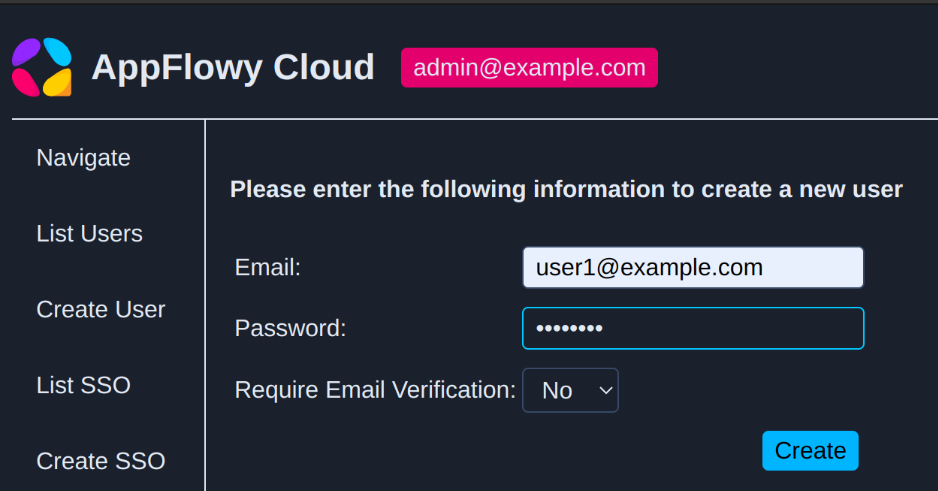
<span data-slate-fragment="JTVCJTdCJTIyYmxvY2tJZCUyMiUzQSUyMkZ1cHp4dCUyMiUyQyUyMmNoaWxkcmVuJTIyJTNBJTVCJTdCJTIyY2hpbGRyZW4lMjIlM0ElNUIlN0IlMjJ0ZXh0JTIyJTNBJTIyQ3JlYXRlJTIwYSUyMG5ldyUyMHVzZXIuJTIwVGhlJTIwZW1haWwlMjBkb2Vzbid0JTIwbmVlZCUyMHRvJTIwYWN0dWFsbHklMjBleGlzdCUyQyUyMHVubGVzcyUyMHlvdSUyMHBsYW4lMjB0byUyMGxvZ2luJTIwdXNpbmclMjBJZGVudGl0eSUyMFByb3ZpZGVyJTIwb3IlMjBtYWdpYyUyMGxpbmslMjBpbiUyMHRoZSUyMGZ1dHVyZSUyMiU3RCU1RCUyQyUyMnRleHRJZCUyMiUzQSUyMkRSSVh5VyUyMiUyQyUyMnR5cGUlMjIlM0ElMjJ0ZXh0JTIyJTdEJTVEJTJDJTIyZGF0YSUyMiUzQSU3QiU3RCUyQyUyMnJlbGF0aW9uSWQlMjIlM0ElMjJ0N1FWUXYlMjIlMkMlMjJ0eXBlJTIyJTNBJTIyYnVsbGV0ZWRfbGlzdCUyMiU3RCU1RA==" style="white-space: pre;">Create a new user. The email doesn't need to actually exist, unless you plan to login using Identity Provider or magic link in the future</span></span></span></span></span></span>

[![image.png](https://capacita.multiautomacoes.com.br/uploads/images/gallery/2026-08/scaled-1680-/qeiimage.png)](https://capacita.multiautomacoes.com.br/uploads/images/gallery/2026-08/qeiimage.png)

<div class="block-element flex-col relative flex rounded-[4px] " data-block-type="bulleted_list" data-slate-node="element" id="bkmrk-for-the-purpose-of-t" style="scroll-margin-top: 100px;"><div class="flex w-full flex-col"><span class="text-element relative flex w-full whitespace-pre-wrap break-word has-start-icon" data-slate-node="element"><span class="relative text-content leading-[1.5em] "><span data-slate-node="text"><span class="" data-slate-leaf="true"><span data-slate-string="true">For the purpose of this demo, we will create two users, user1@example.com and user2@example.com .</span></span></span></span></span></div></div><div class="block-element flex-col relative flex rounded-[4px] " data-block-type="bulleted_list" data-slate-node="element" id="bkmrk-logout-from-the-admi" style="scroll-margin-top: 100px;"><div class="flex w-full flex-col"><span class="text-element relative flex w-full whitespace-pre-wrap break-word has-start-icon" data-slate-node="element"><span class="text-block-icon relative select-none w-6 h-6 pr-1 text-xl" contenteditable="false" data-playwright-selected="false"><svg fill="none" height="1em" role="img" viewbox="0 0 20 20" width="1em" xmlns="http://www.w3.org/2000/svg"><path d="M10 13a3 3 0 1 0 0-6 3 3 0 0 0 0 6" fill="currentColor"></path></svg></span><span class="relative text-content leading-[1.5em] "><span data-slate-node="text"><span class="" data-slate-leaf="true"><span data-slate-string="true">Logout from the admin console, then log in using the credentials for user1@example.com. </span></span></span></span></span></div></div><div class="block-element flex-col relative flex rounded-[4px] " data-block-type="bulleted_list" data-slate-node="element" id="bkmrk-click-on-open-appflo" style="scroll-margin-top: 100px;"><div class="flex w-full flex-col"><span class="text-element relative flex w-full whitespace-pre-wrap break-word has-start-icon" data-slate-node="element"><span class="text-block-icon relative select-none w-6 h-6 pr-1 text-xl" contenteditable="false" data-playwright-selected="false"><svg fill="none" height="1em" role="img" viewbox="0 0 20 20" width="1em" xmlns="http://www.w3.org/2000/svg"><path d="M10 13a3 3 0 1 0 0-6 3 3 0 0 0 0 6" fill="currentColor"></path></svg></span><span class="relative text-content leading-[1.5em] "><span data-slate-node="text"><span class="" data-slate-leaf="true"><span data-slate-string="true">Click on </span></span></span><span data-slate-node="text"><span class="" data-slate-leaf="true"><span class="bg-border-primary font-medium text-[#EB5757]"><span data-slate-string="true">Open AppFlowy</span></span></span></span><span data-slate-node="text"><span class="" data-slate-leaf="true"><span data-slate-string="true"> to launch the desktop application.   
  
</span></span></span></span></span></div></div><div class="block-element flex-col relative flex rounded-[4px] " data-block-type="heading" data-slate-node="element" id="bkmrk-inviting-user-to-a-w" style="scroll-margin-top: 100px;"><div class="flex w-full flex-col heading level-2" id="bkmrk-inviting-user-to-a-w-1" style="scroll-margin-top: 48px;">**<span class="text-element relative flex w-full whitespace-pre-wrap break-word" data-slate-node="element"><span class="relative text-content leading-[1.5em] "><span data-slate-node="text"><span class="" data-slate-leaf="true"><span data-slate-string="true">Inviting user to a workspace</span></span></span></span></span>**</div></div><div class="block-element flex-col relative flex rounded-[4px] " data-block-type="bulleted_list" data-slate-fragment="JTVCJTdCJTIyYmxvY2tJZCUyMiUzQSUyMmFsUnZPbSUyMiUyQyUyMmNoaWxkcmVuJTIyJTNBJTVCJTdCJTIyY2hpbGRyZW4lMjIlM0ElNUIlN0IlMjJ0ZXh0JTIyJTNBJTIyRm9yJTIwdGhlJTIwcHVycG9zZSUyMG9mJTIwdGhpcyUyMGRlbW8lMkMlMjB3ZSUyMHdpbGwlMjBjcmVhdGUlMjB0d28lMjB1c2VycyUyQyUyMHVzZXIxJTQwZXhhbXBsZS5jb20lMjBhbmQlMjB1c2VyMiU0MGV4YW1wbGUuY29tJTIwLiUyMiU3RCU1RCUyQyUyMnRleHRJZCUyMiUzQSUyMlRNNHg3USUyMiUyQyUyMnR5cGUlMjIlM0ElMjJ0ZXh0JTIyJTdEJTVEJTJDJTIyZGF0YSUyMiUzQSU3QiU3RCUyQyUyMnJlbGF0aW9uSWQlMjIlM0ElMjJBZ3N1QmslMjIlMkMlMjJ0eXBlJTIyJTNBJTIyYnVsbGV0ZWRfbGlzdCUyMiU3RCUyQyU3QiUyMmJsb2NrSWQlMjIlM0ElMjJ0OFB6MWklMjIlMkMlMjJjaGlsZHJlbiUyMiUzQSU1QiU3QiUyMmNoaWxkcmVuJTIyJTNBJTVCJTdCJTIydGV4dCUyMiUzQSUyMkxvZ291dCUyMGZyb20lMjB0aGUlMjBhZG1pbiUyMGNvbnNvbGUlMkMlMjB0aGVuJTIwbG9nJTIwaW4lMjB1c2luZyUyMHRoZSUyMGNyZWRlbnRpYWxzJTIwZm9yJTIwdXNlcjElNDBleGFtcGxlLmNvbS4lMjAlMjIlN0QlNUQlMkMlMjJ0ZXh0SWQlMjIlM0ElMjJhcG5OY1QlMjIlMkMlMjJ0eXBlJTIyJTNBJTIydGV4dCUyMiU3RCU1RCUyQyUyMmRhdGElMjIlM0ElN0IlN0QlMkMlMjJyZWxhdGlvbklkJTIyJTNBJTIycFZ3bF9sJTIyJTJDJTIydHlwZSUyMiUzQSUyMmJ1bGxldGVkX2xpc3QlMjIlN0QlMkMlN0IlMjJibG9ja0lkJTIyJTNBJTIyZ2FjNFktJTIyJTJDJTIyY2hpbGRyZW4lMjIlM0ElNUIlN0IlMjJjaGlsZHJlbiUyMiUzQSU1QiU3QiUyMnRleHQlMjIlM0ElMjJDbGljayUyMG9uJTIwJTIyJTdEJTJDJTdCJTIyY29kZSUyMiUzQXRydWUlMkMlMjJ0ZXh0JTIyJTNBJTIyT3BlbiUyMEFwcEZsb3d5JTIyJTdEJTJDJTdCJTIydGV4dCUyMiUzQSUyMiUyMHRvJTIwbGF1bmNoJTIwdGhlJTIwZGVza3RvcCUyMGFwcGxpY2F0aW9uLiU1Q24lMjIlN0QlNUQlMkMlMjJ0ZXh0SWQlMjIlM0ElMjJialZNQVIlMjIlMkMlMjJ0eXBlJTIyJTNBJTIydGV4dCUyMiU3RCU1RCUyQyUyMmRhdGElMjIlM0ElN0IlN0QlMkMlMjJyZWxhdGlvbklkJTIyJTNBJTIyTUJyWEJ4JTIyJTJDJTIydHlwZSUyMiUzQSUyMmJ1bGxldGVkX2xpc3QlMjIlN0QlMkMlN0IlMjJibG9ja0lkJTIyJTNBJTIyS2hvY1dEJTIyJTJDJTIyY2hpbGRyZW4lMjIlM0ElNUIlN0IlMjJjaGlsZHJlbiUyMiUzQSU1QiU3QiUyMnRleHQlMjIlM0ElMjJJbnZpdGluZyUyMHVzZXIlMjB0byUyMGElMjB3b3Jrc3BhY2UlMjIlN0QlNUQlMkMlMjJ0ZXh0SWQlMjIlM0ElMjJ4TEZTc3klMjIlMkMlMjJ0eXBlJTIyJTNBJTIydGV4dCUyMiU3RCU1RCUyQyUyMmRhdGElMjIlM0ElN0IlMjJsZXZlbCUyMiUzQTIlN0QlMkMlMjJyZWxhdGlvbklkJTIyJTNBJTIydFNVV2ZrJTIyJTJDJTIydHlwZSUyMiUzQSUyMmhlYWRpbmclMjIlN0QlMkMlN0IlMjJibG9ja0lkJTIyJTNBJTIyTlRFT0c1JTIyJTJDJTIyY2hpbGRyZW4lMjIlM0ElNUIlN0IlMjJjaGlsZHJlbiUyMiUzQSU1QiU3QiUyMnRleHQlMjIlM0ElMjJJZiUyMHlvdSUyMGhhdmUlMjAlMjIlN0QlMkMlN0IlMjJocmVmJTIyJTNBJTIyaHR0cHMlM0ElMkYlMkZhcHBmbG93eS5jb20lMkZkb2NzJTJGc2V0dGluZy11cC1TTVRQJTIyJTJDJTIydGV4dCUyMiUzQSUyMnNldHVwJTIwU01UUCUyMiU3RCUyQyU3QiUyMnRleHQlMjIlM0ElMjIlMkMlMjB5b3UlMjBjYW4lMjBpbnZpdGUlMjBhJTIwbmV3JTIwbWVtYmVyJTIwdG8lMjB5b3VyJTIwd29ya3NwYWNlJTIwZGlyZWN0bHklMjBmcm9tJTIwdGhlJTIwd29ya3NwYWNlJTIwc2V0dGluZyUyMHBhZ2UlMkMlMjBpbiUyMHRoZSUyMGFwcGxpY2F0aW9uJTNBJTIyJTdEJTVEJTJDJTIydGV4dElkJTIyJTNBJTIyeERaRG1DJTIyJTJDJTIydHlwZSUyMiUzQSUyMnRleHQlMjIlN0QlNUQlMkMlMjJkYXRhJTIyJTNBJTdCJTdEJTJDJTIycmVsYXRpb25JZCUyMiUzQSUyMkR6dUpKdyUyMiUyQyUyMnR5cGUlMjIlM0ElMjJidWxsZXRlZF9saXN0JTIyJTdEJTVE" data-slate-node="element" id="bkmrk-if-you-have-setup-sm" style="scroll-margin-top: 100px;"><div class="flex w-full flex-col"><span class="text-element relative flex w-full whitespace-pre-wrap break-word has-start-icon" data-slate-node="element"><span class="text-block-icon relative select-none w-6 h-6 pr-1 text-xl" contenteditable="false" data-playwright-selected="false"><svg fill="none" height="1em" role="img" viewbox="0 0 20 20" width="1em" xmlns="http://www.w3.org/2000/svg"><path d="M10 13a3 3 0 1 0 0-6 3 3 0 0 0 0 6" fill="currentColor"></path></svg></span><span class="relative text-content leading-[1.5em] "><span data-slate-node="text"><span class="" data-slate-leaf="true"><span data-slate-string="true">If you have </span></span></span><span data-slate-node="text"><span class="" data-slate-leaf="true"><span class="href-link cursor-pointer select-auto py-0.5 underline" style="color: var(--text-action);"><span data-slate-string="true">setup SMTP</span></span></span></span><span data-slate-node="text"><span class="" data-slate-leaf="true"><span data-slate-string="true">, you can invite a new member to your workspace directly from the workspace setting page, in the application:  
  
</span></span></span></span></span></div></div>[![image.png](https://capacita.multiautomacoes.com.br/uploads/images/gallery/2026-08/scaled-1680-/24Kimage.png)](https://capacita.multiautomacoes.com.br/uploads/images/gallery/2026-08/24Kimage.png)

<div class="block-element flex-col relative flex rounded-[4px] " data-block-type="bulleted_list" data-slate-fragment="JTVCJTdCJTIyYmxvY2tJZCUyMiUzQSUyMmFsUnZPbSUyMiUyQyUyMmNoaWxkcmVuJTIyJTNBJTVCJTdCJTIyY2hpbGRyZW4lMjIlM0ElNUIlN0IlMjJ0ZXh0JTIyJTNBJTIyRm9yJTIwdGhlJTIwcHVycG9zZSUyMG9mJTIwdGhpcyUyMGRlbW8lMkMlMjB3ZSUyMHdpbGwlMjBjcmVhdGUlMjB0d28lMjB1c2VycyUyQyUyMHVzZXIxJTQwZXhhbXBsZS5jb20lMjBhbmQlMjB1c2VyMiU0MGV4YW1wbGUuY29tJTIwLiUyMiU3RCU1RCUyQyUyMnRleHRJZCUyMiUzQSUyMlRNNHg3USUyMiUyQyUyMnR5cGUlMjIlM0ElMjJ0ZXh0JTIyJTdEJTVEJTJDJTIyZGF0YSUyMiUzQSU3QiU3RCUyQyUyMnJlbGF0aW9uSWQlMjIlM0ElMjJBZ3N1QmslMjIlMkMlMjJ0eXBlJTIyJTNBJTIyYnVsbGV0ZWRfbGlzdCUyMiU3RCUyQyU3QiUyMmJsb2NrSWQlMjIlM0ElMjJ0OFB6MWklMjIlMkMlMjJjaGlsZHJlbiUyMiUzQSU1QiU3QiUyMmNoaWxkcmVuJTIyJTNBJTVCJTdCJTIydGV4dCUyMiUzQSUyMkxvZ291dCUyMGZyb20lMjB0aGUlMjBhZG1pbiUyMGNvbnNvbGUlMkMlMjB0aGVuJTIwbG9nJTIwaW4lMjB1c2luZyUyMHRoZSUyMGNyZWRlbnRpYWxzJTIwZm9yJTIwdXNlcjElNDBleGFtcGxlLmNvbS4lMjAlMjIlN0QlNUQlMkMlMjJ0ZXh0SWQlMjIlM0ElMjJhcG5OY1QlMjIlMkMlMjJ0eXBlJTIyJTNBJTIydGV4dCUyMiU3RCU1RCUyQyUyMmRhdGElMjIlM0ElN0IlN0QlMkMlMjJyZWxhdGlvbklkJTIyJTNBJTIycFZ3bF9sJTIyJTJDJTIydHlwZSUyMiUzQSUyMmJ1bGxldGVkX2xpc3QlMjIlN0QlMkMlN0IlMjJibG9ja0lkJTIyJTNBJTIyZ2FjNFktJTIyJTJDJTIyY2hpbGRyZW4lMjIlM0ElNUIlN0IlMjJjaGlsZHJlbiUyMiUzQSU1QiU3QiUyMnRleHQlMjIlM0ElMjJDbGljayUyMG9uJTIwJTIyJTdEJTJDJTdCJTIyY29kZSUyMiUzQXRydWUlMkMlMjJ0ZXh0JTIyJTNBJTIyT3BlbiUyMEFwcEZsb3d5JTIyJTdEJTJDJTdCJTIydGV4dCUyMiUzQSUyMiUyMHRvJTIwbGF1bmNoJTIwdGhlJTIwZGVza3RvcCUyMGFwcGxpY2F0aW9uLiU1Q24lMjIlN0QlNUQlMkMlMjJ0ZXh0SWQlMjIlM0ElMjJialZNQVIlMjIlMkMlMjJ0eXBlJTIyJTNBJTIydGV4dCUyMiU3RCU1RCUyQyUyMmRhdGElMjIlM0ElN0IlN0QlMkMlMjJyZWxhdGlvbklkJTIyJTNBJTIyTUJyWEJ4JTIyJTJDJTIydHlwZSUyMiUzQSUyMmJ1bGxldGVkX2xpc3QlMjIlN0QlMkMlN0IlMjJibG9ja0lkJTIyJTNBJTIyS2hvY1dEJTIyJTJDJTIyY2hpbGRyZW4lMjIlM0ElNUIlN0IlMjJjaGlsZHJlbiUyMiUzQSU1QiU3QiUyMnRleHQlMjIlM0ElMjJJbnZpdGluZyUyMHVzZXIlMjB0byUyMGElMjB3b3Jrc3BhY2UlMjIlN0QlNUQlMkMlMjJ0ZXh0SWQlMjIlM0ElMjJ4TEZTc3klMjIlMkMlMjJ0eXBlJTIyJTNBJTIydGV4dCUyMiU3RCU1RCUyQyUyMmRhdGElMjIlM0ElN0IlMjJsZXZlbCUyMiUzQTIlN0QlMkMlMjJyZWxhdGlvbklkJTIyJTNBJTIydFNVV2ZrJTIyJTJDJTIydHlwZSUyMiUzQSUyMmhlYWRpbmclMjIlN0QlMkMlN0IlMjJibG9ja0lkJTIyJTNBJTIyTlRFT0c1JTIyJTJDJTIyY2hpbGRyZW4lMjIlM0ElNUIlN0IlMjJjaGlsZHJlbiUyMiUzQSU1QiU3QiUyMnRleHQlMjIlM0ElMjJJZiUyMHlvdSUyMGhhdmUlMjAlMjIlN0QlMkMlN0IlMjJocmVmJTIyJTNBJTIyaHR0cHMlM0ElMkYlMkZhcHBmbG93eS5jb20lMkZkb2NzJTJGc2V0dGluZy11cC1TTVRQJTIyJTJDJTIydGV4dCUyMiUzQSUyMnNldHVwJTIwU01UUCUyMiU3RCUyQyU3QiUyMnRleHQlMjIlM0ElMjIlMkMlMjB5b3UlMjBjYW4lMjBpbnZpdGUlMjBhJTIwbmV3JTIwbWVtYmVyJTIwdG8lMjB5b3VyJTIwd29ya3NwYWNlJTIwZGlyZWN0bHklMjBmcm9tJTIwdGhlJTIwd29ya3NwYWNlJTIwc2V0dGluZyUyMHBhZ2UlMkMlMjBpbiUyMHRoZSUyMGFwcGxpY2F0aW9uJTNBJTIyJTdEJTVEJTJDJTIydGV4dElkJTIyJTNBJTIyeERaRG1DJTIyJTJDJTIydHlwZSUyMiUzQSUyMnRleHQlMjIlN0QlNUQlMkMlMjJkYXRhJTIyJTNBJTdCJTdEJTJDJTIycmVsYXRpb25JZCUyMiUzQSUyMkR6dUpKdyUyMiUyQyUyMnR5cGUlMjIlM0ElMjJidWxsZXRlZF9saXN0JTIyJTdEJTVE" data-slate-node="element" id="bkmrk--10" style="scroll-margin-top: 100px;"><div class="flex w-full flex-col"><span class="text-element relative flex w-full whitespace-pre-wrap break-word has-start-icon" data-slate-node="element"><span class="relative text-content leading-[1.5em] "><span data-slate-node="text"><span class="" data-slate-leaf="true"><span data-slate-string="true">  
</span></span></span></span></span></div></div><div class="block-element flex-col relative flex rounded-[4px] " data-block-type="bulleted_list" data-slate-node="element" id="bkmrk-since-we-have-not-se" style="scroll-margin-top: 100px;"><div class="flex w-full flex-col"><span class="text-element relative flex w-full whitespace-pre-wrap break-word has-start-icon" data-slate-node="element"><span class="relative text-content leading-[1.5em] "><span data-slate-node="text"><span class="" data-slate-leaf="true"><span data-slate-string="true">Since we have not setup SMTP yet, for this guide, we will use the admin console to manage workspace member instead.</span></span></span></span></span></div></div><div class="block-element flex-col relative flex rounded-[4px] " data-block-type="bulleted_list" data-slate-node="element" id="bkmrk-login-to-the-admin-c" style="scroll-margin-top: 100px;"><div class="flex w-full flex-col"><span class="text-element relative flex w-full whitespace-pre-wrap break-word has-start-icon" data-slate-node="element"><span class="text-block-icon relative select-none w-6 h-6 pr-1 text-xl" contenteditable="false" data-playwright-selected="false"><svg fill="none" height="1em" role="img" viewbox="0 0 20 20" width="1em" xmlns="http://www.w3.org/2000/svg"><path d="M10 13a3 3 0 1 0 0-6 3 3 0 0 0 0 6" fill="currentColor"></path></svg></span><span class="relative text-content leading-[1.5em] "><span data-slate-node="text"><span class="" data-slate-leaf="true"><span data-slate-string="true">Login to the admin console using user1's credential.</span></span></span></span></span></div></div><div class="block-element flex-col relative flex rounded-[4px] " data-block-type="bulleted_list" data-slate-fragment="JTVCJTdCJTIyYmxvY2tJZCUyMiUzQSUyMkszb2Z2cyUyMiUyQyUyMmNoaWxkcmVuJTIyJTNBJTVCJTdCJTIyY2hpbGRyZW4lMjIlM0ElNUIlN0IlMjJ0ZXh0JTIyJTNBJTIyU2luY2UlMjB3ZSUyMGhhdmUlMjBub3QlMjBzZXR1cCUyMFNNVFAlMjB5ZXQlMkMlMjBmb3IlMjB0aGlzJTIwZ3VpZGUlMkMlMjB3ZSUyMHdpbGwlMjB1c2UlMjB0aGUlMjBhZG1pbiUyMGNvbnNvbGUlMjB0byUyMG1hbmFnZSUyMHdvcmtzcGFjZSUyMG1lbWJlciUyMGluc3RlYWQuJTIyJTdEJTVEJTJDJTIydGV4dElkJTIyJTNBJTIyZURsQVlNJTIyJTJDJTIydHlwZSUyMiUzQSUyMnRleHQlMjIlN0QlNUQlMkMlMjJkYXRhJTIyJTNBJTdCJTdEJTJDJTIycmVsYXRpb25JZCUyMiUzQSUyMnFkeWlSeiUyMiUyQyUyMnR5cGUlMjIlM0ElMjJidWxsZXRlZF9saXN0JTIyJTdEJTJDJTdCJTIyYmxvY2tJZCUyMiUzQSUyMmZoNjgtdSUyMiUyQyUyMmNoaWxkcmVuJTIyJTNBJTVCJTdCJTIyY2hpbGRyZW4lMjIlM0ElNUIlN0IlMjJ0ZXh0JTIyJTNBJTIyTG9naW4lMjB0byUyMHRoZSUyMGFkbWluJTIwY29uc29sZSUyMHVzaW5nJTIwdXNlcjEncyUyMGNyZWRlbnRpYWwuJTIyJTdEJTVEJTJDJTIydGV4dElkJTIyJTNBJTIyQ2tCMXZLJTIyJTJDJTIydHlwZSUyMiUzQSUyMnRleHQlMjIlN0QlNUQlMkMlMjJkYXRhJTIyJTNBJTdCJTdEJTJDJTIycmVsYXRpb25JZCUyMiUzQSUyMkhFbXllNiUyMiUyQyUyMnR5cGUlMjIlM0ElMjJidWxsZXRlZF9saXN0JTIyJTdEJTJDJTdCJTIyYmxvY2tJZCUyMiUzQSUyMlFQbWVWUSUyMiUyQyUyMmNoaWxkcmVuJTIyJTNBJTVCJTdCJTIyY2hpbGRyZW4lMjIlM0ElNUIlN0IlMjJ0ZXh0JTIyJTNBJTIyT24lMjB0aGUlMjBsZWZ0JTIwcGFuZWwlMkMlMjBjbGljayUyMG9uJTIwJTIyJTdEJTJDJTdCJTIyY29kZSUyMiUzQXRydWUlMkMlMjJ0ZXh0JTIyJTNBJTIySW52aXRlJTIyJTdEJTJDJTdCJTIydGV4dCUyMiUzQSUyMiUyMCUyQyUyMHRoZW4lMjBpbnZpdGUlMjB1c2VyMiUyMHRvJTIwdGhlJTIwd29ya3NwYWNlLiUyMiU3RCU1RCUyQyUyMnRleHRJZCUyMiUzQSUyMlhQcmpaLSUyMiUyQyUyMnR5cGUlMjIlM0ElMjJ0ZXh0JTIyJTdEJTVEJTJDJTIyZGF0YSUyMiUzQSU3QiU3RCUyQyUyMnJlbGF0aW9uSWQlMjIlM0ElMjI4ZUNtRzElMjIlMkMlMjJ0eXBlJTIyJTNBJTIyYnVsbGV0ZWRfbGlzdCUyMiU3RCU1RA==" data-slate-node="element" id="bkmrk-on-the-left-panel%2C-c" style="scroll-margin-top: 100px;"><div class="flex w-full flex-col"><span class="text-element relative flex w-full whitespace-pre-wrap break-word has-start-icon" data-slate-node="element"><span class="text-block-icon relative select-none w-6 h-6 pr-1 text-xl" contenteditable="false" data-playwright-selected="false"><svg fill="none" height="1em" role="img" viewbox="0 0 20 20" width="1em" xmlns="http://www.w3.org/2000/svg"><path d="M10 13a3 3 0 1 0 0-6 3 3 0 0 0 0 6" fill="currentColor"></path></svg></span><span class="relative text-content leading-[1.5em] "><span data-slate-node="text"><span class="" data-slate-leaf="true"><span data-slate-string="true">On the left panel, click on </span></span></span><span data-slate-node="text"><span class="" data-slate-leaf="true"><span class="bg-border-primary font-medium text-[#EB5757]"><span data-slate-string="true">Invite</span></span></span></span><span data-slate-node="text"><span class="" data-slate-leaf="true"><span data-slate-string="true"> , then invite user2 to the workspace.</span></span></span></span></span></div><div class="flex w-full flex-col"><span class="text-element relative flex w-full whitespace-pre-wrap break-word has-start-icon" data-slate-node="element">  
</span></div></div>[![image.png](https://capacita.multiautomacoes.com.br/uploads/images/gallery/2026-08/scaled-1680-/1zcimage.png)](https://capacita.multiautomacoes.com.br/uploads/images/gallery/2026-08/1zcimage.png)

<div class="block-element flex-col relative flex rounded-[4px] " data-block-type="bulleted_list" data-slate-node="element" id="bkmrk-logout-from-the-desk" style="scroll-margin-top: 100px;"><div class="flex w-full flex-col"><span class="text-element relative flex w-full whitespace-pre-wrap break-word has-start-icon" data-slate-node="element"><span class="relative text-content leading-[1.5em] "><span data-slate-node="text"><span class="" data-slate-leaf="true"><span data-slate-string="true">Logout from the desktop application, so that we can login as user2 later. Close the application.</span></span></span></span></span></div></div><div class="block-element flex-col relative flex rounded-[4px] " data-block-type="bulleted_list" data-slate-fragment="JTVCJTdCJTIyYmxvY2tJZCUyMiUzQSUyMnpYdWhaQiUyMiUyQyUyMmNoaWxkcmVuJTIyJTNBJTVCJTdCJTIyY2hpbGRyZW4lMjIlM0ElNUIlN0IlMjJ0ZXh0JTIyJTNBJTIyTG9nb3V0JTIwZnJvbSUyMHRoZSUyMGRlc2t0b3AlMjBhcHBsaWNhdGlvbiUyQyUyMHNvJTIwdGhhdCUyMHdlJTIwY2FuJTIwbG9naW4lMjBhcyUyMHVzZXIyJTIwbGF0ZXIuJTIwQ2xvc2UlMjB0aGUlMjBhcHBsaWNhdGlvbi4lMjIlN0QlNUQlMkMlMjJ0ZXh0SWQlMjIlM0ElMjJVVk5raDMlMjIlMkMlMjJ0eXBlJTIyJTNBJTIydGV4dCUyMiU3RCU1RCUyQyUyMmRhdGElMjIlM0ElN0IlN0QlMkMlMjJyZWxhdGlvbklkJTIyJTNBJTIycDFJMVgzJTIyJTJDJTIydHlwZSUyMiUzQSUyMmJ1bGxldGVkX2xpc3QlMjIlN0QlMkMlN0IlMjJibG9ja0lkJTIyJTNBJTIyblp4LXpXJTIyJTJDJTIyY2hpbGRyZW4lMjIlM0ElNUIlN0IlMjJjaGlsZHJlbiUyMiUzQSU1QiU3QiUyMnRleHQlMjIlM0ElMjJMb2dpbiUyMHRvJTIwdGhlJTIwYWRtaW4lMjBjb25zb2xlJTIwdXNpbmclMjB1c2VyMidzJTIwY3JlZGVudGlhbC4lMjBZb3UlMjBzaG91bGQlMjBzZWUlMjBzb21ldGhpbmclMjBzaW1pbGFyJTIwdG8lMjB0aGUlMjBpbWFnZSUyMGJlbG93JTJDJTIwZm9yJTIwdGhlJTIwaW52aXRlJTIwcGFnZSUzQSUyMiU3RCU1RCUyQyUyMnRleHRJZCUyMiUzQSUyMkR3QUFMdyUyMiUyQyUyMnR5cGUlMjIlM0ElMjJ0ZXh0JTIyJTdEJTVEJTJDJTIyZGF0YSUyMiUzQSU3QiU3RCUyQyUyMnJlbGF0aW9uSWQlMjIlM0ElMjJlanBnb2slMjIlMkMlMjJ0eXBlJTIyJTNBJTIyYnVsbGV0ZWRfbGlzdCUyMiU3RCU1RA==" data-slate-node="element" id="bkmrk-login-to-the-admin-c-1" style="scroll-margin-top: 100px;"><div class="flex w-full flex-col"><span class="text-element relative flex w-full whitespace-pre-wrap break-word has-start-icon" data-slate-node="element"><span class="text-block-icon relative select-none w-6 h-6 pr-1 text-xl" contenteditable="false" data-playwright-selected="false"><svg fill="none" height="1em" role="img" viewbox="0 0 20 20" width="1em" xmlns="http://www.w3.org/2000/svg"><path d="M10 13a3 3 0 1 0 0-6 3 3 0 0 0 0 6" fill="currentColor"></path></svg></span><span class="relative text-content leading-[1.5em] "><span data-slate-node="text"><span class="" data-slate-leaf="true"><span data-slate-string="true">Login to the admin console using user2's credential. You should see something similar to the image below, for the invite page:  
  
</span></span></span></span></span></div></div>[![image.png](https://capacita.multiautomacoes.com.br/uploads/images/gallery/2026-08/scaled-1680-/M4Yimage.png)](https://capacita.multiautomacoes.com.br/uploads/images/gallery/2026-08/M4Yimage.png)

<div class="block-element flex-col relative flex rounded-[4px] " data-block-type="bulleted_list" data-slate-node="element" id="bkmrk-accept-the-invitatio" style="scroll-margin-top: 100px;"><div class="flex w-full flex-col"><span class="text-element relative flex w-full whitespace-pre-wrap break-word has-start-icon" data-slate-node="element"><span class="relative text-content leading-[1.5em] "><span data-slate-node="text"><span class="" data-slate-leaf="true"><span data-slate-string="true">Accept the invitation, then launch AppFlowy. user2 should now be a member of user1's workspace.</span></span></span></span></span></div><div class="flex w-full flex-col"></div></div><div class="block-element flex-col relative flex rounded-[4px] " data-block-type="heading" data-slate-node="element" id="bkmrk-shutting-down-servic" style="scroll-margin-top: 100px;"><div class="flex w-full flex-col heading level-2" id="bkmrk-shutting-down-servic-1" style="scroll-margin-top: 48px;">**<span class="text-element relative flex w-full whitespace-pre-wrap break-word" data-slate-node="element"><span class="relative text-content leading-[1.5em] "><span data-slate-node="text"><span class="" data-slate-leaf="true"><span data-slate-string="true">Shutting down service</span></span></span></span></span>**</div></div><div class="block-element flex-col relative flex rounded-[4px] " data-block-type="paragraph" data-slate-node="element" id="bkmrk-the-services-can-be-" style="scroll-margin-top: 100px;"><div class="flex w-full flex-col"><span class="text-element relative flex w-full whitespace-pre-wrap break-word" data-slate-node="element"><span class="relative text-content leading-[1.5em] "><span data-slate-node="text"><span class="" data-slate-leaf="true"><span data-slate-string="true">The services can be stopped by running</span></span></span></span></span></div></div><div class="block-element flex-col relative flex rounded-[4px] " data-block-type="code" data-slate-node="element" id="bkmrk-auto-4" style="scroll-margin-top: 100px;"><div class="relative my-0.5 w-full"><div class="absolute flex h-12 w-full select-none items-center px-2" contenteditable="false" style="visibility: hidden;"><button class="MuiButtonBase-root MuiButton-root MuiButton-text MuiButton-textInherit MuiButton-sizeSmall MuiButton-textSizeSmall MuiButton-colorInherit MuiButton-root MuiButton-text MuiButton-textInherit MuiButton-sizeSmall MuiButton-textSizeSmall MuiButton-colorInherit px-4 css-eb363p" tabindex="0" type="button">Auto</button></div><div class="flex w-full flex-col flex w-full"></div></div></div>```
docker compose down
```

<div class="block-element flex-col relative flex rounded-[4px] " data-block-type="heading" data-slate-node="element" id="bkmrk-removing-all-data" style="scroll-margin-top: 100px;"><div class="flex w-full flex-col heading level-2" id="bkmrk-removing-all-data-1" style="scroll-margin-top: 48px;">**<span class="text-element relative flex w-full whitespace-pre-wrap break-word" data-slate-node="element"><span class="relative text-content leading-[1.5em] "><span data-slate-node="text"><span class="" data-slate-leaf="true"><span data-slate-string="true">Removing all data</span></span></span></span></span>**</div></div><div class="block-element flex-col relative flex rounded-[4px] " data-block-type="paragraph" data-slate-node="element" id="bkmrk-if%2C-at-any-point-in-" style="scroll-margin-top: 100px;"><div class="flex w-full flex-col"><span class="text-element relative flex w-full whitespace-pre-wrap break-word" data-slate-node="element"><span class="relative text-content leading-[1.5em] "><span data-slate-node="text"><span class="" data-slate-leaf="true"><span data-slate-string="true">If, at any point in time, you would like to erase all the data and start the setup from scratch again, run</span></span></span></span></span></div></div><div class="block-element flex-col relative flex rounded-[4px] " data-block-type="code" data-slate-node="element" id="bkmrk-auto-5" style="scroll-margin-top: 100px;"><div class="relative my-0.5 w-full"><div class="absolute flex h-12 w-full select-none items-center px-2" contenteditable="false" style="visibility: hidden;"><button class="MuiButtonBase-root MuiButton-root MuiButton-text MuiButton-textInherit MuiButton-sizeSmall MuiButton-textSizeSmall MuiButton-colorInherit MuiButton-root MuiButton-text MuiButton-textInherit MuiButton-sizeSmall MuiButton-textSizeSmall MuiButton-colorInherit px-4 css-eb363p" tabindex="0" type="button">Auto</button></div><div class="flex w-full flex-col flex w-full"></div></div></div>```
docker compose down -v
```

<div class="block-element flex-col relative flex rounded-[4px] " data-block-type="heading" data-slate-node="element" id="bkmrk-%E2%9E%A1%EF%B8%8F-next" style="scroll-margin-top: 100px;"><div class="flex w-full flex-col heading level-2" id="bkmrk-%E2%9E%A1%EF%B8%8F-next-1" style="scroll-margin-top: 48px;"><span class="text-element relative flex w-full whitespace-pre-wrap break-word" data-slate-node="element"><span class="relative text-content leading-[1.5em] "><span data-slate-node="text"><span class="" data-slate-leaf="true"><span data-slate-string="true">➡️ Next</span></span></span></span></span></div></div><div class="block-element flex-col relative flex rounded-[4px] " data-block-type="paragraph" data-slate-fragment="JTVCJTdCJTIyYmxvY2tJZCUyMiUzQSUyMkVDVDNuVyUyMiUyQyUyMmNoaWxkcmVuJTIyJTNBJTVCJTdCJTIyY2hpbGRyZW4lMjIlM0ElNUIlN0IlMjJ0ZXh0JTIyJTNBJTIyQWNjZXB0JTIwdGhlJTIwaW52aXRhdGlvbiUyQyUyMHRoZW4lMjBsYXVuY2glMjBBcHBGbG93eS4lMjB1c2VyMiUyMHNob3VsZCUyMG5vdyUyMGJlJTIwYSUyMG1lbWJlciUyMG9mJTIwdXNlcjEncyUyMHdvcmtzcGFjZS4lMjIlN0QlNUQlMkMlMjJ0ZXh0SWQlMjIlM0ElMjIzR2xXOW0lMjIlMkMlMjJ0eXBlJTIyJTNBJTIydGV4dCUyMiU3RCU1RCUyQyUyMmRhdGElMjIlM0ElN0IlN0QlMkMlMjJyZWxhdGlvbklkJTIyJTNBJTIyVmJQbDhZJTIyJTJDJTIydHlwZSUyMiUzQSUyMmJ1bGxldGVkX2xpc3QlMjIlN0QlMkMlN0IlMjJibG9ja0lkJTIyJTNBJTIyRjVUMk9rJTIyJTJDJTIyY2hpbGRyZW4lMjIlM0ElNUIlN0IlMjJjaGlsZHJlbiUyMiUzQSU1QiU3QiUyMnRleHQlMjIlM0ElMjJTaHV0dGluZyUyMGRvd24lMjBzZXJ2aWNlJTIyJTdEJTVEJTJDJTIydGV4dElkJTIyJTNBJTIyUVZaSTQtJTIyJTJDJTIydHlwZSUyMiUzQSUyMnRleHQlMjIlN0QlNUQlMkMlMjJkYXRhJTIyJTNBJTdCJTIybGV2ZWwlMjIlM0EyJTdEJTJDJTIycmVsYXRpb25JZCUyMiUzQSUyMlpUZVZscyUyMiUyQyUyMnR5cGUlMjIlM0ElMjJoZWFkaW5nJTIyJTdEJTJDJTdCJTIyYmxvY2tJZCUyMiUzQSUyMkViWFFNOCUyMiUyQyUyMmNoaWxkcmVuJTIyJTNBJTVCJTdCJTIyY2hpbGRyZW4lMjIlM0ElNUIlN0IlMjJ0ZXh0JTIyJTNBJTIyVGhlJTIwc2VydmljZXMlMjBjYW4lMjBiZSUyMHN0b3BwZWQlMjBieSUyMHJ1bm5pbmclMjIlN0QlNUQlMkMlMjJ0ZXh0SWQlMjIlM0ElMjJoaHkzYjQlMjIlMkMlMjJ0eXBlJTIyJTNBJTIydGV4dCUyMiU3RCU1RCUyQyUyMmRhdGElMjIlM0ElN0IlN0QlMkMlMjJyZWxhdGlvbklkJTIyJTNBJTIyb3JUVzhHJTIyJTJDJTIydHlwZSUyMiUzQSUyMnBhcmFncmFwaCUyMiU3RCUyQyU3QiUyMmJsb2NrSWQlMjIlM0ElMjJxS2xKRU0lMjIlMkMlMjJjaGlsZHJlbiUyMiUzQSU1QiU3QiUyMmNoaWxkcmVuJTIyJTNBJTVCJTdCJTIydGV4dCUyMiUzQSUyMmRvY2tlciUyMGNvbXBvc2UlMjBkb3duJTIyJTdEJTVEJTJDJTIydGV4dElkJTIyJTNBJTIySFU3Y1RkJTIyJTJDJTIydHlwZSUyMiUzQSUyMnRleHQlMjIlN0QlNUQlMkMlMjJkYXRhJTIyJTNBJTdCJTdEJTJDJTIycmVsYXRpb25JZCUyMiUzQSUyMm5Rdk1TRiUyMiUyQyUyMnR5cGUlMjIlM0ElMjJjb2RlJTIyJTdEJTJDJTdCJTIyYmxvY2tJZCUyMiUzQSUyMkIzZlFDQyUyMiUyQyUyMmNoaWxkcmVuJTIyJTNBJTVCJTdCJTIyY2hpbGRyZW4lMjIlM0ElNUIlN0IlMjJ0ZXh0JTIyJTNBJTIyUmVtb3ZpbmclMjBhbGwlMjBkYXRhJTIyJTdEJTVEJTJDJTIydGV4dElkJTIyJTNBJTIyd25aVVkzJTIyJTJDJTIydHlwZSUyMiUzQSUyMnRleHQlMjIlN0QlNUQlMkMlMjJkYXRhJTIyJTNBJTdCJTIybGV2ZWwlMjIlM0EyJTdEJTJDJTIycmVsYXRpb25JZCUyMiUzQSUyMkFnUXdnTSUyMiUyQyUyMnR5cGUlMjIlM0ElMjJoZWFkaW5nJTIyJTdEJTJDJTdCJTIyYmxvY2tJZCUyMiUzQSUyMkJGYWlabiUyMiUyQyUyMmNoaWxkcmVuJTIyJTNBJTVCJTdCJTIyY2hpbGRyZW4lMjIlM0ElNUIlN0IlMjJ0ZXh0JTIyJTNBJTIySWYlMkMlMjBhdCUyMGFueSUyMHBvaW50JTIwaW4lMjB0aW1lJTJDJTIweW91JTIwd291bGQlMjBsaWtlJTIwdG8lMjBlcmFzZSUyMGFsbCUyMHRoZSUyMGRhdGElMjBhbmQlMjBzdGFydCUyMHRoZSUyMHNldHVwJTIwZnJvbSUyMHNjcmF0Y2glMjBhZ2FpbiUyQyUyMHJ1biUyMiU3RCU1RCUyQyUyMnRleHRJZCUyMiUzQSUyMkx4M0RRcCUyMiUyQyUyMnR5cGUlMjIlM0ElMjJ0ZXh0JTIyJTdEJTVEJTJDJTIyZGF0YSUyMiUzQSU3QiU3RCUyQyUyMnJlbGF0aW9uSWQlMjIlM0ElMjJJZE0xSV8lMjIlMkMlMjJ0eXBlJTIyJTNBJTIycGFyYWdyYXBoJTIyJTdEJTJDJTdCJTIyYmxvY2tJZCUyMiUzQSUyMjZzdmtBcCUyMiUyQyUyMmNoaWxkcmVuJTIyJTNBJTVCJTdCJTIyY2hpbGRyZW4lMjIlM0ElNUIlN0IlMjJ0ZXh0JTIyJTNBJTIyZG9ja2VyJTIwY29tcG9zZSUyMGRvd24lMjAtdiUyMiU3RCU1RCUyQyUyMnRleHRJZCUyMiUzQSUyMmdxc0haWSUyMiUyQyUyMnR5cGUlMjIlM0ElMjJ0ZXh0JTIyJTdEJTVEJTJDJTIyZGF0YSUyMiUzQSU3QiU3RCUyQyUyMnJlbGF0aW9uSWQlMjIlM0ElMjJHekxVR1ElMjIlMkMlMjJ0eXBlJTIyJTNBJTIyY29kZSUyMiU3RCUyQyU3QiUyMmJsb2NrSWQlMjIlM0ElMjJfOTJEQTYlMjIlMkMlMjJjaGlsZHJlbiUyMiUzQSU1QiU3QiUyMmNoaWxkcmVuJTIyJTNBJTVCJTdCJTIydGV4dCUyMiUzQSUyMiVFMiU5RSVBMSVFRiVCOCU4RiUyME5leHQlMjIlN0QlNUQlMkMlMjJ0ZXh0SWQlMjIlM0ElMjJ6N0lUcTYlMjIlMkMlMjJ0eXBlJTIyJTNBJTIydGV4dCUyMiU3RCU1RCUyQyUyMmRhdGElMjIlM0ElN0IlMjJsZXZlbCUyMiUzQTIlN0QlMkMlMjJyZWxhdGlvbklkJTIyJTNBJTIyNlVOMDFhJTIyJTJDJTIydHlwZSUyMiUzQSUyMmhlYWRpbmclMjIlN0QlMkMlN0IlMjJibG9ja0lkJTIyJTNBJTIyR3hwd2VSJTIyJTJDJTIyY2hpbGRyZW4lMjIlM0ElNUIlN0IlMjJjaGlsZHJlbiUyMiUzQSU1QiU3QiUyMm1lbnRpb24lMjIlM0ElN0IlMjJwYWdlX2lkJTIyJTNBJTIyYzNhM2M5MjktY2YxNS00ZDg0LThjYTktOWVjYzJjMDU3NDJkJTIyJTJDJTIydHlwZSUyMiUzQSUyMnBhZ2UlMjIlN0QlMkMlMjJ0ZXh0JTIyJTNBJTIyJTI0JTIyJTdEJTVEJTJDJTIydGV4dElkJTIyJTNBJTIyLXptbmdaJTIyJTJDJTIydHlwZSUyMiUzQSUyMnRleHQlMjIlN0QlNUQlMkMlMjJkYXRhJTIyJTNBJTdCJTdEJTJDJTIycmVsYXRpb25JZCUyMiUzQSUyMlZkaWJMeiUyMiUyQyUyMnR5cGUlMjIlM0ElMjJwYXJhZ3JhcGglMjIlN0QlMkMlN0IlMjJibG9ja0lkJTIyJTNBJTIyTThDWldsJTIyJTJDJTIyY2hpbGRyZW4lMjIlM0ElNUIlN0IlMjJjaGlsZHJlbiUyMiUzQSU1QiU3QiUyMnRleHQlMjIlM0ElMjIlMjIlN0QlNUQlMkMlMjJ0ZXh0SWQlMjIlM0ElMjJKd295QWElMjIlMkMlMjJ0eXBlJTIyJTNBJTIydGV4dCUyMiU3RCU1RCUyQyUyMmRhdGElMjIlM0ElN0IlN0QlMkMlMjJyZWxhdGlvbklkJTIyJTNBJTIyZHlWVFc5JTIyJTJDJTIydHlwZSUyMiUzQSUyMnBhcmFncmFwaCUyMiU3RCU1RA==" data-slate-node="element" id="bkmrk-%24%F0%9F%93%A8setting-up-smtp" style="scroll-margin-top: 100px;"><div class="flex w-full flex-col"><span class="text-element relative flex w-full whitespace-pre-wrap break-word" data-slate-node="element"><span class="relative text-content leading-[1.5em] "><span data-slate-node="text"><span class="" data-slate-leaf="true" style="position: relative; display: inline-block;"><span class="pointer-events-none absolute bottom-0 right-0 overflow-hidden !text-transparent" style="inset: auto 0px 0px auto;"><span data-slate-string="true">$</span></span><span class="w-fit mention relative rounded-[2px] py-0.5  px-1 cursor-default" contenteditable="false"><span class="mention-inline cursor-pointer pr-1 underline select-none" contenteditable="false" data-mention-id="c3a3c929-cf15-4d84-8ca9-9ecc2c05742d"><span class="mention-icon"><span class=" ml-0.5 flex h-[1.25em] w-[1.25em] items-center text-text-primary">📨</span><span class="absolute left-0 top-0 ml-0.5 "><svg class=" link-arrow-overlay h-[1.25em] w-[1.25em]" fill="none" height="1em" role="img" viewbox="0 0 20 20" width="1em" xmlns="http://www.w3.org/2000/svg"><path class="link_arrow-__outline" d="M8 14h10m0 0-4.375-4M18 14l-4.375 4" stroke="#fff" stroke-linecap="round" stroke-linejoin="round" stroke-width="4"></path><path d="M8 14h10m0 0-4.375-4M18 14l-4.375 4" stroke="currentColor" stroke-linecap="round" stroke-linejoin="round"></path></svg></span></span><span class="mention-content max-w-[330px] truncate opacity-80">Setting up SMTP</span></span></span></span></span></span></span></div></div>

# Deploy AppFlowy Cloud

##### Link: [https://github.com/AppFlowy-IO/AppFlowy-Cloud](https://github.com/AppFlowy-IO/AppFlowy-Cloud)  
[https://appflowy.com/docs/self-host-appflowy-deploy-appflowy-cloud](https://appflowy.com/docs/self-host-appflowy-deploy-appflowy-cloud)

##### Deployment  
AppFlowy-Cloud is designed to be easily self deployed for self managed cloud storage  
The following document will walk you through the steps to deploy your own AppFlowy-Cloud  


##### **Hardware Requirements**

- ##### Minimum 2GB Ram (4GB Recommended)
- ##### Ports 80/443 available
- ##### Because AppFlowy-Cloud will have to be running persistently (or at least whenever users need access),
    
    ##### it's probably a good idea to run it on a non-end user device. It is best if you already have a home server (check software requirements),
    
    ##### but if you don't, you can also deploy it on a cloud compute service as host server such as Amazon EC2 or Azure Virtual Machines

#####   
**Software Requirements**

#####   
Ensure you have Docker Compose(v2) installed on your host server. Follow the official guidelines for a reliable setup:  
Docker Compose is included with Docker Engine:

#####   
**Docker Engine**: We suggest adhering to the instructions provided by Docker  
for installing Docker Engine.  
For older versions of Docker Engine that do not include Docker Compose:

#####   
**Docker Compose:** Install it as per the official documentation.  
Once you have it installed, you can check by running the command:

##### docker compose version  
\# Docker Compose version 2.23.3

##### Note: docker-compose (with the hyphen) may not be supported. You are advised to use docker compose (without hyphen) instead.

#####   
Steps  
🚀🚀🚀 Quick Try: Step-by-Step GuideFor an in-depth, step-by-step guide on self-hosting AppFlowy Cloud on AWS EC2, particularly for demonstration  
purposes, please consult our detailed documentation:  
Self-Hosting AppFlowy Cloud on AWS EC2 - Step by Step GuideNote: This guide is tailored for demonstration purposes using the AWS EC2 free tier. For more customized  
deployment options, please follow the subsequent steps outlined below.

#####   
**1. Getting source files**

#####   
Clone this repository into your host server and cd into it

##### git clone https://github.com/AppFlowy-IO/AppFlowy-Cloud  
cd AppFlowy-Cloud

##### **2. Preparing the configuration**

#####   
This is perhaps the most important part of the deployment process, please read carefully.  
It is required that there is a .env file in the root directory of the repository.  
To get started, copy the template deploy.env as .env using the following shell commands:

##### cp deploy.env .env

##### Kindly read through the comments for each option  
Modify the values in .env according to your needs

#####   
For authentication details, refer to the Authentication documentation. You will need to update  
the redirect URI to match your host server's public IP or hostname, such  
as http://&lt;your-host-server-public-ip-or-hostname&gt;/gotrue/callback.

#####   
If using localhost, then just keep the default value.

##### GOTRUE\_EXTERNAL\_GOOGLE\_ENABLED=true  
GOTRUE\_EXTERNAL\_GOOGLE\_CLIENT\_ID=  
GOTRUE\_EXTERNAL\_GOOGLE\_SECRET=  
GOTRUE\_EXTERNAL\_GOOGLE\_REDIRECT\_URI=http://your-host/gotrue/callback

##### \# GitHub OAuth2  
GOTRUE\_EXTERNAL\_GITHUB\_ENABLED=true  
GOTRUE\_EXTERNAL\_GITHUB\_CLIENT\_ID=your-github-client-id  
GOTRUE\_EXTERNAL\_GITHUB\_SECRET=your-github-secret  
GOTRUE\_EXTERNAL\_GITHUB\_REDIRECT\_URI=http://your-host/gotrue/callback

##### \# Discord OAuth2  
GOTRUE\_EXTERNAL\_DISCORD\_ENABLED=true  
GOTRUE\_EXTERNAL\_DISCORD\_CLIENT\_ID=your-discord-client-id  
GOTRUE\_EXTERNAL\_DISCORD\_SECRET=your-discord-secret  
GOTRUE\_EXTERNAL\_DISCORD\_REDIRECT\_URI=http://your-host/gotrue/callback

##### **3. Running the services**

#####   
Start and run AppFlowy-Cloud  
The following command will build and start AppFlowy-Cloud.

##### docker compose up -d

##### Please check that all the services are running

##### docker ps -a

##### **4. Optional Services**

##### We have provided optional services in the file docker-compose-extra.yml.

##### You do not need them for a fully functional installation of AppFlowy Cloud, but they could be helpful for various admin/debug tasks.  
  
**pgadmin** (Web UI to visualize the provided postgres database)  
**portainer/portaine**r\_init (Web UI to provide some monitoring and ease of container management)  
**tunnel** (Cloudflare tunnel to provide a secure way to connect AppFlowy to Cloudflare without a publicly routable IP address)  
**admin\_frontend** (admin portal to manage accounts and add authentication methods. We recommend to keep this)

#####   
If you wish to deploy those, edit the file accordingly and do:

##### docker compose --file docker-compose-extras.yml up -d

##### You may ignore the orphan containers warning message that docker will output.  
When using the docker compose up -d command without specifying a tag, Docker Compose will pull the latest tag for the appflowy\_cloud and admin\_frontend images from Docker Hub by default.

##### If you've set the APPFLOWY\_CLOUD\_VERSION or the APPFLOWY\_ADMIN\_FRONTEND\_VERSION environment variable, it will pull the specified version instead.

#####   
Check that services are running correctly docker ps -a  
If you find a particular service not working properly, you can inspect the logs:

##### \# Getting logs for a particular docker compose service

#####   
\# You can obtain its name by running `docker ps -a`  
docker logs &lt;NAME&gt;  
\# e.g. docker logs appflowy-cloud-admin\_frontend-1

##### **5. Reconfiguring and redeployment**

#####   
It is very common to reconfigure and restart. To do so, simply edit the .env and run docker compose up -d again

#####   
**6. Upgrading the services**

#####   
To upgrade to the latest version, use docker compose pull and git pull to fetch the latest changes for images, docker compose files, and the configuration files.  
Then, run docker compose up -d to start the services.

##### Alternatively, you can use a specific image tag instead of latest, and checkout the corresponding tag for the repository.

#####   
**7. AppFlowy Web**  
AppFlowy Web is a Single Page Application (SPA) that calls the endpoints in appflowy\_cloud, and is assumed to be served on a different origin that the one used for AppFlowy Cloud (eg. if you are hosting appflowy cloud on appflowy.home.com, appflowy\_web may be hosted on web.appflowy.home.com). The source code and deployment guide can be found in this repository.

#####   
To prevent CORS issues, you will need to change set $appflowy\_web "http://localhost:3000"; in nginx/nginx.conf to the origin where you are hosting appflowy\_web.

#####   
**Ports**  
After Deployment, you should see that AppFlowy-Cloud is serving 2 ports  
443 (https)  
80 (http)  
Your host server need to expose either of these ports.

#####   
**SSL Certificate**  
To use your own SSL certificates for https, replace certificate.crt and private\_key.key with your own in nginx/ssl/ directory. Please note that the certificates in the repository are for demonstration purpose only and will need to be replaced by a certificate that is trusted by your devices.

#####   
For example, you can use Let's Encrypt, or CloudFlare Origin CA, if the AppFlowy Cloud endpoint is placed behind a cloudflare proxy.

##### Usage of AppFlowy Application with AppFlowy Cloud AppFlowy with AppFlowyCloud

#####   
**FAQ**

#####   
How do I use a different postgres?  
 The default url is using the postgres in docker compose, in service appflowy\_cloud and gotrue respectively. However it is possible to use an external postgres, as long as it is accessible by the services. You need to change the following settings:

##### POSTGRES\_HOST=postgres  
POSTGRES\_USER=postgres  
POSTGRES\_PASSWORD=password  
POSTGRES\_PORT=5432  
POSTGRES\_DB=postgres

##### You would need to run the supabase\_auth.sh from migrations/before in your hosted postgres. Make sure that the environmental variables referenced by the script (eg. $SUPABASE\_PASSWORD) have been exported before running the script.

#####   
**How do I disable signups?**  
If your deployed AppFlowy-Cloud is publicly available and you do not want any other users to access it, you can disable sign up by setting the GOTRUE\_DISABLE\_SIGNUP environment variable to true.

#####   
**What port should I use for SMTP?**  
The default configuration assumes that TLS is used for SMTP, typically on port 465. If you are using STARTTLS, such as when using port 587, please change APPFLOWY\_MAILER\_SMTP\_TLS\_KIND to opportunistic.

#####   
Can I sign in using only using email and password?  
The AppFlowy clients currently do not support email and password sign in. However, you can login to the admin portal using the admin  
email and password. In the admin section, you can then add users and set their passwords. Subseqently, users can login to the portal  
using their email and password, and launch the AppFlowy client via the portal.  
What functionality will I lose if the SMTP server is not set up?  
Sign in via magic link will not be possible. Inviting users to workspace and accepting invitation will have to be  
performed via the admin portal as opposed to links provided in emails.  
I already have an Nginx server running on my host server. How do I configure it to work with AppFlowy-Cloud?  
First, remove the nginx service from the docker-compose.yml file.  
Update the docker compose file such that the ports for appflowy\_cloud, gotrue, and admin\_frontend are mapped  
to different ports on the host server. If possible, use firewall to make sure that these ports are not accessible  
from the internet.  
Update proxy\_pass in nginx/nginx.conf to point to the above ports.