# Dell PowerEdge T620 : How To Reduce FAN Speed with IPMI
Link: [https://std.rocks/dell\_t620\_fanspeed.html](https://std.rocks/dell_t620_fanspeed.html)
- *Last updated: Feb 8, 2022*
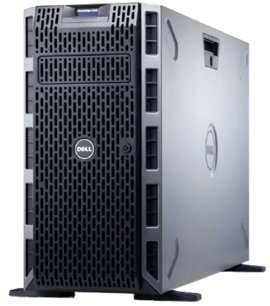
Recently I had to replace **Dell** certified mechanical **hard drives** with uncertified **SSD** drives on a **PowerEdge T620** server and was unpleasantly suprised to find that the fans were spinning noisly when inserted.
After quick research, I discovered that it was a known issue and that **Dell** wasn't able to offer any [solution](https://www.dell.com/community/Systems-Management-General/PowerEdge-T620-Fan-Speed-75-after-installing-SSD/td-p/5136373)…
Thanks to god/internet, I also found a post where a user has been able to control the fan speed with the **ipmitool**. So, big thanks to, [tatmde](https://www.reddit.com/r/homelab/comments/7xqb11/dell_fan_noise_control_silence_your_poweredge/).
I will simply post here what I have done in my situation.
⚠️ Be advised that changing the fan speed may result in overheating and damage to the components. ⚠️
## Enable IPMI over LAN
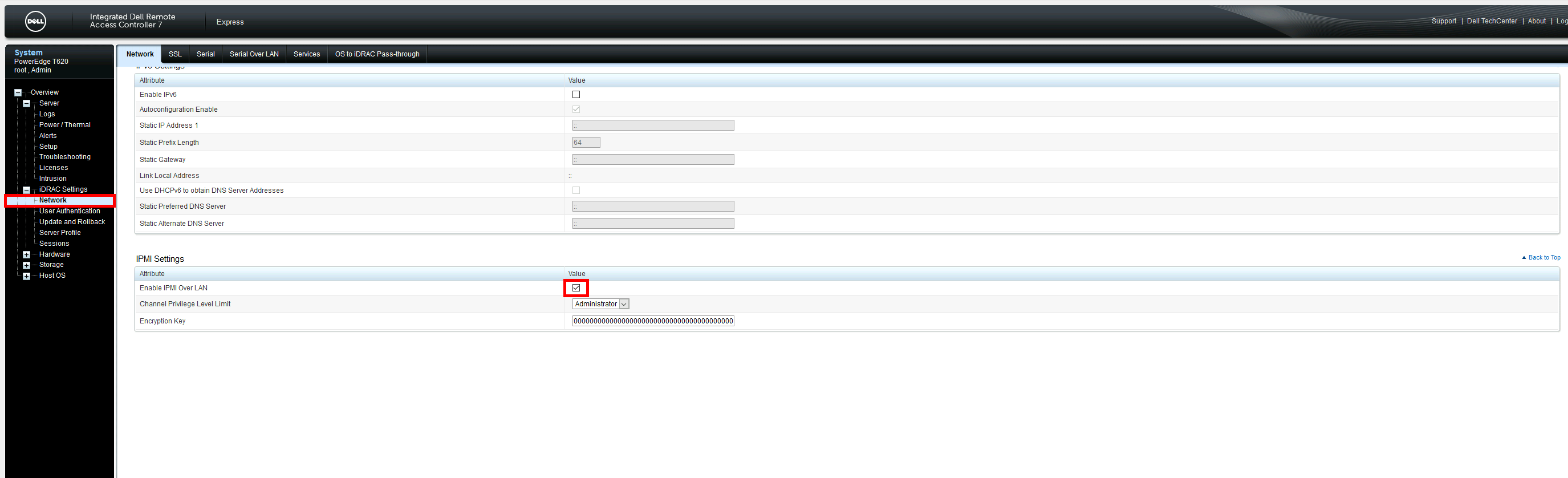
To control the **FANs speed** via network we need to enable **IPMI over LAN** from **IDRAC**.
⚠️ Enable **IPMI over LAN** could be considered as security issue cause a remote station would have the capability to control the system's power state as well as being able to gather certain platform information. ⚠️
- Connect to your **iDRAC**, go to **iDRAC Settings** > **Network** and enable **IPMI Over LAN** :
## ipmitool utility
### Installing on GNU/Linux
Install **ipmitool** software. This utility will allow us to communicate with the **IPMI**.
- From a **Debian** you could use this command to install **ipmitool** :
```
root@host:~# apt-get install ipmitool
```
### Using ipmitool
#### Check temperature
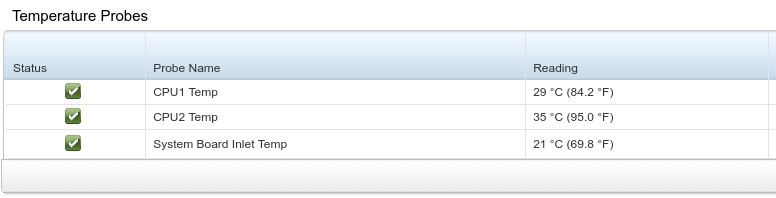
- Get **temperature** informations :
```
user@host:~$ ipmitool -I lanplus -H -U -P sdr type temperature
Inlet Temp | 04h | ok | 7.1 | 21 degrees C
Temp | 0Eh | ok | 3.1 | 29 degrees C
Temp | 0Fh | ok | 3.2 | 35 degrees C
```
- We can see the corresponding values in **iDRAC** :
#### Control FAN Speed
- To disable **manual**/**static** fan control (auto mode) :
```
user@host:~$ ipmitool -I lanplus -H -U -P raw 0x30 0x30 0x01 0x01
```
- To enable **manual**/**static** fan control (manual mode) :
```
user@host:~$ ipmitool -I lanplus -H -U -P raw 0x30 0x30 0x01 0x00
```
- Get current **Fan** speed :
```
user@host:~$ ipmitool -I lanplus -H -U -P sdr get Fan1 Fan2 | grep "Sensor Reading"
Sensor Reading : 1560 (+/- 120) RPM
Sensor Reading : 1560 (+/- 120) RPM
```
- Set **Fan** speed at **1320 RPM (16%)** :
```
user@host:~$ ipmitool -I lanplus -H -U -P raw 0x30 0x30 0x02 0xff 0x10
```
- Set **Fan** speed at **1560 RPM (20%)** :
```
user@host:~$ ipmitool -I lanplus -H -U -P raw 0x30 0x30 0x02 0xff 0x14
```
- Set **Fan** speed at **2040 RPM (30%)** :
```
user@host:~$ ipmitool -I lanplus -H -U -P raw 0x30 0x30 0x02 0xff 0x1e
```
- Set **Fan** speed at **3000 RPM (50%)** :
```
user@host:~$ ipmitool -I lanplus -H -U -P raw 0x30 0x30 0x02 0xff 0x32
```
- Set **Fan** speed at **5040 RPM (100%)** :
```
user@host:~$ ipmitool -I lanplus -H -U -P raw 0x30 0x30 0x02 0xff 0x64
```
## Create ipmi service
I got mad and decided to create a **service** that automatically regulates the **speed** of the **fans**.
I will detail here the different **steps** to set it up.
*Note : This script is adapted to my own configuration*
### Create system account
- For **security** reason I decided to run the service with **system account**. So let's create a **system** account :
```
root@host:~# useradd --system --no-create-home ipmiservice
```
- Create **log** folder :
```
root@host:~# mkdir /var/log/ipmiservice
```
```
root@host:~# chown -R ipmiservice /var/log/ipmiservice
```
### Create bash script
- Create **/usr/local/sbin/ipmiservice.sh** file :
```
root@host:~# touch /usr/local/sbin/ipmiservice.sh
```
```
root@host:~# chown ipmiservice: /usr/local/sbin/ipmiservice.sh
```
```
root@host:~# chmod +x /usr/local/sbin/ipmiservice.sh
```
- **/usr/local/sbin/ipmiservice.sh** :
```
#!/bin/bash
#Stops script on errors, unset variables or failing pipeline
set -euo pipefail
#variables definitions
LOG=/var/log/ipmiservice/ipmi.log
IP="192.168.1.10"
PASSWORD='STp@ssw0rd!'
#functions
##Set Fan Speed, accept one argument to set speed
FanSpeed()
{
ipmitool -I lanplus -H "$IP" -U root -P "$PASSWORD" raw 0x30 0x30 0x02 $1
}
##Get Temp values
GetValues()
{
#Get motherboard, cpu1 and cpu2 temperature
OUTPUT=$(/usr/bin/ipmitool -I lanplus -H "$IP" -U root -P "$PASSWORD" sdr type temperature | sed -e 's/Temp\(.*0Eh\)/Cpu1\1/' -e 's/Temp\(.*0Fh\)/Cpu2\1/')
#Extract motherboard temp
SB=$(echo $OUTPUT| awk -F'|' '{ print $5 $9 $13 }' | awk '{ print $1 }')
#Extract cpu1 temp
CPU1=$(echo $OUTPUT| awk -F'|' '{ print $5 $9 $13 }' | awk '{ print $5 }')
#Extract cpu2 temp
CPU2=$(echo $OUTPUT| awk -F'|' '{ print $5 $9 $13 }' | awk '{ print $9 }')
#motherboard+cpu1+cpu2 temp
LOG_TOTAL=$(($SB+$CPU1+$CPU2))
#Get Fan1 speed
FANS=$(ipmitool -I lanplus -H "$IP" -U root -P "$PASSWORD" sensor reading Fan1 | awk '{ print $3 }')
}
#set manual mode
ipmitool -I lanplus -H "$IP" -U root -P "$PASSWORD" raw 0x30 0x30 0x01 0x00
GetValues
echo "$(date "+%Y-%m-%d %H:%M:%S")" "MB : $SB | CPU1 : $CPU1 | CPU2 : $CPU2 | LOG_TOTAL : $LOG_TOTAL"
while :
do
if [ "$LOG_TOTAL" -le 100 ] && [ $FANS -eq 1440 ]; then
echo "$(date "+%Y-%m-%d %H:%M:%S")" "FAN speed : 1440, don't do anything" | tee -a "$LOG"
elif [ "$LOG_TOTAL" -le 100 ] && [ $FANS -ne 1440 ]; then
FanSpeed "0xff 0x12" #Set speed to 1440
echo "$(date "+%Y-%m-%d %H:%M:%S")" "Set speed to 1440" | tee -a "$LOG"
elif [ "$LOG_TOTAL" -gt 100 ] && [ "$LOG_TOTAL" -le 105 ] && [ $FANS -ne 1560 ]; then
FanSpeed "0xff 0x14" #Set speed to 1560
echo "$(date "+%Y-%m-%d %H:%M:%S")" "Set speed to 1560" | tee -a "$LOG"
elif [ "$LOG_TOTAL" -gt 105 ] && [ "$LOG_TOTAL" -le 115 ] && [ $FANS -ne 2040 ]; then
FanSpeed "0xff 0x1e" #Set speed to 2040
echo "$(date "+%Y-%m-%d %H:%M:%S")" "Set speed to 2040" | tee -a "$LOG"
elif [ "$LOG_TOTAL" -gt 115 ] && [ "$LOG_TOTAL" -le 130 ] && [ $FANS -ne 3000 ]; then
FanSpeed "0xff 0x32" #Set speed to 3000
echo "$(date "+%Y-%m-%d %H:%M:%S")" "Set speed to 3000" | tee -a "$LOG"
elif [ "$LOG_TOTAL" -gt 130 ] && [ $FANS -ne 5040 ]; then
FanSpeed "0xff 0x64" #Set speed to 5040
echo "$(date "+%Y-%m-%d %H:%M:%S")" "Set speed to 5040" | tee -a "$LOG"
fi
sleep 30s
GetValues
echo "$(date "+%Y-%m-%d %H:%M:%S")" "MB : $SB | CPU1 : $CPU1 | CPU2 : $CPU2 | TEMP TOTAL : $LOG_TOTAL" >> "$LOG"
echo "$(date "+%Y-%m-%d %H:%M:%S")" "FAN speed : $FANS" | tee -a "$LOG"
done
```
### Create systemd service
Now we will create a **systemd** service.
- Create **systemd** service :
```
root@host:~# vim /etc/systemd/system/ipmi.service
```
```
[Unit]
Description=ipmi t620 fan control
After=network.target
[Service]
Type=simple
User=ipmiservice
Group=ipmiservice
WorkingDirectory=/usr/local/sbin/
ExecStart=/usr/local/sbin/ipmiservice.sh
Restart=always
[Install]
WantedBy=multi-user.target
```
- Enable **systemd** service :
```
root@host:~# systemctl enable ipmi.service
```
- Start **systemd** service :
```
root@host:~# systemctl start ipmi.service
```
- Check **logs** output :
```
root@host:~# tail -f /var/log/ipmiservice/ipmi.log
2021-05-09 15:16:57 FAN speed : 1440, don't do anything
2021-05-09 15:17:32 MB : 22 | CPU1 : 37 | CPU2 : 40 | TEMP TOTAL : 99
2021-05-09 15:17:32 FAN speed : 1440, don't do anything
2021-05-09 15:18:04 MB : 22 | CPU1 : 38 | CPU2 : 40 | TEMP TOTAL : 100
2021-05-09 15:18:04 FAN speed : 1440, don't do anything
2021-05-09 15:18:36 MB : 22 | CPU1 : 39 | CPU2 : 40 | TEMP TOTAL : 101
2021-05-09 15:18:36 FAN speed : 1440, don't do anything
2021-05-09 15:18:37 Set speed to 1560
2021-05-09 15:19:09 MB : 22 | CPU1 : 38 | CPU2 : 40 | TEMP TOTAL : 100
2021-05-09 15:19:09 FAN speed : 1560
```