# Controlar Fans/Coolers - Linux
Controla os fans/coolers/temperatura com ipmitool
# How to control Dell server fanspeeds with ipmitool
Link: [https://wiki.joeplaa.com/en/tutorials/how-to-control-dell-server-fanspeeds-with-ipmitool](https://wiki.joeplaa.com/en/tutorials/how-to-control-dell-server-fanspeeds-with-ipmitool)
# Introduction
I'm running a homelab partly as a hobby, but also to support our business needs, especially the software development part. My current setup consist of three servers, one HP and two Dell servers. The HP server is running perfectly fine when considering its temperatures and fanspees. The fans are throttled down pretty aggressively, so I don't really have too much of an issue with noise. It will speed up and make a racket when TeamCity is doing its thing, but that is shortlived.
The Dells however are troublesome. I have a T320 with 8 harddisks running TrueNAS. The disks obviously produce heat and the single fan in the tower doesn't generate enough airflow. Or better said, because the air shroud is missing, the air is not properly routed along the disk and through the CPU heat sink. The CPU will run into the 50°C region (when idling) when the ambient temperature is around 30°C (we're experiencing a heat wave).
The other Dell, a R320, is just loud. The little fans have to spin at an insane rate to keep the CPU cool. On top of that, I flashed the RAID card to passthrough mode for ZFS. The server doesn't get any disk temperature readings and thus preventatively speeds up the fans (this doesn't seem to apply to the T320).
The real solution would be to have a dedicated, air-conditioned (or at least well ventilated) room. But alas, we don't have that luxury. Currently the servers are in a little hallway next to the office. This little room will heat up quickly with three servers buzzing away, so the doors cannot be closed permanently.
A temporary "fix", well it isn't really a fix, because they are still very loud, is to slow down the fans manually using `ipmitool` commands. The downside obviously is that temperatures will go up quickly. Luckily [brezlord](https://github.com/brezlord/iDRAC7_fan_control) made [a script](https://github.com/brezlord/iDRAC7_fan_control) to fix that, thanks man!.
# The script
I modified it a little to fit my specific usecase:
- Changed the "dynamic" temperature from 35 to 45°C
- Added additional speed settings
- Use the CPU instead of inlet (ambient) temperature to control the speeds
- Added additional speed increments
```bash
#!/bin/bash
#
# https://github.com/brezlord/iDRAC7_fan_control
# A simple script to control fan speeds on Dell generation 12 PowerEdge servers.
# If the inlet temperature is above 45deg C enable iDRAC dynamic control and exit program.
# If inlet temp is below 45deg C set fan control to manual and set fan speed to predetermined value.
# The tower servers T320, T420 & T620 inlet temperature sensor is after the HDDs so temperature will
# be higher than the ambient temperature.
# Variables
IDRAC_IP="IP address of iDRAC"
IDRAC_USER="user"
IDRAC_PASSWORD="password"
# Fan speed in %
SPEED0="0x00"
SPEED5="0x05"
SPEED10="0x0a"
SPEED15="0x0f"
SPEED20="0x14"
SPEED25="0x19"
SPEED30="0x1e"
SPEED35="0x23"
SPEED40="0x28"
SPEED45="0x2D"
SPEED50="0x32"
TEMP_THRESHOLD="45" # iDRAC dynamic control enable threshold
#TEMP_SENSOR="04h" # Inlet Temp
#TEMP_SENSOR="01h" # Exhaust Temp
TEMP_SENSOR="0Eh" # CPU 1 Temp
#TEMP_SENSOR="0Fh" # CPU 2 Temp
# Get system date & time.
DATE=$(date +%d-%m-%Y\ %H:%M:%S)
echo "Date $DATE"
# Get temperature from iDARC.
T=$(ipmitool -I lanplus -H $IDRAC_IP -U $IDRAC_USER -P $IDRAC_PASSWORD sdr type temperature | grep $TEMP_SENSOR | cut -d"|" -f5 | cut -d" " -f2)
echo "--> iDRAC IP Address: $IDRAC_IP"
echo "--> Current CPU Temp: $T"
# If CPU ~~ambient~~ temperature is above 45deg C enable dynamic control and exit, if below set manual control.
if [[ $T > $TEMP_THRESHOLD ]]
then
echo "--> Temperature is above 45deg C"
echo "--> Enabled dynamic fan control"
ipmitool -I lanplus -H $IDRAC_IP -U $IDRAC_USER -P $IDRAC_PASSWORD raw 0x30 0x30 0x01 0x01
exit 1
else
echo "--> Temperature is below 45deg C"
echo "--> Disabled dynamic fan control"
ipmitool -I lanplus -H $IDRAC_IP -U $IDRAC_USER -P $IDRAC_PASSWORD raw 0x30 0x30 0x01 0x00
fi
# Set fan speed dependant on CPU ~~ambient~~ temperature if CPU ~~inlet~~ temperature is below 45deg C.
# If CPU ~~inlet~~ temperature between 0 and 19deg C then set fans to 15%.
if [ "$T" -ge 0 ] && [ "$T" -le 19 ]
then
echo "--> Setting fan speed to 15%"
ipmitool -I lanplus -H $IDRAC_IP -U $IDRAC_USER -P $IDRAC_PASSWORD raw 0x30 0x30 0x02 0xff $SPEED15
# If inlet temperature between 20 and 24deg C then set fans to 20%
elif [ "$T" -ge 20 ] && [ "$T" -le 24 ]
then
echo "--> Setting fan speed to 20%"
ipmitool -I lanplus -H $IDRAC_IP -U $IDRAC_USER -P $IDRAC_PASSWORD raw 0x30 0x30 0x02 0xff $SPEED20
# If inlet temperature between 25 and 29deg C then set fans to 25%
elif [ "$T" -ge 25 ] && [ "$T" -le 29 ]
then
echo "--> Setting fan speed to 25%"
ipmitool -I lanplus -H $IDRAC_IP -U $IDRAC_USER -P $IDRAC_PASSWORD raw 0x30 0x30 0x02 0xff $SPEED25
# If inlet temperature between 30 and 34deg C then set fans to 30%
elif [ "$T" -ge 30 ] && [ "$T" -le 34 ]
then
echo "--> Setting fan speed to 30%"
ipmitool -I lanplus -H $IDRAC_IP -U $IDRAC_USER -P $IDRAC_PASSWORD raw 0x30 0x30 0x02 0xff $SPEED30
# If inlet temperature between 35 and 40deg C then set fans to 35%
elif [ "$T" -ge 35 ] && [ "$T" -le 39 ]
then
echo "--> Setting fan speed to 35%"
ipmitool -I lanplus -H $IDRAC_IP -U $IDRAC_USER -P $IDRAC_PASSWORD raw 0x30 0x30 0x02 0xff $SPEED35
# If inlet temperature between 40 and 45deg C then set fans to 40%
elif [ "$T" -ge 40 ] && [ "$T" -le 45 ]
then
echo "--> Setting fan speed to 40%"
ipmitool -I lanplus -H $IDRAC_IP -U $IDRAC_USER -P $IDRAC_PASSWORD raw 0x30 0x30 0x02 0xff $SPEED40
fi
```
# Implementation
## pfSense
1. Create a folder `/root/fan_control`
2. The Bash executable in pfSense is located in `usr/local/bin/bash`, so make sure this is specified in the top of the script:
```bash
#!/usr/local/bin/bash
...
```
3. Copy the script to the folder
4. Make script executable: `chmod +x /root/fan_control/fan_control.sh`
5. Add iDRAC credentials in script
6. Run the script to test
7. Create a cron job with `crontab -e` and add line:
```shell
* * * * * /usr/local/bin/bash /root/fan_control/fan_control.sh >/dev/null 2>&1
```
## TrueNAS
I followed [breznet's guide](https://www.breznet.com/dell-idrac7-manual-fan-control/).
1. Create a dataset `fan_control`
2. Copy the script to the dataset
3. Make script executable: `chmod +x /mnt/store1/fan_control/fan_control.sh`
4. Add iDRAC credentials in script
5. Run the script to test
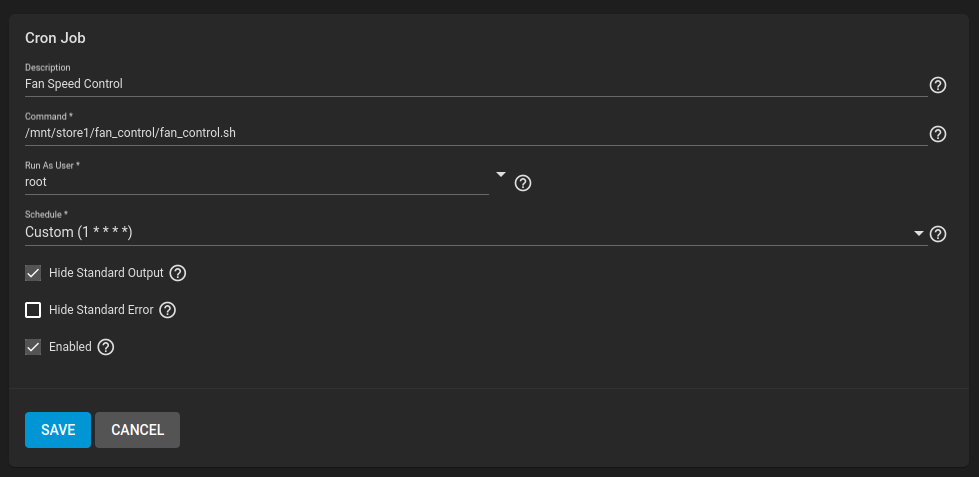
6. Create a cron job in TrueNAS GUI running every minute
#
# Script controla fan - decimal/hexadecinal
Link: [https://forum.proxmox.com/threads/ipmi-tool-error-after-v8-upgrade.129334/page-2](https://forum.proxmox.com/threads/ipmi-tool-error-after-v8-upgrade.129334/page-2)
Bash:
```bash
#!/bin/bash
# Fancontrol v1.1 2022-09-15 15:42
# Define variables
MAX_FAN=90
MIN_FAN=20
HIGH_TEMP=37
LOW_TEMP=35
SPEED_STEP=10
IDRAC_IP=10.0.0.1
IPMI_USER=fancontrol
IPMI_PASSWORD=yoursupercomplexpassword
# Define Functions
ENABLE_FAN ()
{
ipmitool -I lanplus -H $IDRAC_IP -U $IPMI_USER -P $IPMI_PASSWORD raw 0x30 0x30 0x01 0x00 > /dev/null 2>&1
}
GET_TEMP ()
{
ipmitool -I lanplus -H $IDRAC_IP -U $IPMI_USER -P $IPMI_PASSWORD sensor reading "Exhaust Temp"|sed 's/[^0-9]//g'
}
SET_FAN ()
{
ipmitool -I lanplus -H $IDRAC_IP -U $IPMI_USER -P $IPMI_PASSWORD raw 0x30 0x30 0x02 0xff $FAN_SETTING > /dev/null 2>&1
}
# File to save the last fan speed
[ -f fan_speed.last ] || echo $MIN_FAN > fan_speed.last
FAN_SPEED=$( $HIGH_TEMP)) ; then
FAN_SPEED=$(expr $FAN_SPEED + $SPEED_STEP)
if (($FAN_SPEED > $MAX_FAN)) ; then
FAN_SPEED=$MAX_FAN
fi
fi
if (($CURRENT_TEMP < $LOW_TEMP)) ; then
FAN_SPEED=$(expr $FAN_SPEED - $SPEED_STEP)
if (($FAN_SPEED < $MIN_FAN)) ; then
FAN_SPEED=$MIN_FAN
fi
fi
FAN_SETTING=$(printf "0x"'%x\n' $FAN_SPEED)
ENABLE_FAN
SET_FAN
logger -t FanControl "Current Temperature" $CURRENT_TEMP"C" "Fans at" $FAN_SPEED"%"
echo $FAN_SPEED > fan_speed.last
exit 0
```
**Informações adicionais:**
Launch a command prompt on the server and navigate to the directory above. Then run the following commands, substituting the ip address (-H), username (-U), and password (-P) of your iDRAC:
```
To enable remote fan control: ipmitool -I lanplus -H 192.168.1.240 -U root -P calvin raw 0x30 0x30 0x01 0x00
To set the fan to 20%: ipmitool -I lanplus -H 192.168.1.240 -U root -P calvin raw 0x30 0x30 0x02 0xff 0x14
To set the fan to 25%: ipmitool -I lanplus -H 192.168.1.240 -U root -P calvin raw 0x30 0x30 0x02 0xff 0x19
To set the fan to 30%: ipmitool -I lanplus -H 192.168.1.240 -U root -P calvin raw 0x30 0x30 0x02 0xff 0x1e
To set the fan to 35%: ipmitool -I lanplus -H 192.168.1.240 -U root -P calvin raw 0x30 0x30 0x02 0xff 0x23
To set the fan to 40%: ipmitool -I lanplus -H 192.168.1.240 -U root -P calvin raw 0x30 0x30 0x02 0xff 0x28
To set the fan to 45%: ipmitool -I lanplus -H 192.168.1.240 -U root -P calvin raw 0x30 0x30 0x02 0xff 0x2D
To set the fan to 50%: ipmitool -I lanplus -H 192.168.1.240 -U root -P calvin raw 0x30 0x30 0x02 0xff 0x32
```
**TABELA CONVERSÃO DECIMAL PARA HEXADECIMAL**
# Decimal-hexadecimal-binary conversion table
Dec
Hex
Bin
Dec
Hex
Bin
Dec
Hex
Bin
Dec
Hex
Bin
0
0
00000000
64
40
01000000
128
80
10000000
192
c0
11000000
1
1
00000001
65
41
01000001
129
81
10000001
193
c1
11000001
2
2
00000010
66
42
01000010
130
82
10000010
194
c2
11000010
3
3
00000011
67
43
01000011
131
83
10000011
195
c3
11000011
4
4
00000100
68
44
01000100
132
84
10000100
196
c4
11000100
5
5
00000101
69
45
01000101
133
85
10000101
197
c5
11000101
6
6
00000110
70
46
01000110
134
86
10000110
198
c6
11000110
7
7
00000111
71
47
01000111
135
87
10000111
199
c7
11000111
8
8
00001000
72
48
01001000
136
88
10001000
200
c8
11001000
9
9
00001001
73
49
01001001
137
89
10001001
201
c9
11001001
10
a
00001010
74
4a
01001010
138
8a
10001010
202
ca
11001010
11
b
00001011
75
4b
01001011
139
8b
10001011
203
cb
11001011
12
c
00001100
76
4c
01001100
140
8c
10001100
204
cc
11001100
13
d
00001101
77
4d
01001101
141
8d
10001101
205
cd
11001101
14
e
00001110
78
4e
01001110
142
8e
10001110
206
ce
11001110
15
f
00001111
79
4f
01001111
143
8f
10001111
207
cf
11001111
16
10
00010000
80
50
01010000
144
90
10010000
208
d0
11010000
17
11
00010001
81
51
01010001
145
91
10010001
209
d1
11010001
18
12
00010010
82
52
01010010
146
92
10010010
210
d2
11010010
19
13
00010011
83
53
01010011
147
93
10010011
211
d3
11010011
20
14
00010100
84
54
01010100
148
94
10010100
212
d4
11010100
21
15
00010101
85
55
01010101
149
95
10010101
213
d5
11010101
22
16
00010110
86
56
01010110
150
96
10010110
214
d6
11010110
23
17
00010111
87
57
01010111
151
97
10010111
215
d7
11010111
24
18
00011000
88
58
01011000
152
98
10011000
216
d8
11011000
25
19
00011001
89
59
01011001
153
99
10011001
217
d9
11011001
26
1a
00011010
90
5a
01011010
154
9a
10011010
218
da
11011010
27
1b
00011011
91
5b
01011011
155
9b
10011011
219
db
11011011
28
1c
00011100
92
5c
01011100
156
9c
10011100
220
dc
11011100
29
1d
00011101
93
5d
01011101
157
9d
10011101
221
dd
11011101
30
1e
00011110
94
5e
01011110
158
9e
10011110
222
de
11011110
31
1f
00011111
95
5f
01011111
159
9f
10011111
223
df
11011111
32
20
00100000
96
60
01100000
160
a0
10100000
224
e0
11100000
33
21
00100001
97
61
01100001
161
a1
10100001
225
e1
11100001
34
22
00100010
98
62
01100010
162
a2
10100010
226
e2
11100010
35
23
00100011
99
63
01100011
163
a3
10100011
227
e3
11100011
36
24
00100100
100
64
01100100
164
a4
10100100
228
e4
11100100
37
25
00100101
101
65
01100101
165
a5
10100101
229
e5
11100101
38
26
00100110
102
66
01100110
166
a6
10100110
230
e6
11100110
39
27
00100111
103
67
01100111
167
a7
10100111
231
e7
11100111
40
28
00101000
104
68
01101000
168
a8
10101000
232
e8
11101000
41
29
00101001
105
69
01101001
169
a9
10101001
233
e9
11101001
42
2a
00101010
106
6a
01101010
170
aa
10101010
234
ea
11101010
43
2b
00101011
107
6b
01101011
171
ab
10101011
235
eb
11101011
44
2c
00101100
108
6c
01101100
172
ac
10101100
236
ec
11101100
45
2d
00101101
109
6d
01101101
173
ad
10101101
237
ed
11101101
46
2e
00101110
110
6e
01101110
174
ae
10101110
238
ee
11101110
47
2f
00101111
111
6f
01101111
175
af
10101111
239
ef
11101111
48
30
00110000
112
70
01110000
176
b0
10110000
240
f0
11110000
49
31
00110001
113
71
01110001
177
b1
10110001
241
f1
11110001
50
32
00110010
114
72
01110010
178
b2
10110010
242
f2
11110010
51
33
00110011
115
73
01110011
179
b3
10110011
243
f3
11110011
52
34
00110100
116
74
01110100
180
b4
10110100
244
f4
11110100
53
35
00110101
117
75
01110101
181
b5
10110101
245
f5
11110101
54
36
00110110
118
76
01110110
182
b6
10110110
246
f6
11110110
55
37
00110111
119
77
01110111
183
b7
10110111
247
f7
11110111
56
38
00111000
120
78
01111000
184
b8
10111000
248
f8
11111000
57
39
00111001
121
79
01111001
185
b9
10111001
249
f9
11111001
58
3a
00111010
122
7a
01111010
186
ba
10111010
250
fa
11111010
59
3b
00111011
123
7b
01111011
187
bb
10111011
251
fb
11111011
60
3c
00111100
124
7c
01111100
188
bc
10111100
252
fc
11111100
61
3d
00111101
125
7d
01111101
189
bd
10111101
253
fd
11111101
62
3e
00111110
126
7e
01111110
190
be
10111110
254
fe
11111110
63
3f
00111111
127
7f
01111111
191
bf
10111111
255
ff
11111111
# Quiet Fans on Dell PowerEdge Servers Via IPMI
Link: https://blog.hessindustria.com/quiet-fans-on-dell-poweredge-servers-via-ipmi/
[JOSHUA HESS](https://blog.hessindustria.com/author/joshua/)• 3 MIN READ
## Intro
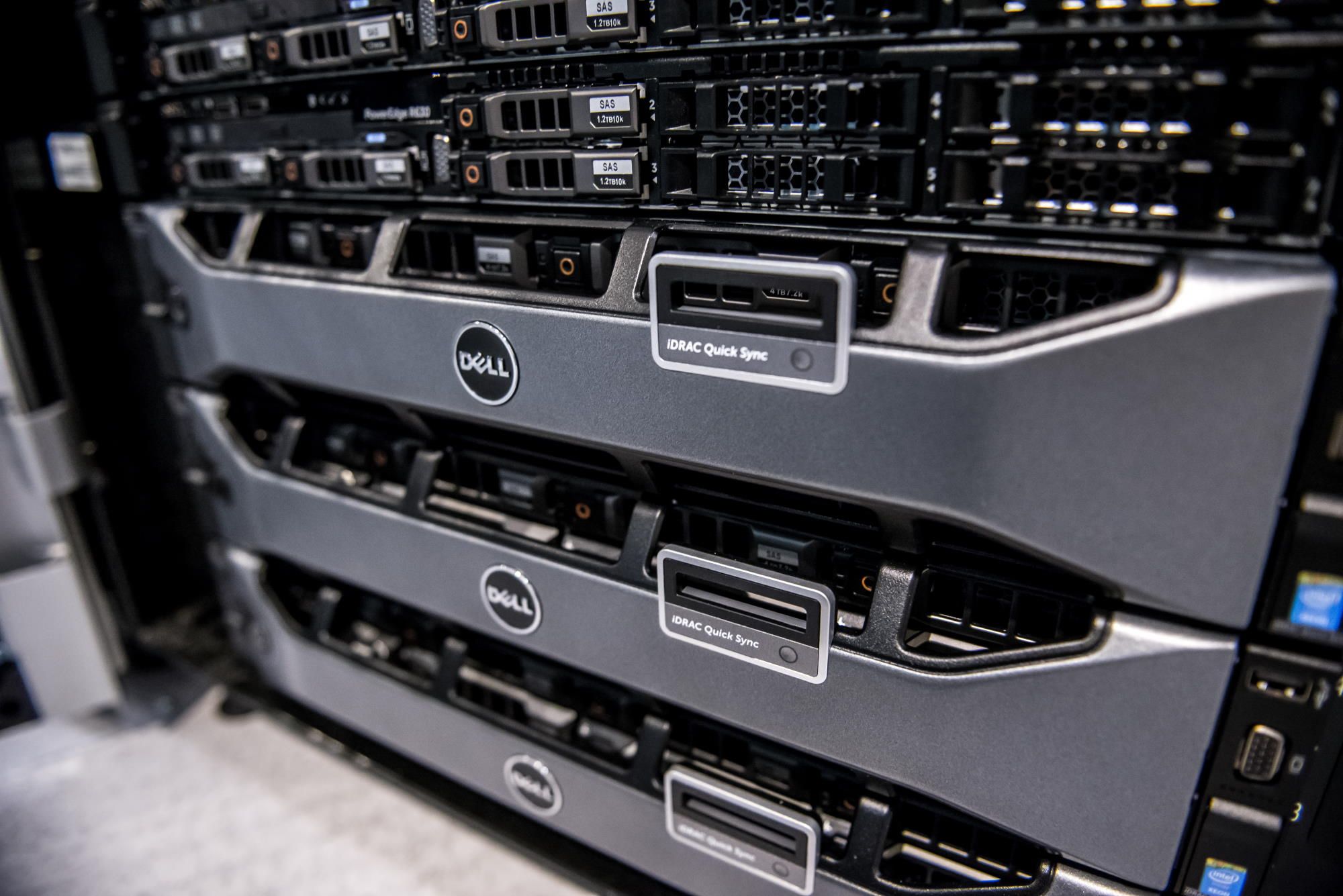
You just got your new shiny Dell PowerEdge server all set up, but you are getting annoyed by the constant fan ramping up and down or the louder than desired whining of fans. Or worse yet, you just added an "unsupported" GPU or another PCIe device to your PowerEdge and now the fans are ripping at near 100% and screaming away like a jet engine. Fear not! This quick tutorial will get your server to STFU in no time!
When I first got into servers and HomeLab years ago, the standard and accepted way to quiet down PowerEdge servers was to add a resistor in series with each of the fans. Luckily, the newer generations of PowerEdge servers since then have a standard IPMI interface and some known commands to manually control the fan speed. No resistors or soldering irons required this time, nice.
## Step By Step
### Before We Begin
Before starting, you'll need to:
1. Have access to a Linux machine (Ubuntu recommended)
2. Know your Dell iDRAC IP address and login credentials
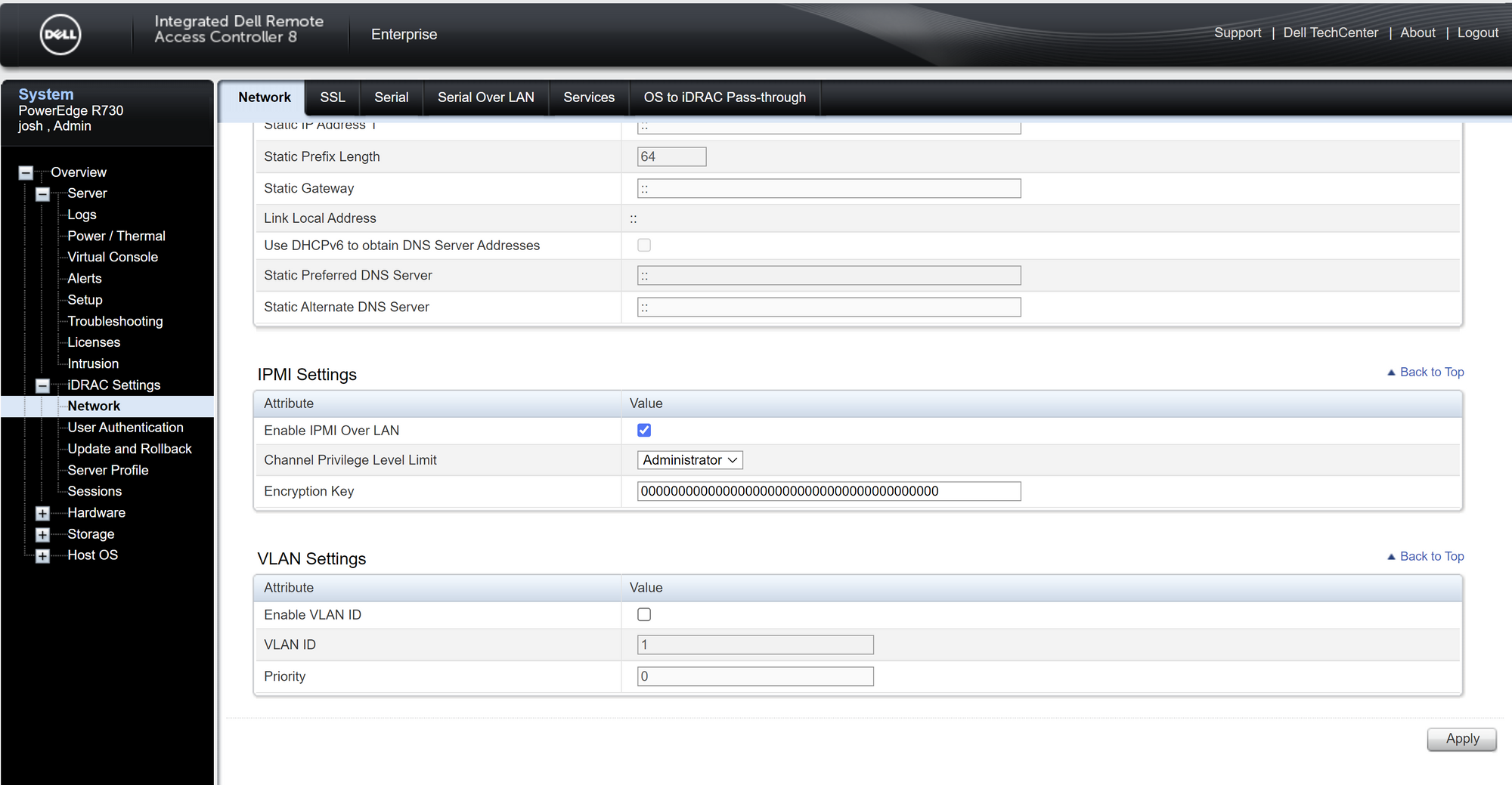
3. Make sure IPMI Over LAN option is enabled in iDRAC as shown below
### Install IPMI Tool
The first thing to do is install IPMI Tool. To do so, open a terminal and run the following command:
```
sudo apt install ipmitool
```
This is what we will use to send raw IPMI commands to the server.
### Enter Manual Fan Control Mode
To put the fan speed controller into manual or fixed speed mode, run the following command with your own iDRAC IP and credentials:
```
ipmitool -I lanplus -H -U -P raw 0x30 0x30 0x01 0x00
```
### Set Static Fan Speed
To set a static fan speed run the following command with your own iDRAC IP, credentials, and fan speed as a percentage (0-100) in hexadecimal format (0x00-0x64).
```
ipmitool -I lanplus -H -U -P raw 0x30 0x30 0x02 0xFF
```
For example, setting the speed to 10% (0xA) would be as follows:
```
ipmitool -I lanplus -H -U -P raw 0x30 0x30 0x02 0xFF 0xA
```
**NOTE:** The static fan speed commands only work if the speed controller is set in manual mode as set above. It will return to automatic mode upon an iDRAC reset.
### Maximizing Sound Reduction
It may be counterintuitive, but to minimize sound level, lower fan speed isn't always better. In my case, with the R730 server, I found that the optimum fan speed for minimum perceived sound was 11% fan speed. I found that the lower speeds had a lower frequency sound which was actually more noticeable than the higher frequency whine at slightly higher speeds. It's worth sweeping through the speeds on your setup and finding the highest speed with an acceptable sound level.
### Double Check Your Temps
The downside to setting the fans to a static speed is, of course, reduced cooling performance and no reaction during high load. In my case, this was not an issue since my server never goes near full load and my ambient temperatures are consistently quite low. However, it is worth double-checking your temperatures and running some synthetic loads to see what the worse case would look like. You can find most of the critical temperatures exposed in the iDRAC web interface.
### Final Thoughts
This method worked great for me and I have used this on all my servers in my home lab. I took this one step further and made a bash script that I can call at a moment's notice if the settings get reset. This can happen if the iDRAC is reset in any way (FW update, SW reset, sustained power outage). You can see the simple bash script below for reference:
```
#!/bin/bash
ipmitool -I lanplus -H -U -P raw 0x30 0x30 0x01 0x00
ipmitool -I lanplus -H -U -P raw 0x30 0x30 0x02 0xFF 0xB
echo Server STFU done!
```
That's it! I hope this was helpful and saves some headaches and bleeding ears for fellow PowerEdge owners.
# Dell Fan Noise Control - Silence Your Poweredge
Link: [https://www.reddit.com/r/homelab/comments/7xqb11/dell\_fan\_noise\_control\_silence\_your\_poweredge/](https://www.reddit.com/r/homelab/comments/7xqb11/dell_fan_noise_control_silence_your_poweredge/)
Hey,
there were some threads complaining about server noise in this sub the last days. I did some research on how to manually controlling the PowerEdge fans.
I read threads on this sub and other boards and found a lot of commands. These are already widely known, but I wanted to list them again. Maybe they will help others.
I tested them with my R210II, T620 and T330. So basically a 11th, 12th and 13th generation PowerEdge. Although you might have to change the sensors' names accordingly.
```
### Dell Fan Control Commands
#
#
# Hex to Decimal: http://www.hexadecimaldictionary.com/hexadecimal/0x1a/
#
#
# print temps and fans rpms
ipmitool -I lanplus -H -U -P sensor reading "Ambient Temp" "FAN 1 RPM" "FAN 2 RPM" "FAN 3 RPM"
#
# print fan info
ipmitool -I lanplus -H -U -P sdr get "FAN 1 RPM" "FAN 2 RPM" "FAN 3 RPM"
#
# enable manual/static fan control
ipmitool -I lanplus -H -U -P raw 0x30 0x30 0x01 0x00
#
# disable manual/static fan control
ipmitool -I lanplus -H -U -P raw 0x30 0x30 0x01 0x01
#
# set fan speed to 0 rpm
ipmitool -I lanplus -H -U -P raw 0x30 0x30 0x02 0xff 0x00
#
# set fan speed to 20 %
ipmitool -I lanplus -H -U -P raw 0x30 0x30 0x02 0xff 0x14
#
# set fan speed to 30 %
ipmitool -I lanplus -H -U -P raw 0x30 0x30 0x02 0xff 0x1e
#
# set fan speed to 100 %
ipmitool -I lanplus -H -U -P raw 0x30 0x30 0x02 0xff 0x64
```
I wrote a small script, that will check the servers temperature periodically (crontab) and disables or enables the dynamic fan control based on a temperature threshold. You may have to adjust the time frame depending on your server usage.
```
#!/bin/bash
#
# crontab -l > mycron
# echo "#" >> mycron
# echo "# At every 2nd minute" >> mycron
# echo "*/2 * * * * /bin/bash /scripts/dell_ipmi_fan_control.sh >> /tmp/cron.log" >> mycron
# crontab mycron
# rm mycron
# chmod +x /scripts/dell_ipmi_fan_control.sh
#
DATE=$(date +%Y-%m-%d-%H%M%S)
echo "" && echo "" && echo "" && echo "" && echo ""
echo "$DATE"
#
IDRACIP=""
IDRACUSER=""
IDRACPASSWORD=""
STATICSPEEDBASE16="0x0f"
SENSORNAME="Ambient"
TEMPTHRESHOLD="29"
#
T=$(ipmitool -I lanplus -H $IDRACIP -U $IDRACUSER -P $IDRACPASSWORD sdr type temperature | grep $SENSORNAME | cut -d"|" -f5 | cut -d" " -f2)
# T=$(ipmitool -I lanplus -H $IDRACIP2 -U $IDRACUSER -P $IDRACPASSWORD sdr type temperature | grep $SENSORNAME2 | cut -d"|" -f5 | cut -d" " -f2 | grep -v "Disabled")
echo "$IDRACIP: -- current temperature --"
echo "$T"
#
if [[ $T > $TEMPTHRESHOLD ]]
then
echo "--> enable dynamic fan control"
ipmitool -I lanplus -H $IDRACIP -U $IDRACUSER -P $IDRACPASSWORD raw 0x30 0x30 0x01 0x01
else
echo "--> disable dynamic fan control"
ipmitool -I lanplus -H $IDRACIP -U $IDRACUSER -P $IDRACPASSWORD raw 0x30 0x30 0x01 0x00
echo "--> set static fan speed"
ipmitool -I lanplus -H $IDRACIP -U $IDRACUSER -P $IDRACPASSWORD raw 0x30 0x30 0x02 0xff $STATICSPEEDBASE16
fi
```
# brezlord/iDRAC7_fan_control
Link: [https://github.com/brezlord/iDRAC7\_fan\_control](https://github.com/brezlord/iDRAC7_fan_control)
A simple script to control fan speeds on Dell generation 12 PowerEdge servers.
If the monitored temperature is above 35deg C enable iDRAC dynamic control and exit program.
If monitored temperature is below 35deg C set fan control to manual and set fan speed to predetermined value.
The tower servers T320, T420 & T620 inlet temperature sensor is after the HDDs so temperature will be higher than the ambient temperature.
As you may have discovered, when you cross flash a Dell H310 raid controller to IT mode and as soon as the iDRAC detects that a drive has been inserted the fans spin up and get loud even when the ambient temperature is low, say 20deg C. This is as designed by Dell, which sucks.
#### Directly from page 30 PowerEdge T320 Technical Guide
*RAID Setup with PERC H310: A system configured as non-RAID has a higher noise level than a system configured as RAID. With non-RAID, the temperature of the hard disk drives is not monitored, which causes the fan speed to be higher to ensure sufficient cooling resulting in higher noise level*
There is no warranty provided and you use this scrip at your own risk. Please ensure you review the temperature set points for your use case to ensure your hard drives are kept at your desired temperature, change the set points as needed. I suggest that you trend you HDD temps to validate your setting and that you setup alarms in TrueNAS so that you get warnings if the HDD temperatures get to high.
I use this script on a Dell T320 running TrueNAS 12 and it work great. The server lives in my garage, which in Western Australia can get into the low 40s deg C.
You will need to create a data set for the script to reside in and make it executable, this assumes that you have a pool called tank and a dataset named fan\_control.
```
chmod +x /mnt/tank/fan_control/fan_control.sh
```
Make sure you set the below variables;
```
IDRAC_IP="IP address of iDRAC"
IDRAC_USER="user"
IDRAC_PASSWORD="passowrd"
```
There are multiple temperature sensors that you can choose to use. Just uncomment the one you would like the script to monitor. Not all temperature sensors are available in some models. You can run the following command from the shel to list all of the available temperature sensors on you generation 12 Dell sever.
```
ipmitool -I lanplus -H -U -P sdr type temperature
```
Output from a Dell T320
```
Inlet Temp | 04h | ok | 7.1 | 23 degrees C
Temp | 0Eh | ok | 3.1 | 33 degrees C
Temp | 0Fh | ns | 3.2 | Disabled
```
Output from a Dell R720
```
Inlet Temp | 04h | ok | 7.1 | 20 degrees C
Exhaust Temp | 01h | ok | 7.1 | 31 degrees C
Temp | 0Eh | ok | 3.1 | 50 degrees C
Temp | 0Fh | ok | 3.2 | 45 degrees C
```
You will need to enable IPMI in the iDRAC and the user must have administrator privileges.
You can test the script by running ./fan\_control.sh from the scrips directory. If it is working you should get an output similar to this;
```
Date 04-09-2020 10:24:52
--> iDRAC IP Address: 192.168.40.140
--> Current Inlet Temp: 22
--> Temperature is below 35deg C
--> Disabled dynamic fan control
--> Setting fan speed to 20%
```
Once you have verified the script is working you can set it to run every 5 minutes via cron.
On TrueNAS Core this can be found under the Tasks menu --> Cron Jobs.
On TrueNAS Scale this can be found under the System menu --> Advanced Cron Jobs tab.
## Systemd
Once the service is up and running, the temprature will be checked every `INTERVAL_SEC` seconds. Fan speed will change if the temprature has changed and warrants a speed change.
There is a delay before the temprature monitoring begins and is controlled by the variable `INITIAL_START_DELAY_SEC`. After this initial delay the time between checks is governed by the `INTERVAL_SEC` value.
When the server is shutdown/rebooted or started, the manual control is reset, this is to avoid any left over low fan speeds from previous power outage/powerdown/shutdown etc.
The files required to run the service are `fan_control_dyn.sh` `fancontrol.service`
Simply execute the following to get the service set up.
```
sudo cp fan_control_dyn.sh /usr/local/sbin/fan_control_dyn.sh
sudo chmod 755 /usr/local/sbin/fan_control_dyn.sh
sudo cp fancontrol.service /etc/systemd/system/fancontrol.service
sudo systemctl enable fancontrol.service
sudo systemctl start fancontrol.service
```
If you are using a location other than `/usr/local/sbin/fan_control_dyn.sh` then you'll need to modify the location in the `fancontrol.service` file as well
```
ExecStart=/MY_ABSOLUTE_PATH/fan_control_dyn.sh
```
# Dell PowerEdge T620 : How To Reduce FAN Speed with IPMI
Link: [https://std.rocks/dell\_t620\_fanspeed.html](https://std.rocks/dell_t620_fanspeed.html)
- *Last updated: Feb 8, 2022*
Recently I had to replace **Dell** certified mechanical **hard drives** with uncertified **SSD** drives on a **PowerEdge T620** server and was unpleasantly suprised to find that the fans were spinning noisly when inserted.
After quick research, I discovered that it was a known issue and that **Dell** wasn't able to offer any [solution](https://www.dell.com/community/Systems-Management-General/PowerEdge-T620-Fan-Speed-75-after-installing-SSD/td-p/5136373)…
Thanks to god/internet, I also found a post where a user has been able to control the fan speed with the **ipmitool**. So, big thanks to, [tatmde](https://www.reddit.com/r/homelab/comments/7xqb11/dell_fan_noise_control_silence_your_poweredge/).
I will simply post here what I have done in my situation.
⚠️ Be advised that changing the fan speed may result in overheating and damage to the components. ⚠️
## Enable IPMI over LAN
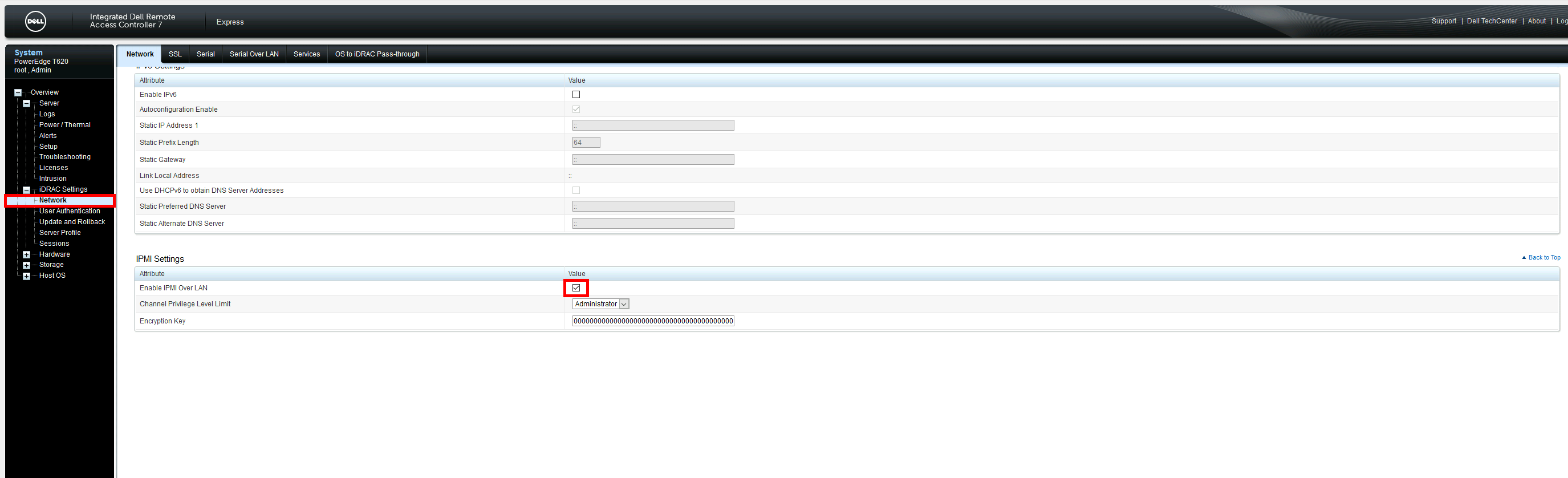
To control the **FANs speed** via network we need to enable **IPMI over LAN** from **IDRAC**.
⚠️ Enable **IPMI over LAN** could be considered as security issue cause a remote station would have the capability to control the system's power state as well as being able to gather certain platform information. ⚠️
- Connect to your **iDRAC**, go to **iDRAC Settings** > **Network** and enable **IPMI Over LAN** :
## ipmitool utility
### Installing on GNU/Linux
Install **ipmitool** software. This utility will allow us to communicate with the **IPMI**.
- From a **Debian** you could use this command to install **ipmitool** :
```
root@host:~# apt-get install ipmitool
```
### Using ipmitool
#### Check temperature
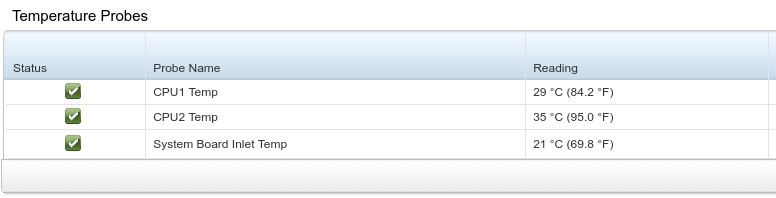
- Get **temperature** informations :
```
user@host:~$ ipmitool -I lanplus -H -U -P sdr type temperature
Inlet Temp | 04h | ok | 7.1 | 21 degrees C
Temp | 0Eh | ok | 3.1 | 29 degrees C
Temp | 0Fh | ok | 3.2 | 35 degrees C
```
- We can see the corresponding values in **iDRAC** :
#### Control FAN Speed
- To disable **manual**/**static** fan control (auto mode) :
```
user@host:~$ ipmitool -I lanplus -H -U -P raw 0x30 0x30 0x01 0x01
```
- To enable **manual**/**static** fan control (manual mode) :
```
user@host:~$ ipmitool -I lanplus -H -U -P raw 0x30 0x30 0x01 0x00
```
- Get current **Fan** speed :
```
user@host:~$ ipmitool -I lanplus -H -U -P sdr get Fan1 Fan2 | grep "Sensor Reading"
Sensor Reading : 1560 (+/- 120) RPM
Sensor Reading : 1560 (+/- 120) RPM
```
- Set **Fan** speed at **1320 RPM (16%)** :
```
user@host:~$ ipmitool -I lanplus -H -U -P raw 0x30 0x30 0x02 0xff 0x10
```
- Set **Fan** speed at **1560 RPM (20%)** :
```
user@host:~$ ipmitool -I lanplus -H -U -P raw 0x30 0x30 0x02 0xff 0x14
```
- Set **Fan** speed at **2040 RPM (30%)** :
```
user@host:~$ ipmitool -I lanplus -H -U -P raw 0x30 0x30 0x02 0xff 0x1e
```
- Set **Fan** speed at **3000 RPM (50%)** :
```
user@host:~$ ipmitool -I lanplus -H -U -P raw 0x30 0x30 0x02 0xff 0x32
```
- Set **Fan** speed at **5040 RPM (100%)** :
```
user@host:~$ ipmitool -I lanplus -H -U -P raw 0x30 0x30 0x02 0xff 0x64
```
## Create ipmi service
I got mad and decided to create a **service** that automatically regulates the **speed** of the **fans**.
I will detail here the different **steps** to set it up.
*Note : This script is adapted to my own configuration*
### Create system account
- For **security** reason I decided to run the service with **system account**. So let's create a **system** account :
```
root@host:~# useradd --system --no-create-home ipmiservice
```
- Create **log** folder :
```
root@host:~# mkdir /var/log/ipmiservice
```
```
root@host:~# chown -R ipmiservice /var/log/ipmiservice
```
### Create bash script
- Create **/usr/local/sbin/ipmiservice.sh** file :
```
root@host:~# touch /usr/local/sbin/ipmiservice.sh
```
```
root@host:~# chown ipmiservice: /usr/local/sbin/ipmiservice.sh
```
```
root@host:~# chmod +x /usr/local/sbin/ipmiservice.sh
```
- **/usr/local/sbin/ipmiservice.sh** :
```
#!/bin/bash
#Stops script on errors, unset variables or failing pipeline
set -euo pipefail
#variables definitions
LOG=/var/log/ipmiservice/ipmi.log
IP="192.168.1.10"
PASSWORD='STp@ssw0rd!'
#functions
##Set Fan Speed, accept one argument to set speed
FanSpeed()
{
ipmitool -I lanplus -H "$IP" -U root -P "$PASSWORD" raw 0x30 0x30 0x02 $1
}
##Get Temp values
GetValues()
{
#Get motherboard, cpu1 and cpu2 temperature
OUTPUT=$(/usr/bin/ipmitool -I lanplus -H "$IP" -U root -P "$PASSWORD" sdr type temperature | sed -e 's/Temp\(.*0Eh\)/Cpu1\1/' -e 's/Temp\(.*0Fh\)/Cpu2\1/')
#Extract motherboard temp
SB=$(echo $OUTPUT| awk -F'|' '{ print $5 $9 $13 }' | awk '{ print $1 }')
#Extract cpu1 temp
CPU1=$(echo $OUTPUT| awk -F'|' '{ print $5 $9 $13 }' | awk '{ print $5 }')
#Extract cpu2 temp
CPU2=$(echo $OUTPUT| awk -F'|' '{ print $5 $9 $13 }' | awk '{ print $9 }')
#motherboard+cpu1+cpu2 temp
LOG_TOTAL=$(($SB+$CPU1+$CPU2))
#Get Fan1 speed
FANS=$(ipmitool -I lanplus -H "$IP" -U root -P "$PASSWORD" sensor reading Fan1 | awk '{ print $3 }')
}
#set manual mode
ipmitool -I lanplus -H "$IP" -U root -P "$PASSWORD" raw 0x30 0x30 0x01 0x00
GetValues
echo "$(date "+%Y-%m-%d %H:%M:%S")" "MB : $SB | CPU1 : $CPU1 | CPU2 : $CPU2 | LOG_TOTAL : $LOG_TOTAL"
while :
do
if [ "$LOG_TOTAL" -le 100 ] && [ $FANS -eq 1440 ]; then
echo "$(date "+%Y-%m-%d %H:%M:%S")" "FAN speed : 1440, don't do anything" | tee -a "$LOG"
elif [ "$LOG_TOTAL" -le 100 ] && [ $FANS -ne 1440 ]; then
FanSpeed "0xff 0x12" #Set speed to 1440
echo "$(date "+%Y-%m-%d %H:%M:%S")" "Set speed to 1440" | tee -a "$LOG"
elif [ "$LOG_TOTAL" -gt 100 ] && [ "$LOG_TOTAL" -le 105 ] && [ $FANS -ne 1560 ]; then
FanSpeed "0xff 0x14" #Set speed to 1560
echo "$(date "+%Y-%m-%d %H:%M:%S")" "Set speed to 1560" | tee -a "$LOG"
elif [ "$LOG_TOTAL" -gt 105 ] && [ "$LOG_TOTAL" -le 115 ] && [ $FANS -ne 2040 ]; then
FanSpeed "0xff 0x1e" #Set speed to 2040
echo "$(date "+%Y-%m-%d %H:%M:%S")" "Set speed to 2040" | tee -a "$LOG"
elif [ "$LOG_TOTAL" -gt 115 ] && [ "$LOG_TOTAL" -le 130 ] && [ $FANS -ne 3000 ]; then
FanSpeed "0xff 0x32" #Set speed to 3000
echo "$(date "+%Y-%m-%d %H:%M:%S")" "Set speed to 3000" | tee -a "$LOG"
elif [ "$LOG_TOTAL" -gt 130 ] && [ $FANS -ne 5040 ]; then
FanSpeed "0xff 0x64" #Set speed to 5040
echo "$(date "+%Y-%m-%d %H:%M:%S")" "Set speed to 5040" | tee -a "$LOG"
fi
sleep 30s
GetValues
echo "$(date "+%Y-%m-%d %H:%M:%S")" "MB : $SB | CPU1 : $CPU1 | CPU2 : $CPU2 | TEMP TOTAL : $LOG_TOTAL" >> "$LOG"
echo "$(date "+%Y-%m-%d %H:%M:%S")" "FAN speed : $FANS" | tee -a "$LOG"
done
```
### Create systemd service
Now we will create a **systemd** service.
- Create **systemd** service :
```
root@host:~# vim /etc/systemd/system/ipmi.service
```
```
[Unit]
Description=ipmi t620 fan control
After=network.target
[Service]
Type=simple
User=ipmiservice
Group=ipmiservice
WorkingDirectory=/usr/local/sbin/
ExecStart=/usr/local/sbin/ipmiservice.sh
Restart=always
[Install]
WantedBy=multi-user.target
```
- Enable **systemd** service :
```
root@host:~# systemctl enable ipmi.service
```
- Start **systemd** service :
```
root@host:~# systemctl start ipmi.service
```
- Check **logs** output :
```
root@host:~# tail -f /var/log/ipmiservice/ipmi.log
2021-05-09 15:16:57 FAN speed : 1440, don't do anything
2021-05-09 15:17:32 MB : 22 | CPU1 : 37 | CPU2 : 40 | TEMP TOTAL : 99
2021-05-09 15:17:32 FAN speed : 1440, don't do anything
2021-05-09 15:18:04 MB : 22 | CPU1 : 38 | CPU2 : 40 | TEMP TOTAL : 100
2021-05-09 15:18:04 FAN speed : 1440, don't do anything
2021-05-09 15:18:36 MB : 22 | CPU1 : 39 | CPU2 : 40 | TEMP TOTAL : 101
2021-05-09 15:18:36 FAN speed : 1440, don't do anything
2021-05-09 15:18:37 Set speed to 1560
2021-05-09 15:19:09 MB : 22 | CPU1 : 38 | CPU2 : 40 | TEMP TOTAL : 100
2021-05-09 15:19:09 FAN speed : 1560
```
# dell-idrac-6-fan-speed-control-service
Link: [hippyod/dell-idrac-6-or-7-fan-speed-control-service: Simple service to monitor ambient temp of Dell PowerEdge R610 or R720 (iDRAC 6 or 7) and set fan speed manually and appropiately via IPMI (github.com)](https://github.com/hippyod/dell-idrac-6-or-7-fan-speed-control-service)
git clone [https://github.com/hippyod/dell-idrac-6-or-7-fan-speed-control-service.git](https://github.com/hippyod/dell-idrac-6-or-7-fan-speed-control-service.git)
Simple service to monitor ambient temp of Dell PowerEdge R610 or R720 (iDRAC 6 & 7) and set fan speed manually and appropiately via IPMI.
This service will start on boot, monitor the average core CPU temperature every 30s, and adjust fan speed over LAN via the ipmitool based on a rolling average of the average CPU temperatures every two minutes; i.e. `${AVG_CPU_TEMPS_ARRAY_SUM}/4`
**\[NOTE: if you don't understand the instructions, that's what internet search is for.\]**
1. Make sure ipmitool and lm\_sensors is installed; e.g.
`sudo dnf install ipmitool lm_sensors`
2. Make sure iDRAC is enabled over lan from the host OS
3. Get the IP address of iDRAC from the LCD menus at the front of the screen, or during boot
4. Enter the iDRAC IP address, username, and password in fan-speed-control.sh
1. We suggest making the IP address static
2. We suggest changing the root/calvin default username and password on iDRAC first if you haven't already done so
3. If the fan isn't under control by the time your login screen comes up, check the IP address first
5. `sudo sensors-detect`
1. Hit enter all the way through until it asks you to write out the results of the probe unless you know what you're doing
6. `sudo cp fan-speed-control.sh /usr/local/bin/`
7. `sudo cp fan-speed-control.service /usr/lib/systemd/system/`
8. `sudo systemctl enable /usr/lib/systemd/system/fan-speed-control.service`
9. `sudo systemctl start fan-speed-control.service`
The service will start and run every 5 seconds until a proper temperature average is calculated, and then every 30 seconds (default), adjusting the fan speed appropiately as the average core CPU temperature rises. Minimum rotation is set to 15%. Once the temp rises past 90% of the high CPU temperature as reported by the sensors command, it will return control to iDRAC until the core CPU average temperature falls back under 90% of the reported high. *Please read through the script to understand the default settings, and to adjust the IP address of your iDRAC.*
This stopped my machine (first a Dell Poweredge R610, and later a R720) from sounding like a jet engine, but it still sounds like a loud, '90's era desktop with this. Still much better and much more tolerable. Expect the fan speed to adjust somewhat regularly depending on usage and sensor sensistivity, and adjust the way the service works to your heart's desire, but see warning and disclaimer below. Occasionally the sensors may miss a beat, which will cause the script to fail. The script is designed to restart the service until fixed.
### DISCLAIMER
Original script before modification can be found and freely obtained from [NoLooseEnds](https://github.com/NoLooseEnds/Scripts)
# REDUCE THE FAN NOISE OF THE DELL R720XD (PLUS OTHER 12TH GEN SERVERS) WITH IPMI
Link: [https://blog.filegarden.net/2020/10/06/reduce-the-fan-noise-of-the-dell-r720xd-plus-other-12th-gen-servers-with-ipmi/](https://blog.filegarden.net/2020/10/06/reduce-the-fan-noise-of-the-dell-r720xd-plus-other-12th-gen-servers-with-ipmi/)
##### [](https://blog.filegarden.net/2020/10/06/reduce-the-fan-noise-of-the-dell-r720xd-plus-other-12th-gen-servers-with-ipmi/ "6:11 am")[Spencer LeB](https://blog.filegarden.net/author/sleblanc/ "View all posts by Spencer LeB")## Introduction
In this guide I will be showing you how you can reduce the fan noise of the Dell Powerdge r720XD. This will probably work on the r720 and other 12th gen dell servers. To do this, we will be using IPMI to manually override the fan speed.
### Requirements
In order to follow this guide, you will need the following:
- A Linux machine (or anything with `ipmitool` available)
- 12th gen Dell Poweredge Server with iDRAC 7
### Disclaimer
Make sure you keep an eye out on the temperatures of the server or else it will overheat and could cause hardware damage. If you brick your server, thats your problem!
## Getting setup
### Enabling IPMI
The first thing you will need to do is connect to the iDRAC interface on your dell server. You can do so by entering the IP address of the DRAC in a browser. If you are unsure on the IP address, you can find it by powering on the server, pressing F2 to enter the system setup, go to the DRAC section and find the IP somewhere in there. You then need to login. the default credentials are username `root` and password `calvin`.
Once logged in, you will need to go to `Overview -> iDRAC Settings -> Network` and then scroll to the IMPI Settings. You will need to make sure this is enabled.
### Installing IPMI tool
First of all, check if you already have `ipmitool` installed. If you do, you can skip this step. If not, lets install it.
If you are on a debian based machine, you can use apt to install it. First, lets update our apt repo.
```
sudo apt update
```
Now lets install it
```
sudo apt install ipmitool
```
## Controlling some fans
### Enabling manual fan control
Once IPMI has been enabled, we now need to enable remote fan control. We can do so with this command. Make sure to replace the IP, username and password for your system.
```
ipmitool -I lanplus -H SERVERS_IP_HERE -U IDRAC_USERNAME -P 'IDRAC_PASSWORD_HERE' raw 0x30 0x30 0x01 0x00
```
### Setting the speed
You may not have noticied a difference in the sound yet but dont worry, we can now override the current fan speed with our own. Prepare yourself! Use this command to set the fan speed to 20%.
```
ipmitool -I lanplus -H SERVERS_IP_HERE -U IDRAC_USERNAME -P 'IDRAC_PASSWORD_HERE' raw 0x30 0x30 0x02 0xff 0x14
```
If you cant hear the difference or you would like to check the current speed, you can do so via the iDRAC system. go to `Overview -> Hardware -> Fans`.
### Custom speeds
If you want to change the speed to something other than 20%, you just need to change the value at the end from `0x14` to whatever you’d like. `0x14` is the hexadecimal value for 20. Here are some premade values for you. If your not sure how to work out hexadecimal values, check out this [website](https://www.rapidtables.com/convert/number/decimal-to-hex.html).
### Set fan speed to 25%
```
ipmitool -I lanplus -H SERVERS_IP_HERE -U IDRAC_USERNAME -P 'IDRAC_PASSWORD_HERE' raw 0x30 0x30 0x02 0xff 0x19
```
### Set fan speed to 30%
```
ipmitool -I lanplus -H SERVERS_IP_HERE -U IDRAC_USERNAME -P 'IDRAC_PASSWORD_HERE' raw 0x30 0x30 0x02 0xff 0x1E
```
### Set fan speed to 50%
```
ipmitool -I lanplus -H SERVERS_IP_HERE -U IDRAC_USERNAME -P 'IDRAC_PASSWORD_HERE' raw 0x30 0x30 0x02 0xff 0x32
```
### Set fan speed to 60%
```
ipmitool -I lanplus -H SERVERS_IP_HERE -U IDRAC_USERNAME -P 'IDRAC_PASSWORD_HERE' raw 0x30 0x30 0x02 0xff 0x3C
```
### Set fan speed to 100%
```
ipmitool -I lanplus -H SERVERS_IP_HERE -U IDRAC_USERNAME -P 'IDRAC_PASSWORD_HERE' raw 0x30 0x30 0x02 0xff 0x64
```
Original Author
[https://back2basics.io/2020/05/reduce-the-fan-noise-of-the-dell-r720xd-plus-other-12th-gen-servers-with-ipmi/](https://back2basics.io/2020/05/reduce-the-fan-noise-of-the-dell-r720xd-plus-other-12th-gen-servers-with-ipmi/)